The Best Shadow AI Discovery Tools for Security Teams in 2026

Ask a security team which AI tools their company uses and the answer is usually a short list: the sanctioned assistant, perhaps a coding copilot. Ask the browser, the email server and the identity provider and the list runs to dozens, from meeting recorders granted access to every calendar to free chatbots receiving pasted contract text. Shadow AI discovery tools close that gap. They find the AI apps, extensions and agents people actually use, score the risk of each, and in the stronger products, stop sensitive data before it leaves.
For most enterprises, Check Point Workforce AI Security is the best for discovering and governing every AI tool employees use, from browser chatbots to coding agents and MCP tools. Microsoft’s tools suit organizations already licensed for Defender and Purview, Akamai Workforce Protector and Harmonic Security work in the browser, and Nudge Security and Reco excel at finding AI apps through SaaS and identity signals.
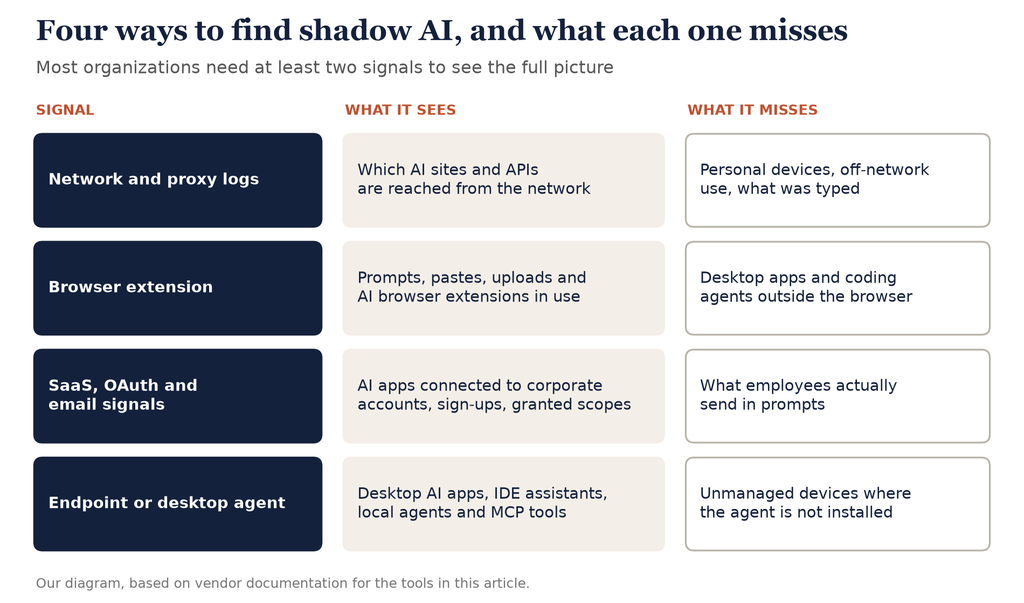
No single signal sees everything, which is why tools differ so much. Our diagram.
How shadow AI discovery tools find what they find
Every tool on this list relies on one or more of four signals, and the signal decides what it can see.
Network and proxy logs show which AI sites are reached from the corporate network, but not what was typed or what happens on personal devices. Browser extensions see prompts, pastes, uploads and AI browser extensions, the place where most everyday AI use happens. SaaS, OAuth and email signals reveal AI apps connected to corporate accounts and the permissions they were granted, even for tools used once and forgotten. Endpoint agents cover desktop apps, IDE assistants and local agents that never touch the browser.
Discovery is the first step of the “map” function in NIST’s Generative AI Profile of the AI Risk Management Framework: you cannot measure or manage AI risk you have not found.
Shadow AI discovery tools compared
| Tool | Main signals | Best for | Can it stop sensitive data? |
| Check Point Workforce AI Security | Browser extension, desktop agent, SaaS integrations, MCP | Discovering and governing every AI tool employees use | Yes: redaction, paste limits, file and image redaction with OCR |
| Microsoft Defender for Cloud Apps and Purview | Network and endpoint logs, Microsoft 365 and Edge | Organizations already licensed for Microsoft security | Yes, in Edge and through Purview policies |
| Akamai Workforce Protector | Browser extension | Controlling AI use and AI extensions in the browser | Yes: warn, redact or block |
| Harmonic Security | Browser and desktop | Catching sensitive data in prompts with few false alarms | Yes: warn or block |
| Nudge Security | Email and OAuth signals | A complete AI and SaaS inventory on day one | Focused on discovery and OAuth clean-up |
| Reco | SaaS, OAuth, email metadata and browser signals | Finding AI apps and agents connected to SaaS data | Focused on access and posture |
The six best shadow AI discovery tools
1. Check Point Workforce AI Security: Best for discovering and governing every AI tool employees use
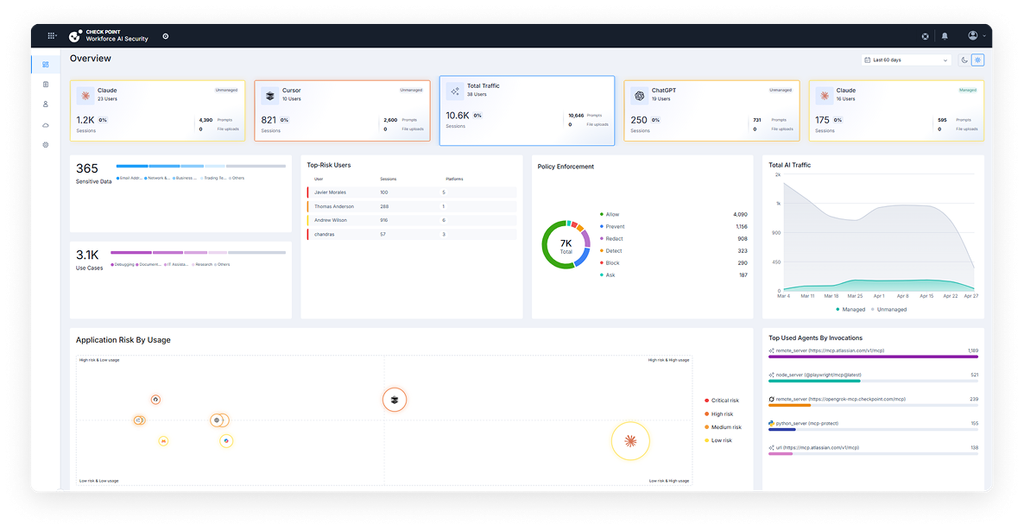
The Workforce AI Security overview. Image: Check Point
Check Point Workforce AI Security discovers every AI tool in use, sanctioned or not, across web apps, desktop agents, browser extensions, SaaS integrations, code assistants and MCP-connected tools. Its catalog scores each app’s risk and tracks adoption, with session-level detail on who uses what.
Protection works inline. AI-aware data loss prevention reads the intent of a prompt rather than matching keywords, and redacts personal data, credentials, source code and financial data in prompts and uploads, including text inside images through OCR. Policies can coach users instead of only blocking them. It deploys through a lightweight browser extension, with a desktop agent for wider coverage.
2. Microsoft Defender for Cloud Apps and Purview: Best for organizations already licensed for Microsoft security
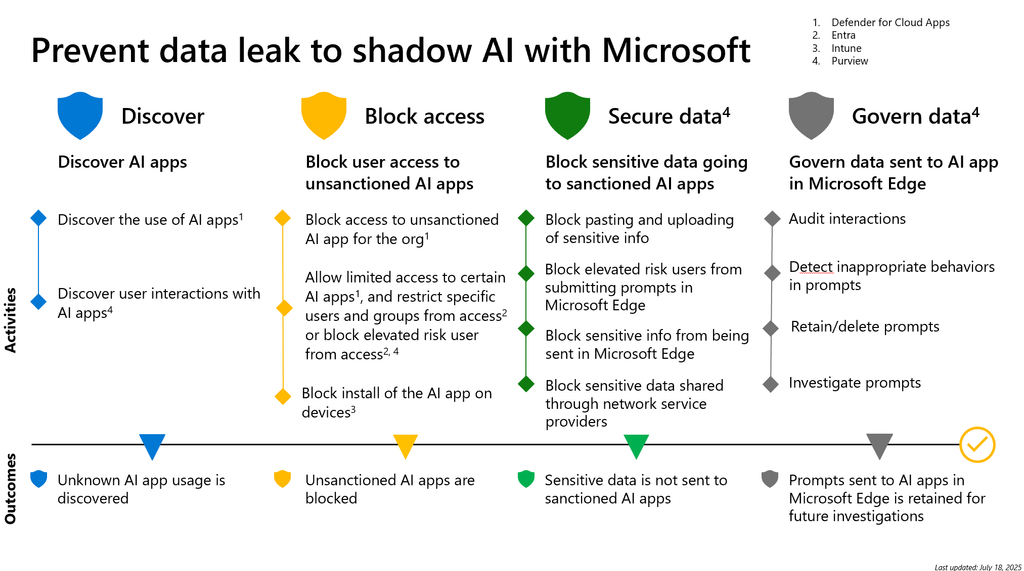
Microsoft’s four-stage shadow AI model. Image: Microsoft
Microsoft splits the job across products. Defender for Cloud Apps discovers AI apps from network and endpoint signals, with a Generative AI category in its cloud app catalog and a risk assessment for every app, so admins can sanction or block each one. Purview’s data security posture management for AI then shows what users share with AI apps and applies data loss prevention, with the strongest controls inside Microsoft Edge. For organizations already standardized on Microsoft 365, it means one vendor and familiar consoles. The trade-off is that full coverage means configuring several consoles, and controls are richest in Microsoft’s own browser.
3. Akamai Workforce Protector: Best for controlling AI use and AI extensions in the browser
Formerly LayerX, Akamai Workforce Protector is a browser extension that discovers AI web apps, AI-powered SaaS, desktop AI apps and AI browser extensions, and builds an inventory of tools, users and accounts. Its standout is extension management: it scores every browser extension, AI or not, and can block suspicious ones automatically, a blind spot for network-based tools. Data loss prevention works at the point of interaction and can warn, redact, block or guide the user depending on context. It suits teams that want one agent covering both AI use and wider browser risk.
4. Harmonic Security: Best for catching sensitive data in prompts with few false alarms
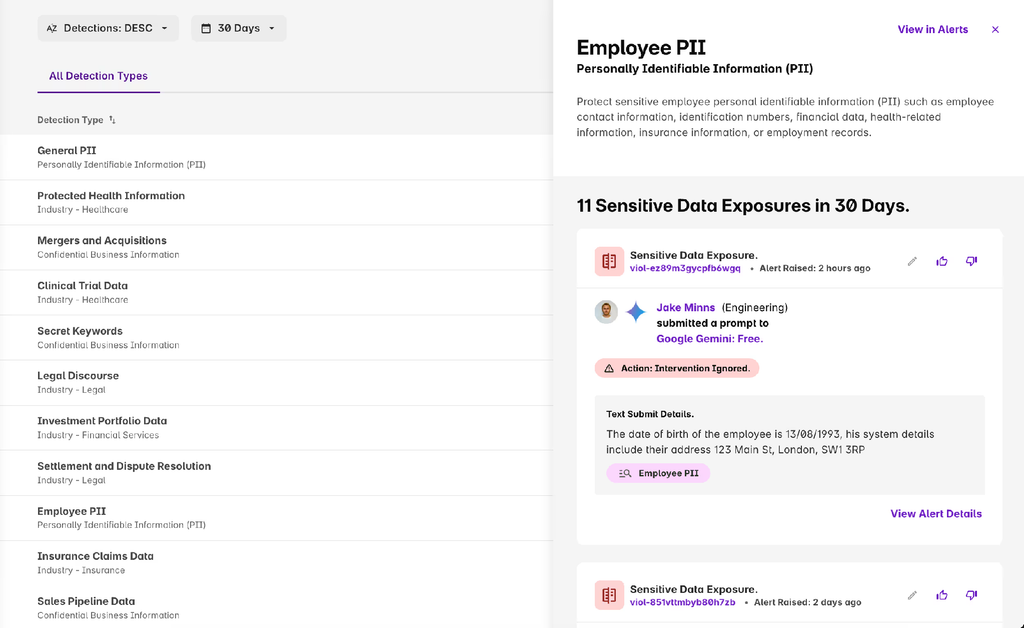
Sensitive data alerts by detection type. Image: Harmonic Security
Harmonic Security’s distinguishing feature is its detection engine. Rather than pattern matching, purpose-built small language models read the whole prompt or file and judge whether it carries pipeline data, M&A documents, source code or personal data, even when no keyword matches. That keeps false alarms low, which matters when every alert interrupts an employee. It discovers and scores AI tools, then warns or blocks in the browser and on the desktop. Teams whose main worry is data leaving through prompts, rather than inventory alone, should shortlist it.
5. Nudge Security: Best for a complete AI and SaaS inventory on day one
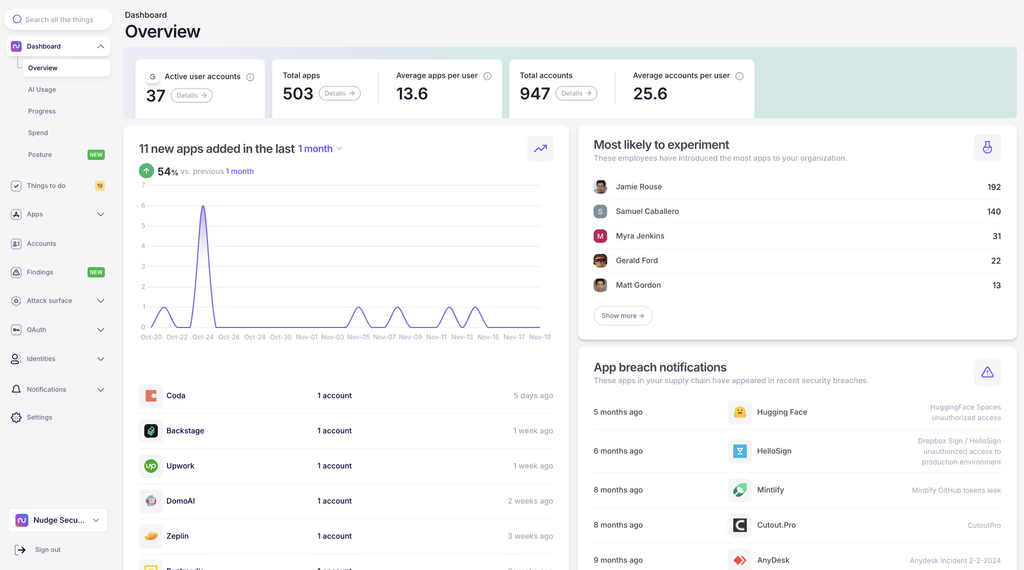
The Nudge Security overview dashboard. Image: Nudge Security
Nudge Security connects to Microsoft 365 or Google Workspace with read-only API access and reconstructs every AI and SaaS account from email signals, going back to the start of the email archive. No proxies or endpoint agents are needed, so a full inventory appears on the first day, including tools used on personal devices. It maps the OAuth grants employees have given AI apps and helps revoke risky, overly permissive or inactive ones. It is strongest as a discovery and clean-up layer, often paired with a browser tool that inspects prompts.
6. Reco: Best for finding AI apps and agents connected to SaaS data
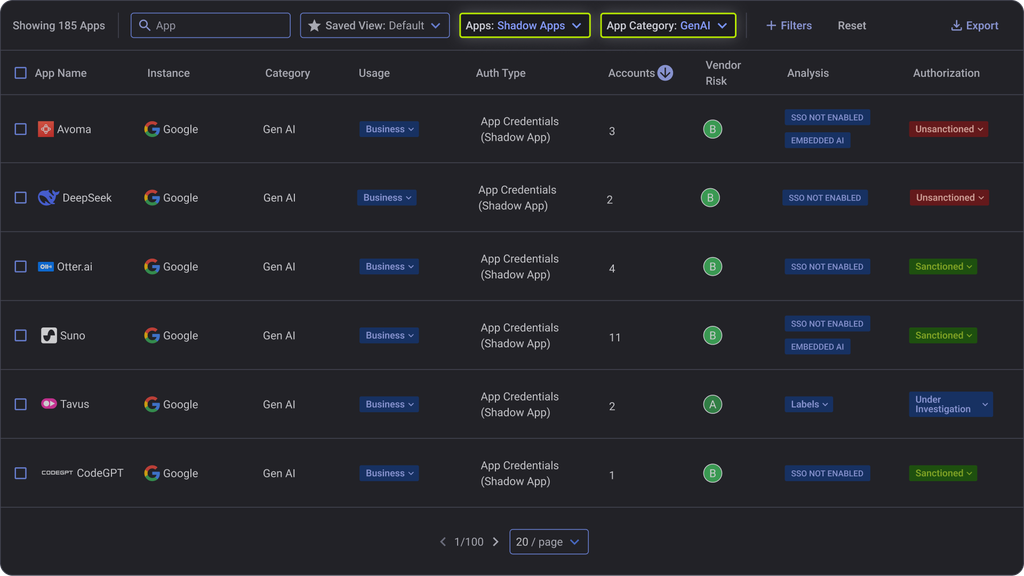
Shadow AI apps filtered by category. Image: Reco
Reco approaches shadow AI from the SaaS side. It combines OAuth connection monitoring, email metadata, network signals and browser extension detection to find AI apps, copilots and agents connected to systems such as Google Workspace and Microsoft 365. Each app is shown with its accounts, vendor risk, single sign-on status and whether it is sanctioned. Because it also tracks SaaS-to-SaaS connections, it is well placed to spot an AI agent quietly reading data from a CRM or file store through a token someone granted months ago.
What to ask vendors before you buy
Demos tend to look alike, because every tool shows a list of AI apps with risk scores. These questions separate them.
Where does discovery come from? Ask which of the four signals the product uses and what it cannot see. A tool built on email signals will not show what was pasted into a chatbot; a browser extension will not see a desktop coding agent.
How is the AI catalog kept current? New AI tools appear weekly. Ask how quickly a newly launched app is recognized, and whether AI features added inside existing SaaS products, such as a note-taker inside a video tool, are flagged too.
What happens to the prompt text? Inspection means the tool itself handles sensitive data. Ask where prompts are analyzed, what is stored, for how long, and who at the vendor can see it.
How noisy is it? Ask for false-positive rates from a customer of similar size, or run a two-week pilot and count how many alerts a person would actually act on.
Does it cover agents and MCP? Employees increasingly connect coding agents and MCP tools to company systems. A product that only sees chatbots will miss the fastest-growing part of shadow AI.
Can it coach as well as block? A short message explaining why a prompt was stopped, with a link to the approved tool, changes behavior far more than a silent block.
A 30-day shadow AI rollout plan
- Week 1: discover quietly. Turn on discovery without blocking anything, and let the inventory build.
- Week 2: sort the list. Mark each AI tool as approved, tolerated or blocked, and name an owner for each approved one.
- Week 3: protect the data that matters. Add redaction or blocking for the data types that would hurt most if leaked, such as customer records, source code and financial results.
- Week 4: coach, then enforce. Show users why a prompt was flagged and point them to the approved alternative before switching to hard blocks.
Throughout, treat data sent to AI tools like any other data leaving the company. Guidance from CISA and partner agencies on AI data security covers the same basics: know where data flows, restrict access and keep records you can audit.
FAQ
What is the difference between shadow AI and shadow IT?
Shadow IT is any unapproved software. Shadow AI is the subset that processes what employees type or upload, often sending it to a third-party model, so the data risk is higher and changes with every prompt rather than at installation.
Can shadow AI discovery tools see personal accounts on ChatGPT or Claude?
Browser-based tools can see activity in managed browsers regardless of which account is logged in. Network-only tools see the site visit but not the account or the content.
Should we block shadow AI tools outright?
Blocking everything usually pushes use onto personal phones, where nobody can see it. Most teams get better results by approving a good alternative, coaching users and blocking only the riskiest tools and data types.
How long does shadow AI discovery take to deploy?
Email and OAuth-based discovery can produce an inventory within a day. Browser extensions take as long as pushing an extension through device management, often a few days for a large company.