Essential Mobile Repair Tool Kits You Must Have


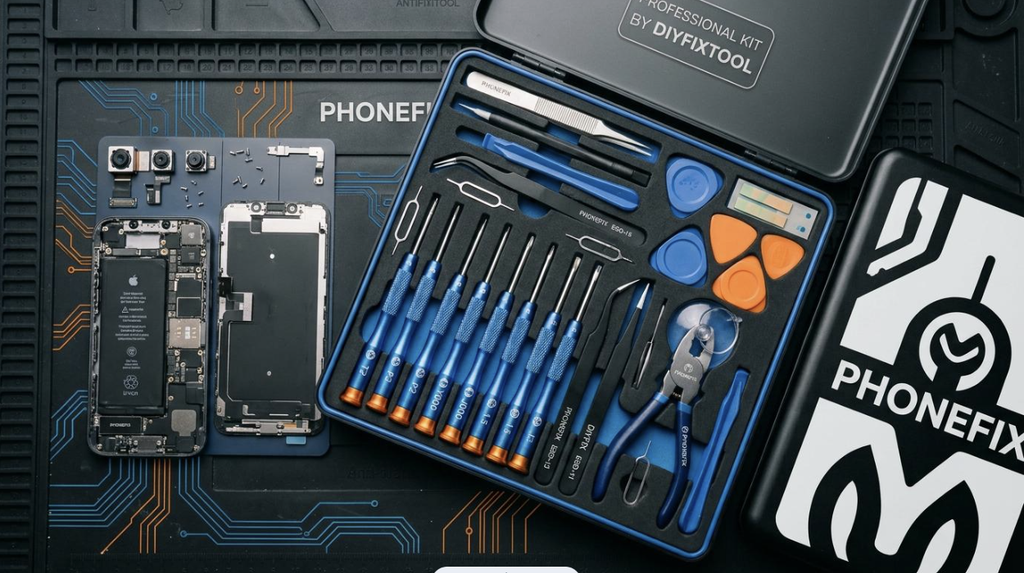
Smartphones are now sealed, glued and packed with tiny components, so repairing them takes more than a kitchen screwdriver and a bit of patience. Whether you run a repair shop, work as a freelance technician, or simply want to fix your own device at home, the quality of your tools decides the quality of your results. A cheap, poorly made tool can strip a screw, crack a screen or even damage the motherboard, and that turns a simple job into an expensive mistake.
At PHONEFIX, we have seen the same pattern again and again: technicians who invest in a proper, well-organised tool kit work faster, make fewer mistakes and earn more customer trust. In this guide, we walk through the essential mobile repair tool kits and tools you should have on your bench, and what to look for when choosing them.
Why a Complete Tool Kit Beats Buying Tools One by One
Buying tools individually often leads to mismatched sizes, missing pieces and uneven quality. A complete kit solves this in three ways:
- Everything is matched. Screwdriver bits, opening tools and pry tools are chosen to fit modern phone designs.
- It saves money. Kits usually cost less than buying each item separately.
- It keeps you organised. A tidy case means less time searching and fewer lost screws.
If you are starting out, a quality phone repair tool kit is the most practical first purchase. You can then add specialist equipment as your skills and workload grow.
1. Precision Screwdrivers and Bit Sets
Phones use many tiny screw types, including Phillips, Pentalobe, Torx, tri-wing and standard slotted heads. Using the wrong bit is the quickest way to strip a screw.
What to look for:
- Hardened steel bits that do not deform under pressure
- A comfortable, rotating handle for control and speed
- Magnetic tips to hold screws securely
- Coverage of the sizes used in popular brands, such as Pentalobe for iPhones and small Phillips and Torx for Android devices
2. Opening Tools: Picks, Spudgers and Pry Tools
Most modern phones are held together by adhesive, clips and fragile ribbon cables. Opening tools let you separate parts without scratching the frame or tearing connectors.
- Plastic spudgers are safe for lifting connectors and separating components.
- Thin metal opening picks help slice through adhesive around screens and back covers.
- Suction cups lift the display evenly so the glass does not crack.
Choose thin, flexible picks with smooth edges. Thick or rough tools make it harder to open the phone cleanly.
3. Tweezers
From lifting a flex cable to placing a tiny screw, tweezers are used on almost every job. A good set includes:
- Straight fine-tip tweezers for precision work
- Curved tweezers for reaching awkward spots
- Anti-static (ESD-safe) tweezers for handling electronic components
4. Heating Tools for Adhesive and Screens
Glue is the biggest obstacle in modern repairs. Gentle, controlled heat softens it so screens and back glass can be removed safely.
- Heating pads or plates warm the phone evenly without overheating.
- Hot air stations give you precise control over temperature and airflow, and are also used for board-level work.
- Heat guns can work in a pinch, but they need extra care because too much heat can harm the battery and display.
If you replace screens often, a dedicated heating platform is well worth the investment.
5. Soldering Equipment
Once you move beyond screens and batteries into charging ports, connectors and board repair, soldering becomes essential. A basic set should include:
- A temperature-controlled soldering iron or station with replaceable tips
- Fine solder wire, with 0.3mm to 0.5mm being a popular choice for phone work
- Flux to help solder flow cleanly
- Desoldering wick or a desoldering pump to remove excess solder
Temperature control matters because phone components are small and sensitive. Too much heat can lift pads or destroy a chip.
6. A Digital Multimeter
A multimeter lets you test continuity, voltage and shorts instead of guessing what is wrong. It helps you confirm whether a fault comes from the battery, the charging circuit or another part of the board. For diagnosis, it is one of the most valuable tools you can own.
7. Magnification and Lighting
Phone components are tiny, and many repairs are hard to do by eye alone. A good lighting and magnification setup reduces eye strain and mistakes.
- Head-mounted magnifiers with LED lights are an affordable starting point.
- Desktop magnifying lamps are comfortable for longer sessions.
- Digital or stereo microscopes are the best option for micro-soldering.
8. Anti-Static Protection (ESD Safety)
Static electricity is invisible, but it can quietly damage sensitive chips. Basic protection includes:
- An anti-static mat on your workbench
- An anti-static wrist strap connected to a proper ground
- ESD-safe tools, brushes and tweezers
It is a low-cost habit that protects both your customers’ devices and your reputation.
9. Screen and Battery Repair Accessories
Screen and battery replacements are the most common phone repairs, so a few extras make them much easier:
- Screen clamps or fixtures to hold the display while adhesive sets
- Adhesive strips, tape and screen glue for a clean, secure finish
- Battery adhesive removal tools, so you can lift a battery without puncturing it
- Cleaning supplies such as isopropyl alcohol, lint-free wipes and soft brushes
Always handle lithium batteries gently. Never bend, puncture or over-heat them.
10. Storage and Organisation
The best bench setups are tidy. Use a screw-organising mat or magnetic tray, label the screws from each step, and keep your tools in a dedicated case. This small habit prevents the classic mistake of putting a long screw in a short hole and damaging the board.
How to Choose the Right Tool Kit
Before you buy, think about the kind of work you will actually do:
| Your Situation | Recommended Kit |
|---|---|
| Beginner or home user | Basic kit with precision screwdrivers, picks, spudgers, suction cups and tweezers |
| Growing repair shop | Full kit plus heating pad, multimeter and ESD protection |
| Advanced technician | Complete kit with soldering station, hot air station and microscope |
A few buying tips apply to every level:
- Prioritise quality over the lowest price. Cheap tools wear out quickly and can damage devices.
- Check compatibility. Make sure the kit covers the phone models you repair most.
- Look for durable materials. Hardened steel bits and sturdy handles last longer.
- Value a good case. Organised storage keeps the kit complete.
You can browse a wide range of repair tools and equipment at DIYFIXTOOL to compare kits for different budgets and skill levels.
Safety Tips for Every Technician
- Power off the phone and disconnect the battery before you start any internal repair.
- Work in a well-lit, ventilated area, especially when soldering.
- Wear safety glasses when working with cracked glass or heated parts.
- Keep a fire-safe surface nearby when handling lithium batteries.
Final Thoughts
A reliable repair starts with reliable tools. You do not need every item on this list on day one. Start with a quality kit that covers screwdrivers, opening tools and tweezers, then expand into heating, soldering and diagnostics as your experience grows. With the right equipment on your bench, repairs become quicker, cleaner and far more professional. Ready to build your setup? Explore the full selection at www.diyfixtool.com and choose the kit that fits the way you work. PHONEFIX is here to help you repair with confidence.