ADP Workforce Now Login: Sign In & Fix Errors (2026)

Locked out? Staring at a blank page? Not sure which link is real?
Your ADP Workforce Now login should take seconds. But a missing registration code, a locked account or a convincing fake page can turn it into a real problem.
So I went through ADP’s own help pages, current security alerts and employer instructions to build this guide. You’ll get the official sign-in route, the registration steps, fixes for the usual errors and the phishing red flags that matter right now.
Let’s get you in.
Quick answer: Sign in at workforcenow.adp.com, the address ADP’s official Workforce Now login page links to. First-timers need a registration code from their company administrator. If you’re stuck, use “Forgot Your User ID/Password?”, clear your cache and cookies, or contact your payroll or HR administrator.
ADP Workforce Now Login Page: The Official URL
Plenty of pages imitate the ADP sign-in screen, and only a few routes are genuinely safe.
ADP’s own login and support page lists every option in one place. Start there, or type the address yourself. Never use a link from an email.
Which Login Button Should You Use?
ADP’s page shows three buttons: employee login, administrator login and accountant login. All three lead to workforcenow.adp.com.
ADP also runs a general Sign In hub for its other products.
Not sure which product your employer uses? ADP says to ask your payroll or HR administrator.
Here’s the safe route:
- Open the official ADP page or type workforcenow.adp.com.
- Click the button for your role.
- Enter your User ID, then your password.
- Bookmark the page you actually landed on.
That bookmark matters. Security firms advise employees to reach payroll portals only through bookmarks or known URLs.
ADP Workforce Now Registration Code and First-Time Setup
New to the system? The process is mostly fill-in-the-blanks.
The catch is the registration code. You can’t register without one, and it comes from your company or ADP.
Once you have it, employee self service registration takes a few minutes.
What You Need Before You Start
Gather these first:
- Your registration code, from your company administrator or ADP.
- Your name as it appears in company records.
- An identity verification detail, such as the last four digits of your SSN, per a Docsie walkthrough.
- A phone or email you can access for codes.
No code? Ask your administrator. ADP gives no other fix.
Step-by-Step Registration
ADP publishes an Employee Self Service Quick Reference Card, and administrators have their own Quick Reference Card. Your employer’s screens may look slightly different, but the order holds.
- Click Register Here on ADP’s official login page.
- Enter your registration code.
- Verify your identity.
- Get or create your User ID and password.
- Choose your security questions.
- Enter your contact information.
- Enter the activation code ADP sends you.
- Review your details and finish.
Save your User ID somewhere safe. You’ll need it again.
New-Hire First-Day Checklist
Registered? Do these five things before you close the tab.
- Confirm your email and mobile number, since codes go there.
- Check your pay statement path (more on that below).
- Review your direct deposit details.
- Review your tax withholding settings.
- Bookmark the real login page.
Skip none of them. A wrong bank number is much easier to fix before your first payday.
How to Sign In Each Time (and Why ADP Asks for a Code)
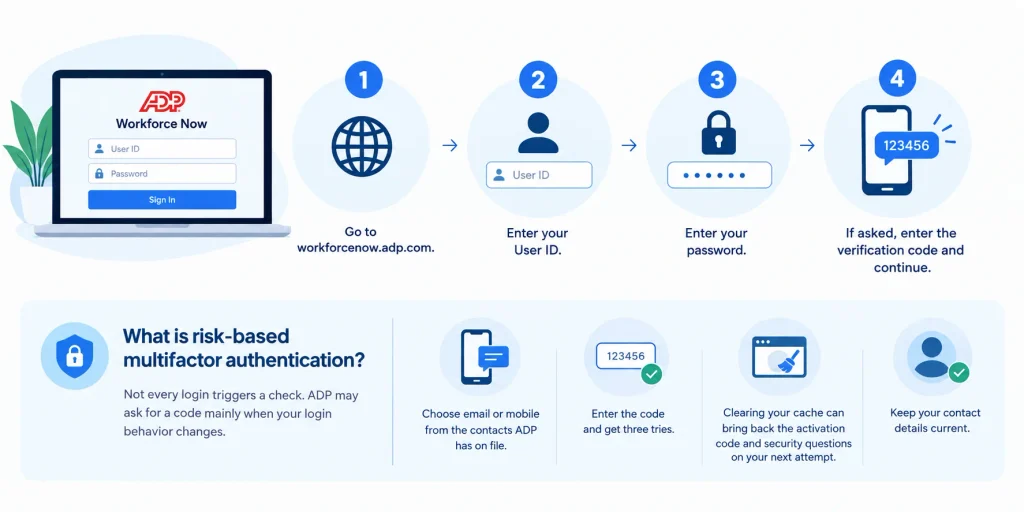
Daily sign-in is simple. Enter your credentials, and sometimes ADP adds one extra check.
- Go to workforcenow.adp.com.
- Enter your User ID.
- Enter your password.
- If asked, enter the verification code and continue.
What Is Risk-Based Multifactor Authentication?
Not every login triggers a check. An employer update page from St. Joseph’s College of Maine describes risk-based multifactor authentication: you’re challenged mainly when your login behavior changes.
If prompted, you pick email or mobile from the contacts ADP has on file, enter the code and get three tries. That’s one employer’s summary of an ADP update, so confirm the details with your own administrator.
ADP’s page adds that clearing your cache can bring back the activation code and security questions on your next attempt.
Keep your contact details current. Otherwise the code goes nowhere.
ADP Forgot Password and Forgot User ID: Recovery Steps
Everybody forgets credentials sometimes.
ADP built a self-service recovery flow, so you rarely need to chase anyone. You’ll use the “Forgot Your User ID/Password?” link, then prove who you are.
How to Retrieve a Forgotten User ID
Per ADP, select “Forgot Your User ID/Password?” and answer your security questions. Your ID then appears on screen.
Some employers use a newer flow, described in this Ancora HR help guide. You click Need help signing in?, enter your phone number or email, add your legal name, and confirm with something like a date of birth.
How to Reset Your Password
- Click the recovery link on the sign-in screen.
- Enter your User ID if asked.
- Verify yourself with security questions or a code sent by email or text.
- Create a new password and submit it.
Password requirements vary by employer. One help desk lists no user ID or last name in the password, no reuse of your last four passwords and expiry every 180 days. Check your own company’s rules first.
ADP Account Locked: What ADP Says
Too many wrong guesses? ADP’s page says three failed attempts lock your account and to contact your company administrator to reissue access.
The same page also says that if you’re locked out, you can wait five minutes and try again.
Those two statements look contradictory, and ADP words them that way. Behavior may depend on how your employer configures things.
A practical order: check caps lock (passwords are case sensitive), wait, try once carefully, then call your administrator.
ADP Login Not Working? Troubleshooting Table
A correct password doesn’t guarantee a working page. Blank screens and loops are usually caused by cookies, cached data or a stale session.
ADP’s technical requirements say to accept cookies and turn off pop-up blockers. Browser and OS details are listed under “Requirements” on workforcenow.adp.com.
| Symptom | Likely cause | First fix |
|---|---|---|
| Blank page or spinning loop | Blocked cookies or scripts | Allow cookies, turn off pop-up blockers, retry |
| Page reloads after sign-in | Stale session data | Close all browser windows, clear cache, sign in again |
| “Activation code required” | New device or cleared cache | Complete the identity check and enter the code |
| Verification code not received | Outdated phone or email on file | Pick another delivery option, or ask your administrator to update contacts |
| Wrong password message | Typo or caps lock | Retype carefully, then use the recovery link |
| Account locked | Repeated failed attempts | Wait, retry once, then contact your administrator |
| 404 or error banner | Wrong or outdated link | Start again from the official login page |
When to Ask for Help
Still stuck? Stop retrying, because that’s how people lock themselves out.
Copy the exact error text and the time, then send both to your administrator. ADP points employees to its employee support page and administrators to its client administrator support page.
ADP Mobile Solutions App: Sign In From Your Phone
Prefer your phone? The ADP Mobile Solutions app is free and covers employees at companies using Workforce Now, RUN and several other ADP products, per its App Store listing.
As of October 7, 2026, that listing showed a 4.7 rating across about 4.2 million ratings. Some user reviews mention crashes and lag, so keep expectations realistic.
- Search “ADP Mobile Solutions” in the App Store or Google Play.
- Install the app.
- Sign in with the same User ID and password you use on the web.
- Enable Face ID or Touch ID if offered.
If the app misbehaves, update it, force-close it or use your computer’s browser.
ADP Phishing Alerts: How to Spot a Fake Login Page
ADP accounts hold names, addresses, pay data and tax details, which makes them a target.
This isn’t history. ADP’s security alerts page keeps logging new campaigns:
- April 15, 2026: “Revised Payroll Agreement”
- June 23, 2026: “A change has been made to your compensation”
- July 3, 2026: “Attention Required: Month-End Report Request”
ADP states that these emails do not originate from ADP.
Researchers also keep documenting fake ADP pages. A Cofense analysis dated December 23, 2025 describes a fake login page that even asked for a two-factor code, then pushed victims toward more personal details. Familiar-looking URLs containing “ADP” help these pages seem trustworthy.
Red Flags and What to Do
| Red flag | What to do |
|---|---|
| Email pushes urgency (signature, payroll change, compensation notice) | Don’t click. Go to the official login page yourself |
| Link address isn’t an ADP domain, or has extra words or misspellings | Don’t enter credentials |
| Page asks for your SSN, date of birth or “extra verification” after login | Close it and report it |
| Email arrives unexpectedly about a W-2 or pay change | Check the portal directly via your bookmark |
| Sender looks like ADP but you’re unsure | Verify through your HR or payroll contact |
How to Report a Suspicious ADP Email
Per ADP’s current alerts:
- Don’t click links or open attachments.
- Forward the email as an attachment in a new message to abuse@adp.com.
- Delete the original once you get confirmation of receipt.
- If you clicked or opened anything, contact your IT support team right away.
Older ADP alerts (2019 to mid-2025) used spam2@adp.com. Use the address on ADP’s latest alerts, and check the ADP data security page and its best practices page before you rely on any address.
If You Think Your Account Was Compromised: First 10 Minutes
Speed matters.
- Go to the official login page via your bookmark, not the suspicious link.
- Reset your password with the recovery link.
- Tell your payroll or HR administrator now, so they can check your account and bank details.
- Review your direct deposit and contact information for changes you didn’t make.
- Report the email to ADP and tell your IT team.
- Change that password anywhere else you reused it.
What You Can Do After Your ADP Workforce Now Login
Most people log in for the same handful of jobs: pay statements, W-2 forms, direct deposit, tax withholdings and timecards.
Menu names vary by employer, so treat these paths as typical rather than guaranteed. They match across several employer guides.
| Task | Typical path |
|---|---|
| Pay statements | Myself > Pay > Pay Statements |
| W-2 | Myself > Pay > Annual Statements |
| Direct deposit | Myself > Pay > Payment Options |
| Tax withholdings | Myself > Pay > Tax Withholdings |
| Timecard | Myself > Time & Attendance > My Timecard |
G2’s feature list shows the platform also covers benefits administration, time-off tracking and time and attendance.
Related reading on this site: if you’re comparing how other organizations handle staff access, see our Scripps Connect login and employee portal guide.
ADP Workforce Now vs RUN vs the Mobile App
Some readers land here with the wrong product in mind.
According to ADP’s comparison of RUN and Workforce Now, RUN suits small businesses with 1 to 49 employees. Workforce Now fits midsized and larger companies, combining payroll, HR, time, benefits, talent and analytics.
| ADP Workforce Now | RUN Powered by ADP | ADP Mobile Solutions | |
|---|---|---|---|
| Best for | Midsized and enterprise (50+ employees) | Small business (1-49 employees) | Employees and managers using supported ADP products |
| Covers | Payroll, HR, time, benefits, talent, analytics | Payroll, tax filing, compliance, time tracking | Pay, time, benefits and HR information on your phone |
| Where to sign in | workforcenow.adp.com | ADP sign-in hub (signin.adp.com) | App Store or Google Play |
| Third-party rating* | 4.4/5, about 7,200 reviews | 4.6/5, about 1,400 reviews | 4.7 on the App Store, about 4.2M ratings |
*Ratings checked October 7, 2026 on Capterra and the App Store. They change often.
If your employer is small, your login may belong to RUN. Just ask.
Weighing other payroll and HR platforms? Our Netchex payroll and HR software review covers pricing, features and user feedback, and our Cornell Workday guide shows how another large HR and payroll system works.
ADP Workforce Now Login FAQs
Short on time? These answers come straight from the official guidance above.
What is the official ADP Workforce Now login URL?
Use workforcenow.adp.com, which ADP’s official login page links to for employees, administrators and accountants. ADP’s general sign-in hub is signin.adp.com. Reach either from ADP’s own page or a bookmark you created, never from an emailed link.
Do I need a registration code to sign up?
Yes. ADP says you need a registration code from your company administrator or ADP before you begin. Without it, registration won’t work, so ask your payroll or HR contact to send it.
How do I reset my ADP password?
Click “Forgot Your User ID/Password?” on the sign-in screen, enter your User ID if asked, verify your identity with security questions or a code, then create a new password. Password rules vary by employer.
Why is my ADP account locked?
ADP says three unsuccessful attempts lock the account and to contact your company administrator. It also says you can wait five minutes and try again. Wait, retry once carefully, then call your administrator.
Why does ADP ask for an activation or verification code?
ADP asks you to identify yourself when it sees changes, such as after you clear your cache. You receive a code, enter it and answer your security questions. It’s a safety step, so keep your contact details current.
Can I use the ADP app instead of the website?
Often, yes. ADP Mobile Solutions works for employees of companies using Workforce Now and several other ADP products. Your employer controls which features appear.
How do I report a fake ADP email?
Don’t click anything. Forward the email as an attachment in a new message to abuse@adp.com, per ADP’s latest alerts, delete the original after confirmation and tell your IT team if you clicked.
Final Thoughts on Your ADP Workforce Now Login
Start from ADP’s official page. Get your registration code before you register. Use the recovery link when you forget something, and work through the troubleshooting table when a page misbehaves.
Above all, never trust a login link in an email.
Do that, and your ADP Workforce Now login goes back to being the ten-second task it should be.