Best Cloud Storage Services Comparison: 11 Tested (2026)

Quick answer: Google Drive is the best cloud storage service for most people — 15GB free and $99.99/year for 2TB, with unmatched ecosystem integration. Proton Drive wins on privacy, pCloud wins on long-term value through its lifetime plan, and OneDrive only makes sense if you’d buy Microsoft Office anyway. Below, I break down pricing, encryption audits, and exit costs across eleven providers.
Here’s the thing nobody tells you upfront.
This comparison exists because I got tired of reading the same recycled list where every provider is somehow “the best.” That’s not helpful. That’s affiliate soup.
So I went digging into pricing pages, cryptographic audits, and market data. What I found changed how I think about cloud storage providers entirely — and honestly, it might save you a few hundred dollars.
Let’s get into it.
Why Most Cloud Storage Comparisons Get It Wrong
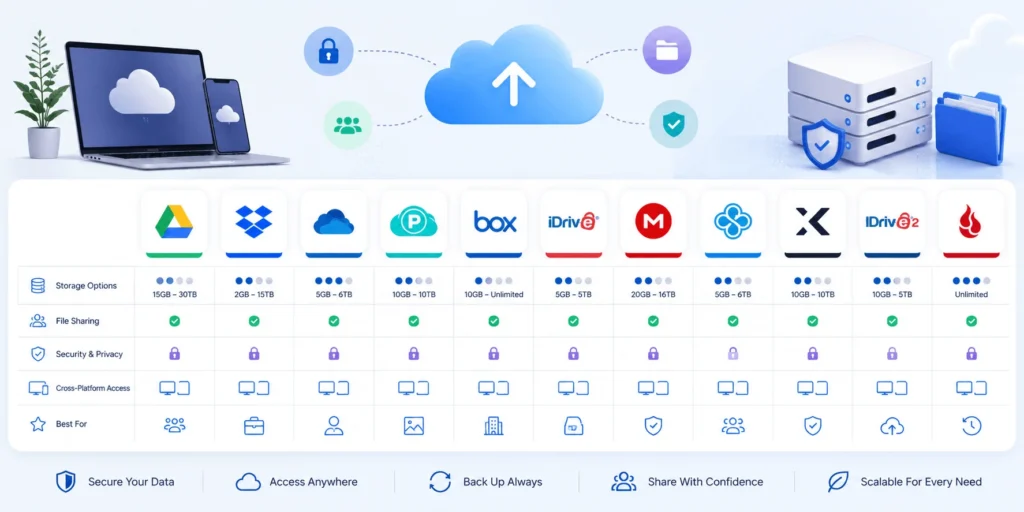
Most comparisons compare the wrong things: free tiers, star ratings, done. But storage capacity is roughly the fourth most important factor. What actually matters is what it costs to leave, whether the encryption survives adversarial testing, and whether your free space is genuinely yours or shared with your inbox. I’ll walk you through all three, plus a step-by-step selection process at the end.
Ready? Cool.
Here’s the uncomfortable truth: the cloud storage market is enormous, which means there’s enormous incentive to sell you the wrong thing. Fortune Business Insights puts the global market at $197.8 billion in 2026, growing toward $810 billion by 2034. That’s a lot of marketing budget aimed at your wallet.
And it works. Because most people pick a provider once and then never move again.
Best Cloud Storage Services Comparison: The Full Pricing Breakdown
Price per terabyte is the easiest metric to compare and the least complete one, so here it is upfront — followed by the context that makes it meaningful. Google One and pCloud tie at the mainstream tier. OneDrive is the most expensive per TB by a wide margin. IDrive and TeraBox own the budget end. Every figure below was checked mid-2026 against vendor pricing pages.
| Provider | Free tier | Mainstream paid tier | Cost per TB/mo | Zero-knowledge encryption |
|---|---|---|---|---|
| Google One | 15GB (shared) | 2TB / $99.99 yr | ~$4.17 | No |
| pCloud | 10GB | 2TB / $99.99 yr | ~$4.17 | Paid add-on |
| Dropbox Plus | 2GB | 2TB / $119.88 yr | ~$5.00 | No |
| iCloud+ | 5GB | 2TB / $9.99 mo | ~$5.00 | No |
| OneDrive | 5GB | 1TB / $99.99 yr | ~$8.33 | No |
| Sync.com | 5GB | 1TB / ~$5.00 mo | ~$5.00 | Yes, default |
| Proton Drive | 5GB | 200GB / €4.99 mo | — | Yes, default |
| Tresorit | Trial only | Business ~$14.50/user | — | Yes, default |
| MEGA | 20GB | 2TB tiers | ~$4.50 | Yes, default |
| IDrive | — | Budget tiers | ~$1.63–2.00 | No |
| TeraBox | 1TB (ads) | Budget tiers | ~$1.63–2.00 | No |
Lifetime cloud storage deserves a separate note. pCloud’s one-time 2TB purchase runs roughly $399 and breaks even against a subscription in about three to four years. If you’ll keep these files for a decade, that isn’t a gimmick — it’s arithmetic.
The Big Four: Google Drive, OneDrive, Dropbox, and iCloud+
These four own the mainstream — not because they’re cheapest or safest, but because they’re already installed on your device. That’s the entire moat. Still, ecosystem gravity is a legitimate reason to choose something, so here’s what each does well and where the fine print bites.
Google Drive: The Default Pick (With an Asterisk)
Verdict: best for most people. Google Drive gives you 15GB free and the best Google Workspace integration available. Docs, Sheets, Gmail — it all flows.
But here’s the asterisk.
That 15GB isn’t 15GB of file storage. It’s shared across Gmail, Google Photos, and Drive. A decade-old email account plus phone photo backup can eat the whole thing before you upload a single document. Most “Drive is full” panic is actually Photos.
One more thing: Google is mid-transition, folding Google One into its AI-branded plans through 2026. Its tier names are the most likely of any provider to shift under you.
Microsoft OneDrive: You’re Buying Office, Not Storage
Verdict: only worth it as part of Microsoft 365. OneDrive costs $99.99/year for 1TB — $8.33 per TB monthly, the worst cost per TB in the mainstream group.
Except you’re not really buying storage.
You’re buying Word, Excel, PowerPoint, and Outlook with a terabyte attached. If you’d pay for Office anyway, the storage is effectively free and the comparison flips. If you live in Google Docs, you’re funding software you’ll never open.
Simple test: would you buy Office on its own? Then OneDrive wins.
Dropbox: Premium Price, Premium Sync
Verdict: worth the markup if you move large files daily. Dropbox Plus runs $119.88/year for 2TB — more than Google charges for identical capacity.
People pay it anyway. Why?
Block-level sync. Dropbox’s engine remains the most reliable in the category, and if you’re constantly shuttling large files between machines, that reliability is worth real money. The free tier, though, is a joke in 2026: 2GB, unchanged for years.
Apple iCloud+: Frictionless If You’re Already In
Verdict: Apple households only. iCloud+ offers 5GB free, which is famously inadequate — it covers device backups, Photos, and iMessage simultaneously, so one iPhone backup can fill it.
At 2TB it’s $9.99/month, competitive with Google. The integration is seamless. The lock-in is total.
Zero-Knowledge Encryption: The Comparison Nobody Runs
If your files contain client work, medical records, or financial documents, mainstream providers aren’t built for you. They use strong server-side encryption but hold the keys — meaning they can read your files, and so can anyone who legally compels them. Zero-knowledge encryption removes that possibility entirely. Here’s exactly who offers it and who doesn’t.
| Encryption model | Providers |
|---|---|
| End-to-end by default, included free | MEGA, Proton Drive, Sync.com, Filen, Internxt |
| Available as a paid add-on only | pCloud (Crypto), Icedrive (Crypto) |
| Not offered at any price | Google Drive, OneDrive, Dropbox |
Read that last row again.
You cannot buy client-side encryption from the three largest providers. It isn’t a tier you’re missing. It doesn’t exist.
The ETH Zurich Audit Nobody Mentions
In 2024, researchers at ETH Zurich published “End-to-End Encrypted Cloud Storage in the Wild: A Broken Ecosystem” — the most rigorous independent test of zero-knowledge claims available. They examined five providers. The results were rough.
Tresorit fared best; the issues found didn’t directly expose file contents or permit easy data manipulation. The other four — Sync, pCloud, Icedrive, and Seafile — showed more serious flaws including file injection, metadata manipulation, and in some cases plaintext access.
Then there’s the part I find most telling.
Icedrive chose not to patch the vulnerabilities researchers disclosed.
I weight that heavily. How a company answers an audit reveals more about its data security culture than any certification badge. For HIPAA compliance or regulated work, Tresorit’s response record makes it the defensible choice.
Jurisdiction: The Criterion Nobody Weighs
Where your data physically sits determines who can legally demand it. Switzerland and Canada fall outside the 14 Eyes intelligence alliance, which is why Proton Drive (Swiss) and Sync.com (Canadian) attract privacy-focused users. Meanwhile the UK’s Investigatory Powers Act and Australia’s assistance-and-access legislation have both broadened recently. If data sovereignty matters to your work, this belongs in your decision, not a footnote.
Egress Fees and the Exit Trap
Sticker price tells you what it costs to start. It says nothing about what it costs to leave — and leaving is where people get quietly trapped for years. Consumer plans hide this behind transfer quotas and throttling. Business and object storage don’t even pretend. Here’s what to check before you commit.
For object storage — S3, Backblaze B2, Wasabi, Cloudflare R2 — egress fees can dwarf your storage bill entirely.
- Backblaze B2 and Wasabi undercut Amazon S3 by roughly 3x on raw storage
- Cloudflare R2 charges zero egress, making it far cheaper for anything served publicly
- Amazon S3 wins on ecosystem depth and loses on retrieval economics
On consumer plans, the trap is quieter. MEGA caps monthly transfer even on paid tiers. TeraBox throttles free downloads aggressively. Try migrating a terabyte out and you’ll discover this the hard way.
If you’re weighing object storage for a business workload rather than personal files, the broader infrastructure decision matters just as much as the per-GB rate — our cloud computing guide covers how storage fits alongside compute and networking.
Free Cloud Storage: What’s Real and What’s Bait
Free tiers are marketing, and reading them correctly means knowing what each provider deliberately omits from the headline number. Some are genuinely useful; others exist to frustrate you into upgrading within a month. Here’s the honest ranking, plus a stacking strategy that gets you real capacity for nothing.
| Provider | Free storage | The catch |
|---|---|---|
| TeraBox | 1TB | Ads, throttled downloads, 4GB per-file cap |
| MEGA | 20GB | Monthly transfer quota |
| Google Drive | 15GB | Shared with Gmail and Photos |
| pCloud | 10GB | Requires verification and referral steps |
| Icedrive | 10GB | ~3GB/day bandwidth cap |
| Box | 10GB | 250MB per-file upload limit |
| OneDrive | 5GB | Thin, but integrated into Windows |
| iCloud | 5GB | Absorbed by device backups |
| Proton Drive | 5GB | Small, but E2EE included |
| Sync.com | 5GB | E2EE included, 30-day versioning |
| Dropbox | 2GB | Smallest permanent tier available |
Here’s a trick worth knowing: stack them. MEGA plus Google Drive plus pCloud gives you 45GB across three accounts, free. Assign each one a single job — archive, working files, paper trail — and never mix them. Log in occasionally, since idle free accounts can be reclaimed after twelve months.
Your Step-by-Step Selection Process
Work through these five steps and you’ll land on the right cloud backup solution the first time. It takes about twenty minutes, and it prevents the most common mistake — choosing on price, then discovering months later that what you needed wasn’t storage at all.
Step 1: Measure what you actually have. Open Settings → Storage on your phone and computer. Photos alone often run 200–500GB; video pushes past 1TB fast. Buy for two to three years out, not today.
Step 2: Decide if you’re buying software. If you’d pay for Office regardless, OneDrive’s math changes completely. Same logic applies to Google Workspace.
Step 3: Set your privacy floor. Does anyone besides you need to be unable to read these files? If yes, you’re shopping in the zero-knowledge tier and the Big Four are disqualified. No exceptions.
Step 4: Test the exit before you commit. Upload 5GB to the free tier, then download all of it. Time it. This single test reveals throttling and quota limits no comparison table will tell you.
Step 5: Verify a restore. Modify a file several times over two days, then recover an old version. If file versioning confuses you now, it’ll be unusable during an actual emergency.
One Warning Before You Buy
Sync is not backup. I’ll say it twice, because it’s the most expensive misunderstanding in this entire category.
When you delete a file, sync faithfully deletes it everywhere. When ransomware encrypts your folder, sync faithfully encrypts the cloud copy too. Your file sync service is a convenience layer, not a safety net.
Real protection follows the 3-2-1 rule: three copies, two media types, one off-site. Cloud storage covers exactly one leg. Pair it with Backblaze for unlimited cloud backup, or keep a local drive in rotation.
Frequently Asked Questions
These are the questions I get asked most often about cloud storage comparison decisions, answered as directly as I can. Each one reflects a genuine decision point rather than a keyword — if you’re stuck between two providers, the answer is usually somewhere below.
How much cloud storage do I actually need?
Most individuals need 200GB to 2TB. Check Settings → Storage on your devices first: photo libraries commonly consume 200–500GB and video archives exceed 1TB. Choose a tier that fits your projected usage two to three years out, since migrating later costs time and sometimes egress fees.
Is cloud storage safe?
It depends entirely on the encryption model. Google Drive, OneDrive, and Dropbox encrypt your files but hold the keys, meaning they can technically access your data. Proton Drive, Sync.com, Tresorit, and MEGA use zero-knowledge encryption where only you hold the keys. For sensitive documents, choose the second group.
For teams evaluating storage alongside a wider software stack, our roundup of the best AI tools for enterprise teams covers adjacent security and compliance considerations.
What is the cheapest cloud storage per TB?
IDrive and TeraBox are cheapest at roughly $1.63–2.00 per TB monthly, though both carry tradeoffs — IDrive is a backup product rather than a sync drive, and TeraBox throttles free-tier downloads. Among mainstream sync services, Google One and pCloud tie at approximately $4.17 per TB monthly.
Is cloud storage better than an external hard drive?
Neither replaces the other. Cloud storage protects against fire, theft, and hardware failure; external drives cost less long-term and work offline. The 3-2-1 backup rule recommends both — three copies, two media types, one stored off-site.
Can Google read the files in my Google Drive?
Technically yes. Google holds the encryption keys and scans content for policy enforcement and malware detection. Google does not offer zero-knowledge encryption at any price tier. If that matters to you, use Proton Drive or Sync.com, or add Cryptomator as an encryption layer over your existing Drive.
What happens if I stop paying for cloud storage?
Most providers switch your account to read-only, then delete files after a grace period — typically 30 to 90 days. Download everything before cancelling, and check transfer quotas first, since some services throttle bulk downloads exactly when you need them most.
So Which One Should You Pick?
One answer per situation. No hedging.
- Most people: Google Drive — ecosystem integration means you’ll actually use it
- Office subscribers: OneDrive — you’re already paying for it
- Heavy file movers: Dropbox — the sync engine justifies the premium
- Privacy-first personal use: Proton Drive — Swiss jurisdiction, E2EE by default
- Regulated business work: Tresorit — best audit record, HIPAA and ISO 27001
- Long-haul value: pCloud lifetime, if you’ll still be around in four years
- Pure capacity on a budget: IDrive, understanding it’s backup more than sync
One final note. Every price in this best cloud storage services comparison was verified mid-2026, and this category moves fast — Google’s tiers especially. Confirm on the vendor’s own page before entering a card number.
Now go test that restore. Seriously. Before you need it.