Free Time Card Calculator: Hours, Breaks & Overtime (2026)

A free time card calculator adds up your start time, end time, and unpaid break to give you total hours worked, overtime hours, and estimated pay. Under federal law, covered non-exempt employees get time and a half after 40 hours in a workweek. Use the calculator below, then read on to avoid the break, rounding, and decimal mistakes that quietly shrink paychecks.
Let’s get into it.
Key takeaways:
- Enter your real punches, not your scheduled shift.
- Subtract only unpaid meal periods. Short paid breaks of roughly 5 to 20 minutes stay in your total.
- Convert minutes with the formula minutes ÷ 60, so 7:30 is 7.5, not 7.30.
- Federal overtime applies after 40 hours in a workweek. Alaska, California, Colorado, and Nevada add daily overtime rules.
- The “7-minute rule” isn’t a standalone law. It’s one way to round to the nearest quarter hour.
Try the Free Time Card Calculator
Here’s the tool itself. Enter your start time, end time, and unpaid break for each day, and it totals your weekly hours, splits regular hours from overtime hours, and estimates gross pay. It handles overnight shifts too: if your end time is earlier than your start time, it assumes you crossed midnight. It applies the federal 40-hour weekly rule only, so check the state section below if you work in a daily-overtime state.
What Is a Free Time Card Calculator?
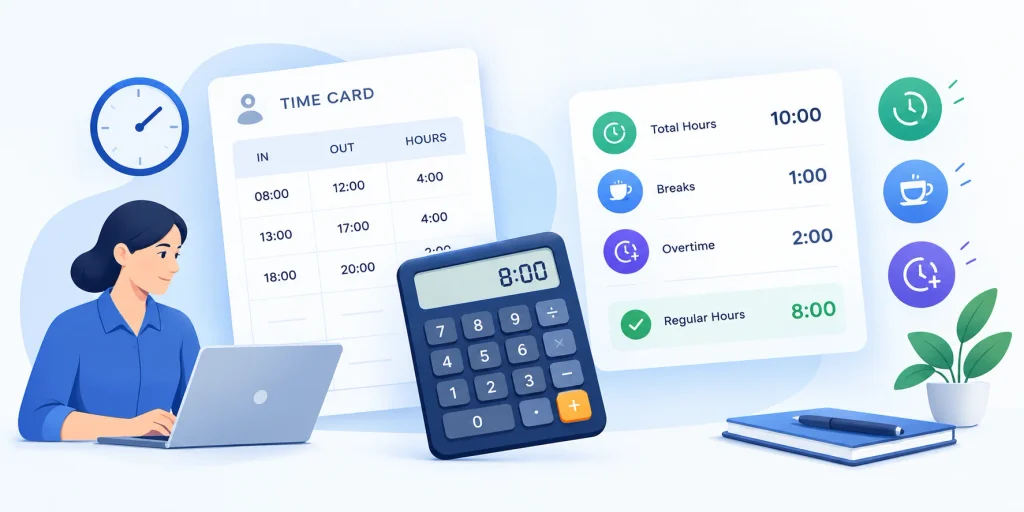
A time card calculator, also called a timesheet calculator or work hours calculator, is a web tool that totals your hours from clock-in and clock-out entries. It replaces hand-added paper timesheets and the spreadsheet you rebuild every week. Most versions also deduct breaks, flag overtime, and show results in decimal time so you can plug them straight into payroll or an invoice.
Think of it as a calculator that already knows the paperwork.
Who Uses It?
Different people use the same tool for different jobs. Knowing which group you’re in helps you focus on the right features instead of wading through ones you’ll never touch.
Employees use it to double-check hours worked before payroll runs.
Freelancers use it to calculate billable hours for invoices.
Small business owners use it for quick payroll checks before they commit to full time tracking software or compare the best small business accounting software.
How to Use a Free Time Card Calculator (Step by Step)
Using one of these tools takes about two minutes, but only if you enter the right numbers. Most mistakes come from inputs, not math. So follow this sequence, and you’ll get a reliable weekly total the first time.
Step 1: Gather Your Actual Punches
Use the real times you started and stopped. Not the schedule.
The law cares about time actually worked, so a 7:56 AM start counts as 7:56 AM, even if your shift says 8:00.
Step 2: Pick Your Time Format
Some tools use 12-hour time. Others use 24-hour military time, where 5:00 PM is 17:00. The DQYDJ time card calculator uses the 24-hour format.
Choose one and stay consistent.
Step 3: Enter Start and End Times
Fill in each day you worked and leave the rest blank. For an overnight shift, enter an end time earlier than your start time, and tools like DQYDJ’s calculator will figure out the midnight crossover.
Step 4: Subtract Only Unpaid Breaks
This is where most errors sneak in. The formula is:
Daily hours = (clock-out minus clock-in) minus unpaid break
So 8:00 AM to 5:00 PM with a 60-minute unpaid lunch equals 8 hours. The Toggl time card calculator uses this same logic.
Step 5: Check Overtime, Then Save
Hit calculate and review your regular hours, overtime hours, and gross pay. Then download, print, or email the time card, and keep a copy.
Free Time Card Calculators Compared
Plenty of tools do the basics, but they differ on extras like overnight handling and export options. This table compares what each tool’s page states. “Not listed” means I didn’t find the feature on the page, not that the tool lacks it, and features can change, so check before you commit.
| Tool | Break deduction | Overtime | Overnight shifts | Export or print |
|---|---|---|---|---|
| Toggl | Yes | Yes (default 40 hrs/week) | Not listed | Printable record |
| Clockify | Yes (auto-deducts) | Yes | Not listed | Print or save as PDF |
| Hubstaff | Yes | Not listed | Not listed | Export and email |
| DQYDJ | Not listed | Not listed | Yes | Weekly totals |
| TimeCamp | Yes | Mentioned | Not listed | Download or print |
Pick based on your need. One-off weekly check? Any of them works. Overnight shifts? DQYDJ is built for it. A printable card for your manager? Clockify or TimeCamp.
How Breaks Change Your Total Hours
Breaks are the number one reason a time card calculator gives the wrong answer. The issue usually isn’t the tool. It’s that people treat every break the same, even though federal rules treat short rest breaks and real meal periods differently. Get this distinction right and most of your errors disappear.
Paid Short Breaks vs. Unpaid Meal Periods
Federal law doesn’t require lunch or coffee breaks. But when an employer offers short breaks of about 5 to 20 minutes, the U.S. Department of Labor says they count as compensable work time. So don’t subtract them.
Bona fide meal periods, typically 30 minutes or more where you’re fully relieved of duty, generally aren’t paid, according to DOL Fact Sheet #22.
Here’s the catch.
If you’re answering phones or watching the counter during lunch, you haven’t been relieved of duty. That time may count as work.
What Your State Adds
Federal law is just the floor. The DOL’s Hours Worked Advisor explains that when state and federal rules both apply, you get the more beneficial one.
California is the classic example. According to the California Department of Industrial Relations, employees are entitled to a duty-free 30-minute meal period for each five-hour stretch, with a second one when a shift runs past ten hours. California also requires a paid 10-minute rest break per four-hour period, per SHRM’s summary of the DIR rules.
Overtime: What Your Time Card Calculator Is Really Checking
Overtime is why most people search for a free time card calculator in the first place. The federal rule is simple, but the details trip people up: what counts as a week, and how hours get split. Once you see how the math works, you can verify any payroll number yourself.
The Federal 40-Hour Rule
DOL Fact Sheet #23 says covered, non-exempt employees must receive overtime for hours over 40 in a workweek, at no less than time and a half their regular rate. It also says overtime can’t be waived by agreement between you and your employer.
A Worked Example
Say you earn $20 an hour and work 45 hours.
- Regular pay: 40 × $20 = $800
- Overtime pay: 5 × $30 = $150
- Total gross pay: $950
A good overtime calculator shows that split so you can catch errors before payroll does.
Weekly, Not Per Pay Period
Overtime is figured per workweek. You can’t average a 50-hour week with a 30-hour week to wipe it out. Each week stands alone.
Overtime and Break Rules by State
Some states go further than federal law, and your total hours may trigger overtime before you hit 40. The table below covers the four states usually cited as having general daily overtime rules. Treat it as a starting point and confirm with your state labor department, since exemptions and wage conditions apply.
| State | Daily overtime rule | Source |
|---|---|---|
| California | 1.5x after 8 hours a day, double time after 12 hours, plus a seventh-day rule | California DIR |
| Alaska | 1.5x after 8 hours a day or 40 hours a week | SHRM |
| Colorado | 1.5x after 12 hours a day or 40 hours a week | SHRM |
| Nevada | 1.5x after 8 hours a day, but only for employees under a wage cutoff | Clockspot |
Working in one of these states? Run your week day by day, not just as a weekly total.
How to Convert Minutes to Decimal Hours
Payroll systems run on decimal hours, not clock time. That’s why 7 hours 30 minutes becomes 7.5, not 7.30. Typing the wrong one shortchanges you. This section gives you the formula, a full chart, and the reverse conversion.
The Formula
Minutes ÷ 60 = decimal hours
So 8 hours 45 minutes is 8 + (45 ÷ 60) = 8.75 hours. Homebase’s time card conversion guide uses the same method.
Minutes-to-Decimal Chart
| Min | Dec | Min | Dec | Min | Dec | Min | Dec |
|---|---|---|---|---|---|---|---|
| 1 | 0.02 | 16 | 0.27 | 31 | 0.52 | 46 | 0.77 |
| 2 | 0.03 | 17 | 0.28 | 32 | 0.53 | 47 | 0.78 |
| 3 | 0.05 | 18 | 0.30 | 33 | 0.55 | 48 | 0.80 |
| 4 | 0.07 | 19 | 0.32 | 34 | 0.57 | 49 | 0.82 |
| 5 | 0.08 | 20 | 0.33 | 35 | 0.58 | 50 | 0.83 |
| 6 | 0.10 | 21 | 0.35 | 36 | 0.60 | 51 | 0.85 |
| 7 | 0.12 | 22 | 0.37 | 37 | 0.62 | 52 | 0.87 |
| 8 | 0.13 | 23 | 0.38 | 38 | 0.63 | 53 | 0.88 |
| 9 | 0.15 | 24 | 0.40 | 39 | 0.65 | 54 | 0.90 |
| 10 | 0.17 | 25 | 0.42 | 40 | 0.67 | 55 | 0.92 |
| 11 | 0.18 | 26 | 0.43 | 41 | 0.68 | 56 | 0.93 |
| 12 | 0.20 | 27 | 0.45 | 42 | 0.70 | 57 | 0.95 |
| 13 | 0.22 | 28 | 0.47 | 43 | 0.72 | 58 | 0.97 |
| 14 | 0.23 | 29 | 0.48 | 44 | 0.73 | 59 | 0.98 |
| 15 | 0.25 | 30 | 0.50 | 45 | 0.75 | 60 | 1.00 |
Want another reference? Clockspot has a time card minutes-to-decimal chart, and Fit Small Business walks through payroll conversion step by step.
Going Backward
Multiply the decimal by 60. So 7.75 hours means 0.75 × 60 = 45 minutes, or 7 hours 45 minutes.
Time Clock Rounding and the 7-Minute Rule
Time clock rounding is where payroll gets legally sensitive. Many employers round punches to the nearest 5, 6, or 15 minutes to keep things simple. That’s allowed, but only under strict conditions. And the famous 7-minute rule is widely misunderstood, so let me clear it up.
What the Regulation Says
The rule comes from 29 CFR § 785.48. It says recording start and stop times to the nearest 5 minutes, tenth, or quarter of an hour is accepted for enforcement, as long as it doesn’t, over time, fail to compensate employees for all the time they actually worked.
Where the 7-Minute Rule Fits
The 7-minute rule isn’t a separate law. It’s the midpoint of a 15-minute interval, as J.J. Keller explains.
| Actual punch | Rounded to |
|---|---|
| 8:01 to 8:07 | 8:00 |
| 8:08 to 8:14 | 8:15 |
| 8:15 | 8:15 |
| 8:16 to 8:22 | 8:15 |
| 8:23 to 8:29 | 8:30 |
The same logic applies to clock-outs.
A Worked Example: Rounding vs. Exact Time
Here’s an illustrative week I calculated myself, using a 60-minute unpaid lunch each day and a $20 hourly rate.
| Day | Actual punches | Exact hours | Rounded punches | Rounded hours |
|---|---|---|---|---|
| Mon | 8:06 to 5:04 | 7h 58m | 8:00 to 5:00 | 8h 00m |
| Tue | 7:58 to 5:09 | 8h 11m | 8:00 to 5:15 | 8h 15m |
| Wed | 8:11 to 5:02 | 7h 51m | 8:15 to 5:00 | 7h 45m |
| Thu | 7:55 to 5:07 | 8h 12m | 8:00 to 5:00 | 8h 00m |
| Fri | 8:03 to 4:52 | 7h 49m | 8:00 to 4:45 | 7h 45m |
| Total | 40h 01m | 39h 45m |
Exact time pushes this worker 1 minute past 40 hours, for about $800.50 in gross pay. Rounding drops the total to 39.75 hours and erases the overtime, for $795.00. That’s only one week, and rounding can swing either way over time, but it shows why the 40-hour line matters.
Rounding Red Flags
Rounding goes wrong when it only works in the employer’s favor. Patriot Software’s rounding guide warns that always rounding down, or rounding in a way that hides overtime, can mean underpaid wages.
My advice: calculate to the exact minute whenever you can. And keep your original punches, since Everhour’s 7-minute rule guide points out they’re the proof that your rounding stayed neutral.
7 Time Card Mistakes That Quietly Cost You Money
Even with a great time card calculator, small slip-ups can wreck your totals, and finding a 45-minute error weeks later is no fun. Here’s a quick checklist to run before you submit anything.
- Mixing up AM and PM. Switch to 24-hour time if it keeps happening.
- Subtracting paid breaks. Short 5 to 20 minute breaks usually stay in.
- Typing 7.30 instead of 7.5. Always use minutes ÷ 60.
- Skipping overnight handling. Shifts past midnight need special treatment.
- Averaging weeks for overtime. Each workweek stands alone.
- Rounding in one direction only. That’s a compliance risk.
- Ignoring state rules. Federal law is only the baseline.
How Long Should You Keep Time Cards?
A time card isn’t just a number. It’s a record, and records protect you in a pay dispute. Employers have legal retention rules, and employees benefit from keeping their own copies. So save a PDF of every card your free time card calculator produces.
What the DOL Requires
DOL Fact Sheet #21 says employers must keep payroll records for at least three years. Records that wage computations rely on, such as time cards, must be kept for two years.
There’s no required form. The DOL’s recordkeeping page says records just need to be accurate and include hours worked each day and total hours each workweek.
What That Means for You
Print or download every time card. Store the file somewhere safe.
If a number ever goes wrong, you’ll have proof.
Free Calculator vs. Spreadsheet vs. Time Tracking Software
Which option fits you? It depends on how often you track time and how many people you manage. A free time card calculator suits quick checks. A spreadsheet works for small, repeating needs. And time tracking software earns its cost when errors start multiplying across a team.
When a Free Calculator Is Enough
Use one when you’re checking a single week, estimating payroll, or printing one timesheet. Toggl’s own guide says it’s the right tool for one-off calculations.
When to Upgrade
Manual entry invites errors in decimal conversion, overtime, and break deductions, and those errors multiply across a team. Managing several employees? Software that builds time cards automatically will save you headaches. If you’re comparing options, see our roundup of the best remote employee monitoring software. If you want payroll and HR in one system, read our Netchex review.
Start free. Upgrade when it hurts.
Frequently Asked Questions
Is a free time card calculator accurate?
Yes, when your inputs are correct. The math is simple addition and subtraction, so errors usually come from wrong times, missed breaks, or typing minutes as decimals. Enter actual punches, subtract only unpaid meal periods, and review the daily totals before you trust the weekly number.
How do I calculate hours worked with a lunch break?
Subtract your clock-in from your clock-out, then subtract the unpaid lunch. For example, 8:00 AM to 5:00 PM is 9 hours, and a 60-minute unpaid lunch leaves 8 hours. Short paid breaks of 5 to 20 minutes stay in your total under federal rules.
What is .75 on a time card?
It’s three-quarters of an hour, or 45 minutes. Decimal time divides minutes by 60, so 45 ÷ 60 equals 0.75. The same logic gives 0.25 for 15 minutes and 0.50 for 30 minutes, which is why payroll shows 7.5 for seven and a half hours.
Can I use a time card calculator for overnight shifts?
Yes. Many tools handle shifts that cross midnight automatically. In calculators like DQYDJ’s and the one above, you enter an end time earlier than the start time, and the tool adds the extra 24 hours for you.
Is the 7-minute rule legal?
Rounding is allowed under 29 CFR § 785.48, but only if it doesn’t, over time, underpay employees. The 7-minute rule isn’t a separate law. It’s one common way to round to the nearest 15 minutes, and some states are stricter.
How long should I keep time cards?
Employers must keep payroll records for at least three years and time cards for two, according to DOL Fact Sheet #21. Employees aren’t bound by that rule, but keeping your own copies for at least that long protects you in a pay dispute.
Final Thoughts: Use a Free Time Card Calculator the Smart Way
A free time card calculator won’t fix a broken payroll process, but it’ll catch the small mistakes that quietly drain your paycheck or your profits. Enter your real times. Subtract only true unpaid breaks. Convert minutes the right way. Watch the 40-hour overtime line, and check your state’s daily rules.
Then save a copy.
Try the calculator on this week’s hours right now. You’ll probably find at least one number worth double-checking.