Best Small Business Accounting Software (2026): 6 Top Picks

Quick answer: QuickBooks Online is the best fit for most small businesses. Xero suits growing teams because it has no per-user fees. Wave and Zoho Books are the best free options. FreshBooks is best for service businesses.
Picking the best small business accounting software should take ten minutes.
It doesn’t.
I’ve watched owners lose whole weekends to feature grids, then buy whatever their cousin uses. Painful, right?
So I did the boring part for you. I checked the official pricing pages, read the major reviewers, and cut the noise. Below you’ll get my picks, the current prices (not the stale ones floating around the web), and a simple process for choosing.
Let’s dive in.
Why Small Business Accounting Software Matters in 2026
Before the rankings, let’s talk about why this decision deserves your attention. Good accounting software does more than add numbers. It tracks your cash flow, keeps you ready for tax season, and shows you where your money goes. In this section, I’ll share what the data says about how owners actually use these tools, because the numbers surprised me.
In a QuickBooks survey reported by Accounting Today, 36% of small businesses named accounting software as their most useful digital tool, ahead of a business website at 29%.
Here’s the twist, though.
The same report found more owners falling back on paper and pen, rising from 18% to 23%. Translation? Plenty of people still skip proper software, and they pay for it at tax time.
What Is the Best Small Business Accounting Software?
Short answer: it depends on your business, but a handful of names keep winning. This section gives you the verdict first, then the reasoning, because nobody wants to scroll through 2,000 words to find an answer. Think of it like shoes. A marathon runner and a hiker both need shoes, just not the same pair.
NerdWallet names QuickBooks Online best for most small businesses, Xero best for ease of use, Zoho Books best all-in-one suite, FreshBooks best for project management, and Wave best for free, unlimited invoicing.
Business.com agrees on its top pick. It chose QuickBooks Online for its cloud features, integrations, affordable pricing and reputation. And CNBC Select praises QuickBooks for AI-powered anomaly detection that flags unusual transactions.
My take? Start with QuickBooks or Xero if you have employees. Start with Wave or Zoho Books if cash is tight.
How I Evaluated the Best Accounting Software for Small Business
A ranking with no criteria is just an opinion in a nice outfit. So here’s exactly how I judged each tool, and what I ignored. I focused on what hits your wallet and your workload, because fancy dashboards don’t pay your bills. I also pulled every price from the vendor’s own page on October 7, 2026, since plans change often.
Here’s what I weighed:
- Real pricing from official pages, including add-ons
- Core features like invoicing, expense tracking, and bank reconciliation
- User limits, since extra seats get expensive fast
- Accountant access, because your bookkeeper will thank you
- Room to grow, so you won’t outgrow it in a year
One more thing. I skipped “top 10” lists that crown their own product number one. Those get a big grain of salt.
Small Business Accounting Software Comparison Table
Money talks, so let’s lay it all out side by side. This table compares the main plans, user limits, and trade-offs in one place, so you can scan it in thirty seconds. Every price below comes from the vendor’s official US page. Many blog posts still quote older numbers, so if you see Xero “from $13” somewhere, that information is out of date.
| Software | Starting price (monthly) | Mid-tier price | Users | Free option | Best for | Main drawback |
|---|---|---|---|---|---|---|
| QuickBooks Online | $38 (Simple Start) | $140 (Plus) | 1 / 3 / 5 / 25 by plan | Limited free tier, 30-day trial | Most businesses with an accountant | Costs climb with users and features |
| Xero | $27 (Early) | $59 (Growing) | No per-user fees | 80% off first 3 months | Growing teams | Early plan caps invoices and bills |
| FreshBooks | $23 (Lite) | $43 (Plus) | Extra users $11 each | 30-day trial | Freelancers, service businesses | Client limits on lower plans |
| Wave | $0 (Starter) | $19 (Pro) | Extra users on Pro | Yes, Starter is free | Solopreneurs | Auto bank import needs Pro |
| Zoho Books | $0 (Free) | $50 (Professional) | 1 to 15 by plan | Free under $50K revenue | Value seekers, Zoho users | Smaller app ecosystem |
| Sage Accounting | Check Sage’s site | Check Sage’s site | Varies by plan | Trial varies | Product businesses | Third-party price trackers disagree |
Notice something? The sticker price rarely tells the whole story. Payroll, extra users, and payment processing fees can double your real bill.
The 6 Best Small Business Accounting Software Options
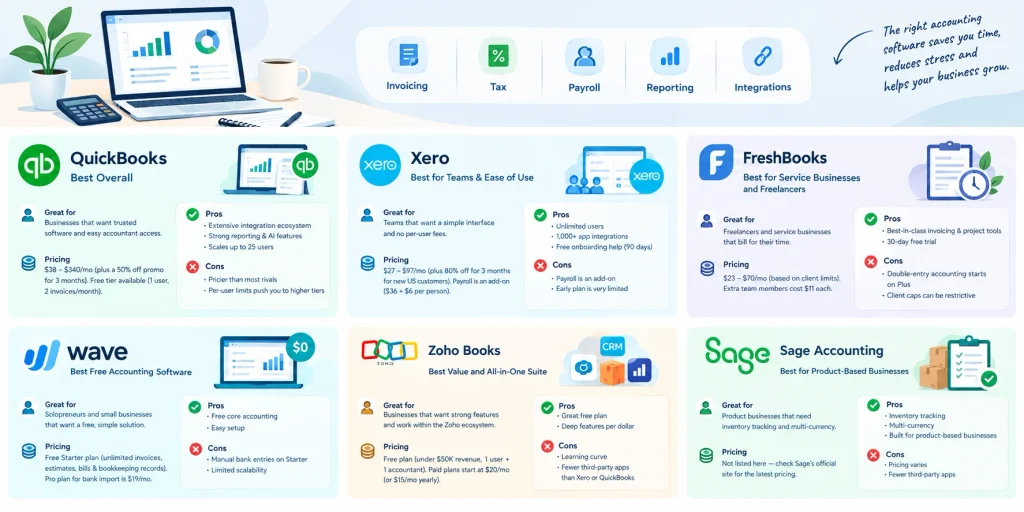
Now the fun part. Below are my six picks, each with who it suits, what it costs, and where it falls short. I’ll be honest about the weak spots, because no tool is perfect. Every pick links to the vendor’s own pricing page so you can double-check the numbers yourself.
1. QuickBooks Online: Best Overall
QuickBooks is the name most bookkeepers already know, and that matters more than you’d think. If your accountant can jump straight into your books, you save hours (and fees). It handles invoicing, sales tax, payroll connections, and deep financial reporting, and it scales with you.
Pricing: On the official QuickBooks pricing page, Simple Start is $38, Essentials $85, Plus $140, and Advanced $340 per month. New customers get 50% off for three months. There’s also a free tier, but it’s limited to one user and two invoices a month.
Pros:
- Huge accountant and integration ecosystem
- Strong reporting and AI features
- Plans scale up to 25 users
Cons:
- Pricier than most rivals
- Per-user limits push you into higher tiers
2. Xero: Best for Teams and Ease of Use
Xero is the one I’d hand to a friend who hates spreadsheets. The layout is clean, bank reconciliation is smooth, and there are no per-user license fees. That’s a big deal if your team is growing.
Pricing: Early is $27, Growing $59, and Established $97 per month. New US customers get 80% off for three months. Watch the Early plan, though. It caps you at 20 invoices and five bills, so most real businesses land on Growing.
Pros:
- Unlimited users
- Over 1,000 app integrations, per Xero
- Free onboarding help for 90 days
Cons:
- Payroll is an add-on ($36 plus $6 per person)
- Early plan is very limited
3. FreshBooks: Best for Service Businesses and Freelancers
If you bill clients for your time, FreshBooks feels built for you. It started as invoicing software, so time tracking, estimates, proposals, and client portals are polished and easy.
Pricing: Per FreshBooks’ pricing page, Lite costs $23, Plus $43, and Premium $70 monthly. The limits are on billable clients: 5, 50, or unlimited. Extra team members cost $11 each.
Pros:
- Best-in-class invoicing and project tools
- 30-day free trial
Cons:
- Double-entry accounting reports only start on Plus
- Client caps can bite quickly
TechRepublic’s comparison makes a related point: Wave includes true double-entry accounting, while FreshBooks’ cheapest plan uses single-entry bookkeeping.
4. Wave: Best Free Accounting Software
Wave is the reason “free” and “accounting” can share a sentence. The Starter plan costs $0 and includes unlimited estimates, invoices, bills, and bookkeeping records. For a solopreneur, that’s generous.
Here’s where owners get surprised, though. According to Wave’s pricing page, automatic bank import sits in the Pro plan at $19 a month. Card payments cost 2.9% plus $0.60 per transaction on Starter.
Pros: Free core accounting, easy setup.
Cons: Manual bank entries on Starter, limited scalability.
5. Zoho Books: Best Value and All-in-One Suite
Zoho Books is the sleeper pick. Its free plan is strong, and it plugs neatly into Zoho’s CRM, inventory, and project tools if you already use them.
Pricing: According to Zoho’s pricing page, the free plan stays free while yearly revenue is under $50K, and it covers one user plus one accountant. Paid plans start at $20 monthly, or $15 on annual billing.
Pros: Great free plan, deep features per dollar.
Cons: A learning curve, and fewer third-party apps than Xero or QuickBooks.
6. Sage Accounting: Best for Product-Based Businesses
Sage is the quiet one. One roundup describes it as a fit for small product businesses that need inventory tracking and multi-currency without jumping to an enterprise platform.
I’m not printing a price here on purpose. Third-party trackers list very different numbers, so check Sage’s official site before you budget.
Best Accounting Software by Business Type
Not every owner has the same needs, so let’s get specific. This quick section matches your situation to a tool, so you can skip the guesswork. Find the line that sounds like you, then run that tool’s free trial. Simple as that.
- Freelancer or consultant: FreshBooks or Wave
- Solopreneur on a budget: Wave or Zoho Books Free
- Small team with an accountant: QuickBooks Online
- Growing team that hates per-user fees: Xero
- Product business with inventory: QuickBooks Plus, Zoho Books Professional, or Sage
- Heavy Zoho user: Zoho Books
QuickBooks vs. Xero: Which One Should You Pick?
This is the matchup everyone asks about, so it gets its own section. Both are excellent, and both cover invoicing, bank feeds, reporting, and payroll connections. The real difference comes down to users, ecosystem, and feel. Here’s the short version.
- Users: Xero has no per-user fees. QuickBooks limits users by plan, from 1 up to 25.
- Ecosystem: QuickBooks wins on accountant familiarity. Xero advertises over 1,000 integrations.
- Feel: Xero is quicker to learn. QuickBooks offers deeper customization.
- Price: Xero’s mid-tier ($59) undercuts QuickBooks Plus ($140), but compare what each plan actually includes.
If you have five or more people logging in, run the numbers on Xero first.
What About AI Features and Payroll?
Two features now decide a lot of purchases: AI bookkeeping and payroll. This section covers what to expect from each, without the hype. AI can save you real time on automated categorization and spotting errors. Payroll, meanwhile, is almost always a paid add-on, so it changes your total cost.
On AI, QuickBooks promotes its Intuit Intelligence tools, and Xero promotes its JAX assistant. Both help with categorizing transactions and answering questions about your numbers. Still, I’d treat them as helpers, not replacements for a quick monthly review. If you want a wider look at tools that cut repetitive work, check out our roundup of the best AI automation tools.
On payroll, expect extra fees. Xero’s add-on starts at $36 a month plus $6 per person, and FreshBooks charges $40 plus $6 per user. Want to compare a dedicated option? Our Netchex payroll and HR software review breaks down its pricing and features.
How to Choose Accounting Software for Your Small Business: A Step-by-Step Guide
Here’s where most owners get stuck. They compare features endlessly and never decide. So I built a five-step process you can finish in one sitting. Each step narrows your options, and by the end you’ll have a clear winner.
Step 1: List your must-haves.
Write down what you truly need. Invoicing? Inventory tracking? Payroll? Sales tax? Cross out anything that’s merely nice to have.
Step 2: Count your users.
How many people need access, including your accountant? This one question can eliminate tools that charge per seat.
Step 3: Set a real monthly budget.
Include add-ons. A $27 plan that needs a $36 payroll add-on is really a $63 plan.
Step 4: Test two tools with real data.
Most vendors offer free trials. QuickBooks and FreshBooks give you 30 days, and Zoho gives you 14. Connect your bank account and send one real invoice.
Step 5: Ask your accountant.
Seriously. A five-minute chat can save you a painful migration later.
How to Switch Accounting Software Without Losing Your Data
Maybe you already use something and it’s not working. Good news: switching is doable if you plan it. This section gives you a short checklist, because moving mid-year is where most mistakes happen. Take your time, and don’t cancel the old tool until the new one is verified.
- Export your chart of accounts, customers, vendors, and transaction history.
- Pick a clean cutoff date, ideally the start of a month or quarter.
- Import the data and run a profit and loss statement in both systems.
- Compare the totals. They should match.
- Reconnect your bank feeds and invoicing links.
- Keep the old account read-only for at least a few months.
Several vendors, including Zoho, offer free migration help, so ask before you start.
Common Mistakes When Buying Accounting Software
I’ve seen smart people make avoidable errors here. This section covers the traps that cost owners the most time and money. None are complicated, but they’re easy to miss when you’re busy running a business. Spot them early and you’ll sidestep a lot of frustration.
Choosing on price alone. The cheapest option often becomes the most expensive once you outgrow it.
Ignoring promo pricing. That 80% off for three months looks lovely. But the regular price kicks in automatically, so mark your calendar.
Skipping setup. Many owners connect their bank and assume everything is categorized correctly. It isn’t always. Review your chart of accounts early.
Trusting outdated reviews. Prices change often, so always verify on the vendor’s own page.
How Long Should You Keep Your Accounting Records?
Software stores your records, but you still need to know the rules. This section covers the IRS timelines in plain English. It matters because your accounting software is only useful if the data is there when an audit or question shows up. Always confirm your situation with a tax professional.
Per the IRS guidance on keeping records:
- Keep records for 3 years in most situations
- Keep them 6 years if you left out income that was more than 25% of the gross income on your return
- Keep them 7 years if you claim a bad debt or worthless securities loss
- Keep employment tax records at least 4 years after the tax is due or paid
Cloud software makes this easy, since everything stays searchable and backed up. Receipts are usually the weak spot, though. If yours pile up in a shoebox, our Expensify expense management guide shows how to automate them.
Final Verdict: Which Is the Best Small Business Accounting Software?
So, where does that leave you? This final section pulls everything together into a simple recommendation. No fluff, just a clear path based on your situation. Remember, the best small business accounting software is the one that fits your business today and still works when you double in size.
Here’s my cheat sheet:
- Most businesses with employees: QuickBooks Online
- Growing teams that hate per-user fees: Xero
- Freelancers and service providers: FreshBooks
- Solopreneurs on a tight budget: Wave
- Value-focused teams wanting an all-in-one suite: Zoho Books
- Product businesses: Sage Accounting
Pick two, run the free trials this week, and decide by Friday.
You’ve got this.
Frequently Asked Questions
What is the best accounting software for a small business?
QuickBooks Online is the most commonly recommended option, thanks to its integrations and accountant support. Xero suits growing teams, FreshBooks suits service businesses, and Wave or Zoho Books suit tight budgets. The best choice depends on your team size, budget, and needs.
Is there free accounting software for small businesses?
Yes. Wave’s Starter plan is free, with unlimited invoices and bookkeeping records. Zoho Books also has a free plan for businesses with yearly revenue under $50K. QuickBooks offers a limited free tier too.
How much does small business accounting software cost?
Entry plans run roughly $20 to $40 per month, and mid-tier plans from $40 to $140. Add-ons like payroll, extra users, and payment fees can raise your total. Always check the vendor’s official page for current prices.
Is QuickBooks or Xero better for small business?
Xero is simpler and includes unlimited users. QuickBooks offers deeper reporting and wider accountant familiarity. If more than a few people need access, compare both prices carefully.
Do I need an accountant if I use accounting software?
Not always, but it helps. Software handles bookkeeping, while an accountant helps with tax strategy and compliance. Most platforms let you invite your accountant for free or a small fee.
Can I switch accounting software later?
Yes. Export your data, pick a clean cutoff date, import it into the new tool, and compare your reports before cancelling the old one.