HRMS Globex: Login, Features & Full Guide (2026)


HRMS Globex is a human resource management system that centralizes employee records, payroll, attendance, and leave tracking into one platform. It functions primarily as an internal, employer issued HR portal, most credibly tied to Global Healthcare Resource, a healthcare staffing firm, rather than a publicly marketed SaaS product with transparent pricing. If you’ve been handed a login link by your employer, this guide walks you through exactly what to expect.
I’ve spent hours digging through everything published on this topic, and I’ll be honest with you upfront: most of it is thin, recycled content. So instead of adding to that pile, I cross checked sources, flagged what’s verifiable, and built this into the guide I wish I’d found first.
Let’s get into it.
What Is HRMS Globex, Really?
Here’s the short version, and then I’ll unpack it for you.
HRMS Globex is a human resource management system, software that pulls together employee records, payroll, attendance, and leave tracking into one platform instead of scattering them across spreadsheets, emails, and paper trails. That’s the baseline definition any HRMS fits into, and Globex is no exception on the surface.
But dig deeper, and it’s clear HRMS Globex isn’t positioned like a public, off the shelf HR software platform. According to a guide updated in July 2026, HRMS Globex functions mainly as an internal, employer issued HR portal rather than an openly marketed SaaS product with public pricing, an important distinction if you’re evaluating it the way you’d evaluate Gusto or Rippling.
In other words: you probably won’t find HRMS Globex on a vendor comparison site. You’ll find it because your employer sent you a login link.
One source specifically connects the platform to Global Healthcare Resource, reportedly a staffing firm active in international healthcare staffing for over two decades, employing thousands of HIPAA compliant coders, billing specialists, and call center representatives. If accurate for your organization, this explains a lot. It looks like a workforce management system customized for one company’s operational needs, particularly healthcare staffing HR and medical billing HR platform workflows.
I can’t independently verify every detail about ownership, and neither can most articles ranking for this term. Treat overly specific claims about who built it with healthy skepticism.
For more on this exact topic, see our companion piece: HRMS Globex: Complete Guide, Features & Pricing.
How to Access the HRMS Globex Portal
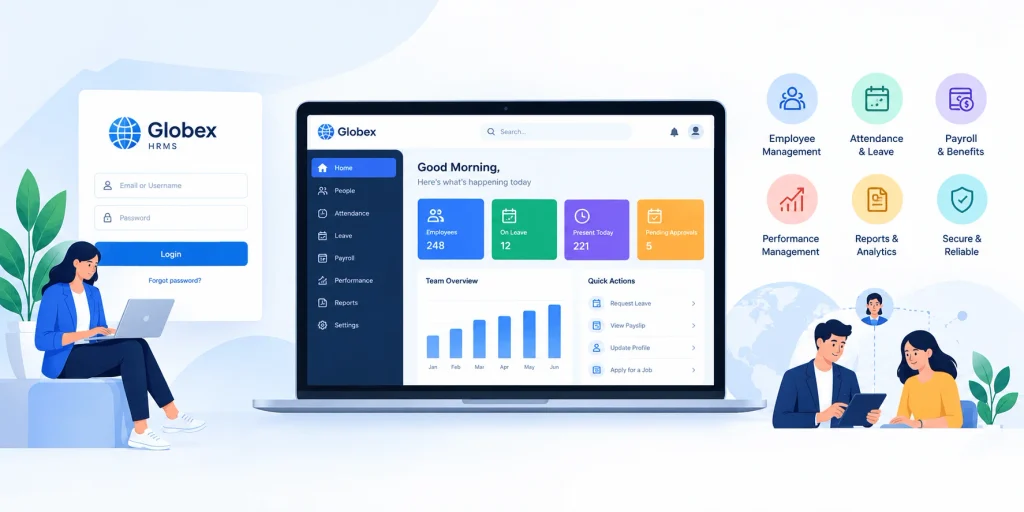
If your company uses HRMS Globex, you’ve likely already been pointed to the login page. Here’s what that process typically looks like, based on how these employee self service portals are usually structured.
Step by Step Login Guide
- Go to the official portal URL your HR department gave you. Don’t Google around for it. Always use the exact link from an official source to avoid phishing pages mimicking the real one.
- Enter your username and password. These are usually issued during onboarding, not self created on day one.
- Complete two factor authentication, if enabled. This is increasingly standard for platforms storing sensitive data like payslip download history.
- Land on your dashboard. You’ll typically see modules for Employee Information, Transactions, Reports, and, depending on access level, Generate Orders.
- Navigate to your task, whether that’s applying for leave, checking appraisal management status, or pulling a report.
If you get stuck, your internal HR contact is a far better resource than any blog, including this one. They know the specific quirks of your company’s instance.
Core Features You’ll Likely Run Into
I’ll be careful here, because a lot of what’s published about HRMS Globex’s feature set reads like generic HR management software marketing copy rather than firsthand documentation. Still, based on consistent reporting across sources, here’s what tends to show up.
Employee Data and Records Management
HRMS Globex centralizes your employee database, personal details, employment history, and performance data, into one secured system. This is the backbone of any modern HRIS system, and it eliminates the “which spreadsheet has the latest version” problem common in manual HR setups.
Payroll and Payslip Access
You can typically access payroll management software functions directly, including viewing and downloading payslips without emailing finance every month.
Leave and Attendance Tracking
The leave management system lets you submit time off requests and check balances. Paired with attendance tracking software, HR gets a real time view of workforce availability without manual whiteboard updates.
Recruitment and Onboarding Tools
Some sources mention HRMS Globex automating recruitment automation, posting jobs, tracking applicants, scheduling interviews, functioning like a lightweight applicant tracking system folded into the broader suite.
Performance and Appraisal Management
A performance management software component lets managers track appraisals, goals, and reviews inside the same system.
Reporting and Analytics
You get access to HR analytics and reporting, attendance trends, turnover, department level metrics, genuinely useful if your company treats HR as data informed rather than purely administrative.
Pricing and Security: What We Actually Know
Here’s a gap most articles on this topic skip entirely, so let’s address it directly.
Pricing: As of this writing (2026), HRMS Globex has no publicly disclosed pricing. This is consistent with its positioning as an internal, employer configured tool rather than a self serve SaaS product. If you’re a business owner evaluating it for adoption, you’d need to go through the company directly rather than a public quote page.
If you’re comparing HRMS Globex against platforms with transparent, published pricing, our Netchex review breaks down exactly what a publicly priced payroll and HR platform looks like, useful context for spotting the difference.
Security and compliance: One source ties the platform to operations handling HIPAA compliant data, given its reported connection to healthcare staffing. That’s a meaningful signal if accurate, but there’s no independently published security certification, SOC 2 report, or compliance documentation available publicly. If security is a dealbreaker for your evaluation, ask your HR or IT team directly rather than relying on secondhand claims.
How Does HRMS Globex Compare to Other HR Platforms?
Because HRMS Globex isn’t a publicly documented product with a comparison chart or verified review page, comparing it directly to established vendors isn’t quite apples to apples. Here’s how it roughly positions:
| Platform | Best For | Pricing Model | Notable Feature |
|---|---|---|---|
| HRMS Globex | Internal/employer specific use | Not publicly disclosed | Custom configured for one organization |
| Zoho People | Small to large businesses | Public, tiered pricing | Broad HR SaaS platform with wide integrations |
| BambooHR | Small to mid size businesses | Public, quote based | Strong employee engagement software and onboarding |
| Keka HR | Growing companies | Public, tiered pricing | Strong payroll management software and performance modules |
| GreytHR | India and similar markets | Public, tiered pricing | Deep HR compliance software for statutory requirements |
| Darwinbox | Large enterprises | Custom quote | Enterprise scale cloud based HRMS |
If your organization is specifically in healthcare staffing, it’s also worth reading our QGenda healthcare workforce management guide. QGenda is a more established, publicly documented alternative built for the exact same use case HRMS Globex reportedly serves.
If you’re evaluating HR software for your own business against Globex, you’re really comparing an enterprise HR solutions vendor against something that isn’t a vendor in the traditional sense at all.
Should You Trust Everything You Read About HRMS Globex?
Honestly? No, and I say that as someone who just spent hours researching this exact topic.
A lot of ranking content reads like templated, AI assisted filler, vague claims about “advanced customization” without specifics, screenshots, or verifiable sourcing. That’s a broader problem across the HR tech stack content space, not unique to this platform.
When researching any HR portal, look for:
- Firsthand accounts from real users, not marketing summaries
- Specific, checkable claims (pricing, integrations, certifications) instead of vague adjectives
- Recent publication dates. HR software features change fast.
- Consistency across independent sources, not one article copied five different ways
If content can’t clear those bars, treat it as a starting point, not a final answer.
Frequently Asked Questions
Is HRMS Globex free to use?
There’s no publicly disclosed pricing. It’s provided by your employer as part of your employment, not purchased individually.
Who owns HRMS Globex?
It’s most commonly linked to Global Healthcare Resource, a healthcare staffing firm, though this isn’t independently confirmed across all sources.
Can I access HRMS Globex on mobile?
Most modern HR portals, including this style of platform, offer mobile responsive access, but availability depends on your organization’s specific configuration. Check with your HR team.
Is HRMS Globex secure?
There’s a reported connection to HIPAA compliant operations, but no independently published security certification is publicly available.
How is HRMS Globex different from BambooHR or Zoho People?
Those platforms are publicly marketed with transparent pricing and broad customer bases. HRMS Globex appears to be a customized, employer specific portal, not a self serve product.
Final Thoughts
HRMS Globex is a legitimate workforce management system, but not a mainstream, publicly marketed product like Gusto or Rippling. It appears purpose built for internal use, likely tied to a specific organization’s staffing operations, which means your best source of truth is always your own HR team, not a stack of blog posts.
If you’re logging into HRMS Globex for work, you now know what to expect: centralized employee records, payroll and payslip access, leave and attendance tracking, recruitment support, performance management, and reporting, all wrapped into one cloud based HRMS.
And if you’re evaluating HR software more broadly, use Globex as a case study in why transparency and independently verifiable information matter when choosing a system that holds your team’s most sensitive data.