Wikiwand vs Wikipedia: Which Is Better in 2026? (Tested)


Quick Answer: Wikiwand and Wikipedia serve you the exact same articles — Wikiwand is a commercial reader interface layered on top of Wikipedia’s content, not a separate encyclopedia. Wikiwand adds better typography, a sticky table of contents, and AI summaries, but runs ads and sets tracking cookies. For most readers in 2026, plain Wikipedia is the better default, because its Vector 2022 redesign already closed most of the design gap.
Here’s the longer version, because I know you want the receipts.
Wikiwand vs Wikipedia isn’t a fight between two encyclopedias. It’s a fight between one encyclopedia and a coat of paint sitting on top of it. Same articles. Same editors. Same facts. Wildly different tradeoffs around ads, tracking, and AI. I spent a week digging through TechCrunch archives, Firefox reviews, and Wikimedia’s own documentation to answer this properly. Let’s get into it.
Key Takeaways
- Wikiwand hosts zero original content — every word comes from Wikipedia
- Wikipedia’s 2023 Vector 2022 skin adopted most of Wikiwand’s original selling points
- Wikiwand’s free tier is ad-supported with tracking cookies; Pro starts at $5/month
- Wikiwand’s AI layer (timelines, cross-language fact-checks) is now its only real differentiator
- Never cite wikiwand.com — always cite the canonical wikipedia.org URL
What Is Wikiwand, Really?
I’ll be blunt with you. Most articles about this topic bury the single most important fact, so I’m putting it first. Wikiwand does not write anything. It does not employ researchers. It does not host a single original sentence. It is a Wikipedia alternative interface — a reader shell that fetches Wikipedia’s content and re-renders it with better typography and extra tools. Once you internalize that, every other question in this comparison gets dramatically easier to answer.
According to Wikipedia’s own article on Wikiwand, it’s a commercial, proprietary interface built by an Israeli company for viewing Wikipedia articles.
The same Wikipedia entry documents that the interface ships with a sidebar table of contents, a navigation bar, language links, fresh typography, link hover previews, and — this part matters — display advertising and sponsored articles.
You can use it two ways. Visit wikiwand.com directly, or install the Chrome extension and let every Wikipedia link you click quietly reroute itself.
If you want a deeper look at the add-on specifically — permissions, install flow, and what changes the moment you enable it — my full Wikiwand extension review for 2026 covers it end to end.
A Quick Origin Story (It Explains Everything)
Context is criminally underrated in comparison posts, so allow me sixty seconds of history. The reason Wikiwand exists at all is a design complaint that was, honestly, completely valid in 2013. Wikipedia looked like it had been embalmed. Understanding why Wikiwand was built tells you almost everything about whether it’s still worth installing today — because the original problem it solved has quietly, largely, been solved by somebody else.
Per Wikipedia’s Wikiwand article, the company was founded in 2013 by Lior Grossman and Ilan Lewin, launched publicly in August 2014, and raised $600,000 — a figure independently confirmed by CB Insights.
Grossman’s pitch, quoted in that same entry, was sharp: it made no sense that the fifth most popular website on earth, used by half a billion people, had an interface that hadn’t been updated in over a decade.
He wasn’t wrong. Gizmodo called it a slick redesign for the Wikipedia addict. Fast Company called it a gorgeous face-lift. The press loved it.
Then 2023 happened.
The Plot Twist: Wikipedia Fixed Itself
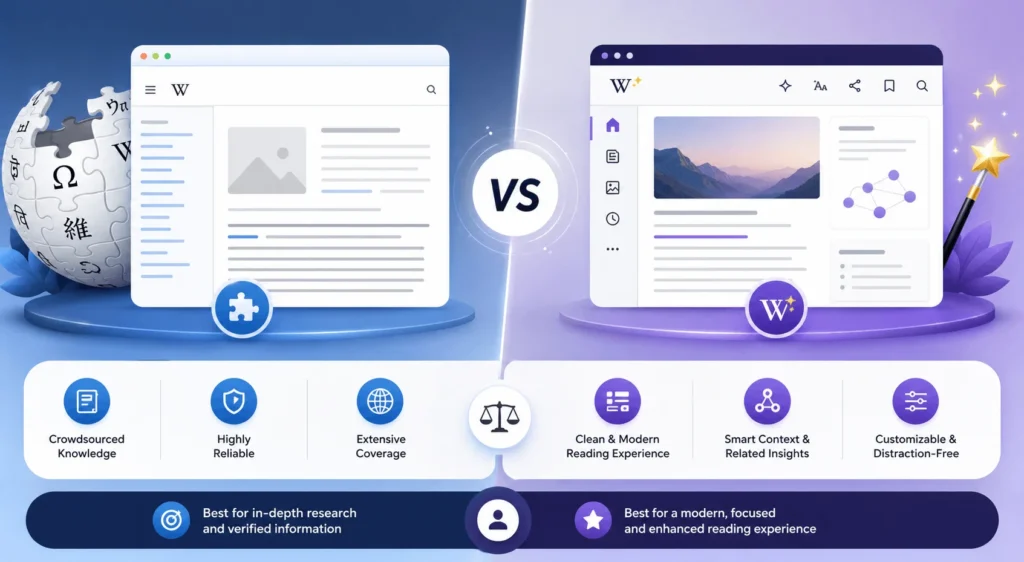
This is the section nobody writing about Wikiwand vs Wikipedia seems willing to include, and I think that’s a disservice to you. Because the entire foundational argument for Wikiwand — Wikipedia looks ancient — took a serious hit in January 2023. The Wikimedia Foundation shipped its first major desktop redesign in over a decade. And funnily enough, it borrowed most of Wikiwand’s greatest hits.
The new skin is called Vector 2022. That documentation page confirms it introduced navigation and layout changes plus persistent elements like a sticky header and a sticky table of contents, and that by early 2023 it was default on 300+ projects covering roughly 1.5 billion page views per month.
Fast Company reported that the improved search experience alone drove a 30% increase in user searches in testing, alongside more prominent language-switching tools.
Slate’s coverage put it perfectly: the redesign was deliberately undramatic, which is exactly why it kept the Vector name.
So ask yourself the honest question. If Wikipedia now has a sticky ToC, a narrower reading column, and a better search bar… what’s left?
Wikiwand vs Wikipedia: The Head-To-Head Comparison Table
You came here for a decision, not a history lecture, so here’s everything compressed. I’ve weighted this toward the stuff that actually changes behavior — money, privacy, and AI-generated article summaries — rather than cosmetic fluff. Scan it, then read the sections below, because two of these rows come with asterisks a table simply cannot carry.
Table: Wikiwand vs Wikipedia feature, pricing, and privacy comparison (2026).
| Factor | Wikipedia | Wikiwand |
|---|---|---|
| Who runs it | Nonprofit Wikimedia Foundation | Private commercial company (Israel) |
| Content | Original source | Identical, re-skinned |
| Ads | None, ever | Ad-supported free tier |
| Price | Free | Free; Pro $5/mo, Researcher $12/mo |
| Code | Open source | Proprietary software |
| Editing | Full access | Read-only |
| AI tools | None | Summaries, Q&A, timelines, fact-checks |
| Tracking | Minimal | Numerous tracking cookies |
| Mobile | Official iOS + Android apps | iOS app; no Android release |
| Citable URL | Yes (canonical) | No (mirror) |
Wikipedia’s article on Wikiwand notes that the service sets a large number of tracking cookies — a meaningful contrast against Wikipedia’s ad-free model.
On pricing, Wikiwand’s own pricing page confirms Pro unlocks 1,000 monthly AI credits, every theme, deeper fact-checks, and zero ads.
The AI Layer: Wikiwand’s Real Pitch In 2026
Let’s talk about what Wikiwand is actually selling you now, because it isn’t fonts anymore. Somewhere around 2023 the company pivoted hard into artificial intelligence, and that pivot is now the entire value proposition. If you’re evaluating this tool today, you are evaluating an AI research assistant that happens to be bolted to a nice reader — not a reader that happens to have AI. That reframe changes the calculation completely.
The timeline is straightforward. Wikipedia’s entry records that Wikiwand 2.0 launched in January 2023 with text-to-speech and AI summaries built with Wordtune Read, and that by March 2023 a GPT-3 powered Q&A feature sat at the top of every article.
Today Wikiwand markets an AI that reads only Wikipedia, so every answer traces back to the source — complete with interactive timelines and cross-language fact-checking that shows where different language editions disagree on the same event.
That last feature is genuinely clever. Comparing how the Hebrew, Arabic, Russian, and Chinese editions frame a contested event is real research value. If academic-grade sourcing is what you’re after, though, a purpose-built tool may serve you better — my Semantic Scholar AI research tool guide walks through the alternative.
But — here comes the asterisk.
Not Everyone Is Thrilled
I want you to hear the users, not just the marketing team. Because there’s a growing revolt in the review sections that any honest Wikiwand review has to acknowledge, and it’s specifically about the AI push. The extension has a loyal base going back a decade, and a chunk of that base feels the 2025–26 releases traded a beloved reading tool for an AI upsell funnel. Their words, not mine.
Over on the Firefox add-on reviews page, longtime users say the extension has gone downhill after shoehorning in excessive AI integrations.
Multiple reviewers on that same page argue the older design was more customizable, and that standard Wikipedia now simply looks better and loads more easily without the add-on.
Meanwhile the Chrome Web Store listing still sits near 4.7 stars. So the picture is split, not settled.
The Money Question Nobody Asks
Alright. This is the part I’d want a friend to tell me before I installed anything, so I’m telling you. Wikiwand’s entire business is built on content it didn’t create and doesn’t pay for, and its relationship with donation transparency has been rocky. This isn’t a hit piece — it’s a documented history, and you deserve it before you decide whether to send this company five dollars a month.
Wikipedia’s Wikiwand article states that when Wikiwand launched it claimed it would donate 30 percent of its profits to the Wikimedia Foundation — and that as of 2024, that pledge applies only to user donations, not subscription or advertising revenue.
That same entry notes those donations go to an Israeli company called Wikipele Ltd, not directly to Wikimedia.
And per Wikipedia’s documentation, as of January 2026 Wikiwand still described itself as a leading donor to the Wikimedia Foundation, despite neither Wikiwand nor Wikipele appearing on the Foundation’s Benefactors list — which you can verify yourself in about ten seconds.
There’s an ad-weight issue too. Wikipedia’s entry cites a 2021 German-language analysis finding that loading a single Wikiwand page triggered hundreds of requests and several megabytes of data exchanged with advertisers.
Wikipedia, by comparison, runs on donations and shows you nothing.
Wikiwand Alternatives Worth Knowing
Before you commit either way, you should know this isn’t a binary choice. There’s a whole category of Wikipedia reader tools sitting between “raw Wikipedia” and “full commercial interface,” and some of them solve your specific complaint without the ads or the tracking. Here’s the honest shortlist, ordered roughly by how many people they’ll actually suit.
1. Wikipedia’s official mobile apps. Free, ad-free, offline saving, dark mode, and a genuinely good reading view. Most people asking about Wikiwand on mobile actually want this.
2. Stylus. Free and open source. Lets you apply custom CSS to Wikipedia — bigger fonts, narrower columns, custom themes. Zero tracking, but you’ll need a userstyle from a library like UserStyles.world.
3. Your browser’s built-in reader mode. Firefox and Safari both strip Wikipedia to clean typography with one keystroke. Underrated and instant.
4. Wikipedia preferences (logged in). Create a free account and you can switch skins, adjust text size, and toggle the sticky ToC natively. No extension required.
5. Wikiwand Pro. If you’ve tried the above and still want the AI timelines and fact-checks, paying removes the ads and the ad-tracking incentive.
Step-By-Step: How To Decide In Under Five Minutes
Enough analysis. Let’s make this actionable, because you clicked a comparison post to choose something. Here’s the exact process I’d walk a friend through — five steps, no fence-sitting, and a clear default at the end. Work through it in order and you’ll land on an answer that fits your actual use case instead of somebody else’s.
Step 1: Ask what you’re using Wikipedia for. Casual curiosity and rabbit-holing? Wikiwand is a legitimate upgrade. Academic citation, journalism, or legal work? Stop here and stay on Wikipedia.
Step 2: Check whether you’ve seen Vector 2022. Seriously, go look. If you haven’t visited Wikipedia since 2022, your mental image is outdated and you may be solving a problem that no longer exists.
Step 3: Decide how you feel about ads and trackers. Free Wikiwand means ads and third-party ad trackers. If that’s a dealbreaker, you have two options: pay, or don’t install.
Step 4: Trial the AI for one week. Install the extension, use the timelines and fact-check tools on three genuinely complicated topics. If you don’t reach for them by day seven, uninstall. It takes five seconds.
Step 5: Verify anything important on the source. Every Wikiwand article has a “Read in Wikipedia” button at the top. Use it. Always cite the wikipedia.org URL, never the wikiwand.com one.
A Note On Citing Wikiwand
Quick but important. If you’re a student or researcher, do not cite Wikiwand. Ever. It’s a mirror, and mirrors break. The canonical URL — the one that will still resolve in ten years, the one that carries the CC BY-SA license and links to the full edit history — lives on wikipedia.org. Wikiwand is a company. Companies pivot, get acquired, and shut down. Wikipedia is infrastructure. My walkthrough on how to cite Wikipedia properly covers the formatting for APA, MLA, and Chicago.
Frequently Asked Questions
Below are the questions I see asked most often about this comparison. I’ve kept each answer short and direct, so you can grab what you need without scrolling through the whole article again.
Is Wikiwand safe to use?
Wikiwand is a legitimate, established service — not malware. However, Wikipedia’s entry on Wikiwand documents that it sets a large number of tracking cookies, and a 2021 analysis found page loads exchanging several megabytes with advertisers. It’s safe in the security sense, but not private in the way Wikipedia is.
Is Wikiwand free?
Yes, with ads. Wikiwand’s pricing page lists a free tier plus a Pro plan from $5/month (billed annually) and a Researcher plan at $12/month, which add AI credits, all themes, deeper fact-checks, and remove advertising.
Does Wikiwand change Wikipedia’s content?
No. Wikiwand re-renders the identical article text, sourcing, and citation links in a different layout. Nothing is added to or removed from the underlying content, and a “Read in Wikipedia” button on every page returns you to the original.
Can I cite Wikiwand in academic work?
You shouldn’t. Wikiwand is a third-party mirror, not the canonical source. Cite the wikipedia.org URL instead — it carries the permanent edit history, the CC BY-SA license, and a stable permalink your reader can verify.
Does Wikiwand work on mobile?
Partially. Wikiwand launched an iOS app in 2015, but Wikipedia’s article notes an Android app announced in 2020 that has still not shipped. For Android users, Wikipedia’s own official app is the better option.
What are the best Wikiwand alternatives?
Wikipedia’s official mobile apps, Stylus with a custom userstyle, your browser’s native reader mode, or simply creating a free Wikipedia account and adjusting skin and text preferences directly.
Is Wikiwand still worth it after Wikipedia’s redesign?
For layout alone, largely no — Vector 2022 delivered the sticky table of contents and narrower reading column that were Wikiwand’s original pitch. The remaining case is the AI layer: summaries, timelines, and cross-language fact-checks.
So, Which One Wins?
Time for a verdict, because comparison posts that refuse to pick a side are useless and I refuse to write one. The honest answer depends on exactly one variable: whether you want an AI research layer. Everything else has converged. Here’s how I’d split it.
Choose Wikipedia if you edit, cite, care about privacy, want zero cost forever, or simply haven’t seen the redesign yet. This is the default for most people, and it’s not close.
Choose Wikiwand if you read long, dense articles constantly, you want AI summaries and cross-language fact-checks, and you’re willing to pay for Pro so you’re not the product.
My actual recommendation? Read on Wikipedia. Install Wikiwand only when you hit a topic gnarly enough that a timeline and a fact-check would genuinely help.
That’s the whole thing. The content is identical — you’re just choosing a window.