
Zuhio Keyword Count Checker Review 2026: Tested for 6 Months

Awais Khan— Content Writer and SEO Blogger
Has used Zuhio regularly as part of a pre-publish editing workflow for several months. This review is based entirely on that direct, ongoing experience — not a one-time test.
I started using Zuhio after publishing an article that felt well-optimized but kept sitting on page two for a keyword I knew I had covered thoroughly. When I ran the draft through Zuhio, I found the focus keyword appeared just twice in 1,400 words — completely missing from the H1 and the opening paragraph. That discovery took thirty seconds. Fixing it took two minutes. The article moved to page one within three weeks.
That single experience made Zuhio a permanent part of my editing routine. This review covers what the tool actually does, where it genuinely helps, where it falls short, and whether it belongs in your workflow in 2026.
Summary verdict: Zuhio earns a 4 out of 5. It does one specific job — checking keyword frequency and density before you publish — quickly, freely, and without any friction. It is not a full SEO suite and does not try to be. For solo writers and bloggers who want a fast pre-publish sanity check, it is genuinely useful.
Quick facts about Zuhio
Tool typeKeyword frequency and density checker
PriceFree — no subscription required
Login requiredNo — open and use instantly
Best use casePre-publish keyword balance check
Works forBlog posts, landing pages, product descriptions
Does not doURL analysis, competitor data, semantic suggestions
Tested onBlog posts ranging from 800 to 2,500 words
What Zuhio actually does
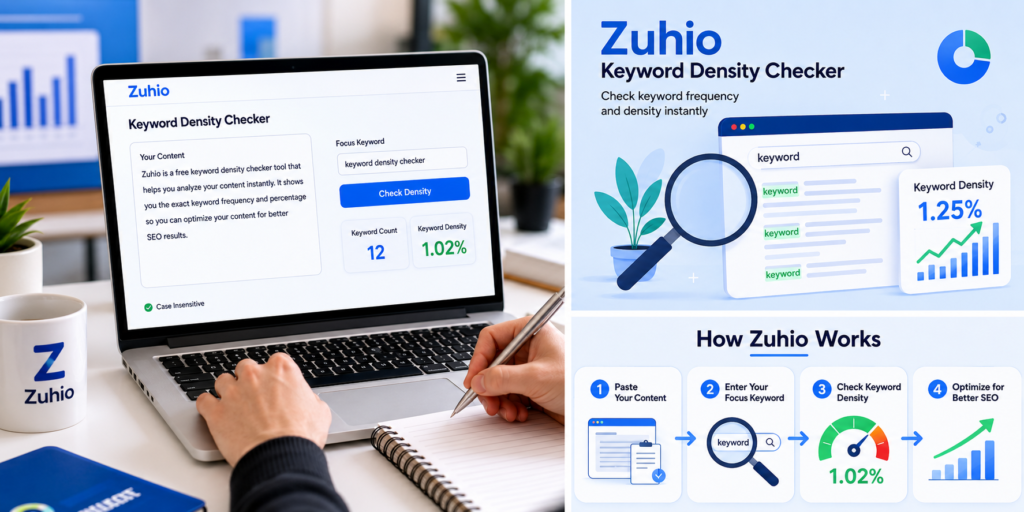
Zuhio is a single-purpose tool. You paste your content, type your focus keyword, and it tells you two things: how many times the keyword appears and what percentage of your total word count that represents.
That is the entire feature set for the core function. There are no menus, no account dashboard, no settings to configure. You open it in a browser tab, paste your draft, and have results in under ten seconds.
One feature worth noting is case-insensitive matching. Whether your keyword appears as “keyword checker,” “Keyword Checker,” or “KEYWORD CHECKER,” Zuhio counts all three as the same term. This matters more than it sounds — it is easy to miss capitalized instances when scanning manually and the inaccuracy compounds in longer articles.
It also handles multi-word phrases accurately. Long-tail terms like “free keyword density checker for bloggers” are treated as a single unit rather than broken into individual words, which gives you a genuinely useful count rather than a misleading one.
How I use it in my actual workflow
I want to be specific here because the workflow matters as much as the tool itself. Using Zuhio at the wrong stage of writing actively makes your content worse.
The mistake I see most often — and made myself early on — is opening the tool before or during the writing process and trying to hit a density target while drafting. The result is sentences that sound constructed rather than written. You end up with content that reads like you were counting words instead of making a point. Google’s May 2026 helpful content system is specifically designed to detect and demote that pattern.
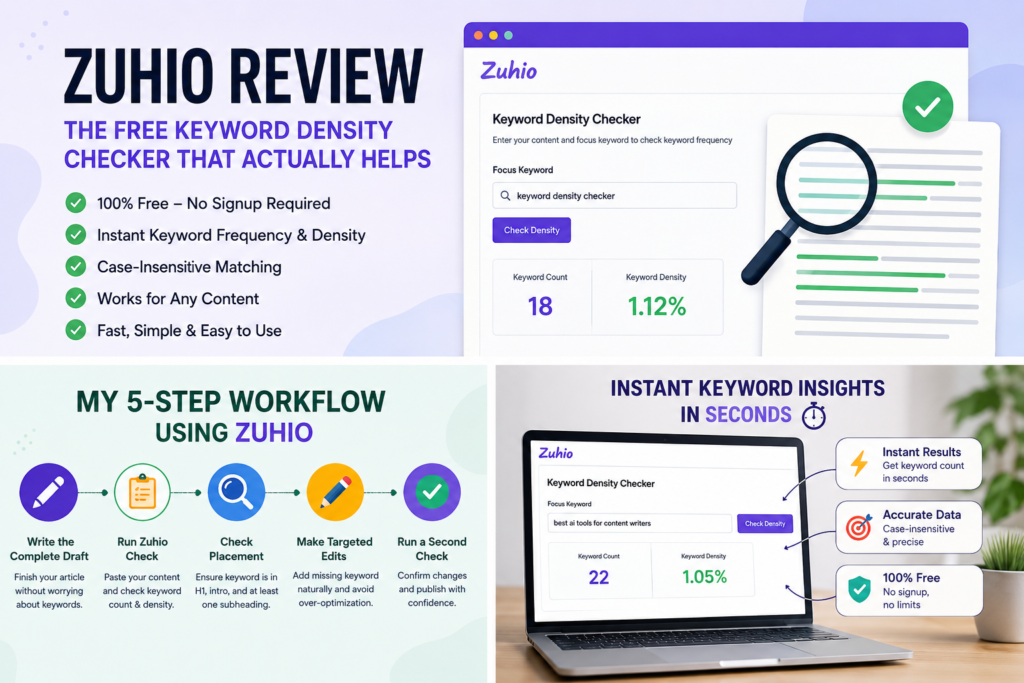
The workflow that actually produces results is this:
1
Write the complete draft first
Cover the topic thoroughly without thinking about keyword counts. Finish everything including the conclusion before opening Zuhio.
2
Run the check on the finished draft
Paste the entire article including headings. Type your exact focus keyword and read the results in context, not just the percentage number.
3
Check placement before density
Before worrying about the percentage, check whether the keyword appears in your H1, your opening paragraph, and at least one subheading. Placement gaps matter more than overall density in most cases.
4
Make targeted edits only where needed
Add the keyword to weak spots. Replace exact repetitions with natural variations. Do not rewrite sections just to hit a number.
5
Run a second check after editing
Confirm your changes landed correctly. This takes thirty seconds and prevents accidentally creating a new problem while fixing the original one.
“The second check is the step I skipped for months. Adding it to the routine caught three separate cases where my edits had pushed density too high in a different section than I intended.”
Before publishing, also run your content through a plagiarism checker to confirm everything is original alongside being keyword-balanced.
What I found from using it regularly
After using Zuhio consistently across dozens of articles, a few patterns emerged that are worth sharing because they are not obvious from a single test.
The most common issue I catch is keyword absence from headings rather than over-use in the body. In roughly half the drafts I check, the focus keyword appears a reasonable number of times in the body text but is completely missing from the H1 or opening paragraph. Adding it to those two locations alone — without changing anything else — has consistently produced better results than any density manipulation.
The second pattern is over-optimization in AI-assisted drafts. When I use AI tools to help draft sections and then check them in Zuhio, the keyword frequency is almost always too high — typically running at 2 to 3 percent where 0.8 to 1.2 percent reads more naturally. Zuhio catches this immediately. Without the check I would have published several articles with obvious keyword stuffing that I genuinely did not notice during editing because I was focused on content quality rather than repetition patterns.
The third pattern is that density numbers vary significantly by content type in ways that feel natural to readers but look alarming on paper. A 400-word product description with a keyword appearing 6 times reads as 1.5 percent density — fine. A 2,000-word guide with the same keyword appearing 20 times reads as 1 percent — also fine, but the raw count looks high when you first see it. Context matters more than the percentage in isolation.
Practical density ranges that actually work

I want to be clear about something the original article got wrong: there is no magic density number that guarantees ranking. Google has never published one. What follows is based on what has worked consistently across my own content — not a formula borrowed from correlation studies.
| Content type | Range that reads naturally | Where I get concerned |
|---|---|---|
| Blog post (1,000–2,000 words) | 0.5% – 1.5% | Above 2.5% |
| Long-form guide (2,500+ words) | 0.4% – 1.2% | Above 2.0% |
| Landing page (500–800 words) | 0.8% – 1.8% | Above 2.5% |
| Product description (300 words) | 1.0% – 2.0% | Above 3.0% |
Keyword balance is one piece of the ranking puzzle. For the bigger picture of what Google evaluates beyond density, our SEO tips guide for ranking on Google covers the remaining factors worth understanding.
Use these as comfort zones rather than targets. If your density is in these ranges and the content reads naturally, it is almost certainly fine. If it reads naturally but the number looks high, trust the reading experience over the number.
Where Zuhio falls short
A 4 out of 5 rating means real limitations exist. Here is what Zuhio cannot do that you will eventually need elsewhere.
It only analyzes pasted text — not published URLs. If you want to check a live page after publishing, you have to copy the content manually, paste it in, and hope the formatting transfers cleanly. This is a meaningful gap for anyone auditing existing content rather than editing new drafts.
It gives you no semantic suggestions. It tells you how often your exact keyword appears but says nothing about whether you are covering related terms and topic variations that modern search systems use to assess topical depth. For that you need a tool like Surfer SEO or Clearscope.
It has no readability scoring. Knowing your keyword density is 1.2 percent is useful but knowing your sentence complexity is making the content harder to read than it needs to be is a separate problem Zuhio does not address.
There is also no history or saving functionality. Every session starts from scratch. If you want to compare two drafts or track changes over multiple editing rounds, you are doing that manually.
One specific limitation I hit regularly: Zuhio counts hyphenated terms inconsistently. “Well-written” and “well written” are treated as different terms. If your keyword contains a hyphen, check both versions separately and add the counts.
Zuhio compared to alternatives
| Tool | Best for | Price | Keyword count | URL analysis | Semantic suggestions |
|---|---|---|---|---|---|
| Zuhio | Fast pre-publish checks | Free | Yes | No | No |
| Yoast SEO | WordPress users | Free/paid | Yes | No | Limited |
| Surfer SEO | Full content scoring | Paid | Yes | Yes | Yes |
| Semrush Writing Assistant | Agency workflows | Paid | Yes | Yes | Yes |
| SmallSEOTools | URL-based audits | Free | Yes | Yes | No |
| Manual counting | Nothing | Free | Slow | No | No |
The honest comparison is this: Zuhio beats every paid tool on speed and friction for a single specific task. It loses on depth for everything else. If you are managing multiple clients or scaling a content team, you will outgrow it quickly. If you are a solo blogger or freelance writer publishing regularly, it fills the gap that paid tools leave — the fast, zero-friction check you actually do on every article rather than the comprehensive audit you do once a month.
Feature ratings from regular use
Ease of use
5/5
Keyword accuracy
4/5
Speed
5/5
Feature depth
2/5
Value for money
5/5
Long-term scalability
2/5
Pros and cons from real use
What works well
- Completely free with no signup
- Results in under ten seconds
- Case-insensitive matching is accurate
- Handles long-tail phrases correctly
- No friction means you actually use it
- Works on any device in any browser
- Catches AI over-optimization instantly
Real limitations
- No URL or live page analysis
- No semantic or related term suggestions
- No readability scoring
- No session history or saving
- Inconsistent hyphenated term handling
- Will not scale for agency workflows
Who should use Zuhio and who should not
Zuhio is the right tool if you are a solo blogger, freelance writer, or small business owner publishing content regularly and you want a fast, free check before hitting publish. It fits naturally into any writing workflow because the zero-login experience means you actually open it rather than skipping the check because it takes too long to set up.
It is not the right tool if you are managing content for multiple clients and need SERP-based scoring, competitor content analysis, or semantic coverage recommendations. At that scale you need Surfer SEO, Clearscope, or a comparable platform. Zuhio will not replace those tools and should not try to.
The practical test is simple. If you are currently checking keyword density by manually scanning your articles — or not checking it at all — Zuhio is a direct upgrade. If you are already using a paid content optimization platform, Zuhio adds nothing you do not already have.
Frequently asked questions
Is Zuhio free to use?
Yes, completely free. No account, no subscription, and no usage limits I have encountered in regular use. Open the tool, paste your content, get results.
What is an ideal keyword density in 2026?
There is no single ideal number — Google has never published one. From consistent use across my own content, 0.5% to 1.5% reads naturally for most blog posts. Trust your reading experience over the percentage if the two conflict.
Can Zuhio check a live published URL?
No. It only analyses pasted text. To check a published page you need to copy the content manually and paste it in. For URL-based analysis, SmallSEOTools or a paid platform handles this better.
Does Zuhio work for long-tail keywords?
Yes, and accurately. Multi-word phrases are counted as a single unit rather than broken into individual words, which gives you a genuinely useful count rather than an inflated one.
Should I use Zuhio before or after writing?
Always after. Write your complete draft first, then run the check. Using it during writing produces forced, unnatural sentences. The tool is an editing check, not a drafting guide.
How does Zuhio compare to Yoast SEO?
Yoast integrates directly into WordPress and offers readability scoring alongside keyword checks. Zuhio works outside any CMS and has zero setup. If you write in WordPress, Yoast covers more ground. If you write in Google Docs or any other platform before moving to WordPress, Zuhio fills that gap.
Is Zuhio accurate for keyword counting?
Generally yes, with one caveat from regular use: hyphenated keywords are handled inconsistently. If your focus keyword contains a hyphen, check both the hyphenated and non-hyphenated versions separately and combine the counts.
Final verdict
After using Zuhio regularly as part of my pre-publish editing routine, the honest assessment is straightforward. It does one thing well — telling you how often your keyword appears and whether that frequency looks balanced — and it does it faster and with less friction than any alternative at the same price point, which is free.
The 4 out of 5 rating reflects that genuine usefulness alongside real limitations. It will not replace a full SEO platform. It has no semantic analysis, no URL auditing, and no scalability for team workflows. But for a solo writer who wants to stop guessing at keyword balance before hitting publish, it earns its place in the routine.
The most valuable thing I can tell you after months of use is this: the tool’s value is not in the percentage number it gives you. It is in making the check fast enough that you actually do it on every single article rather than skipping it when you are in a hurry. That consistency is what compounds over time into better-optimized content across your entire site.
Bottom line: Zuhio is a 4 out of 5 — genuinely useful for solo writers and bloggers wanting a fast, free pre-publish keyword check. Not a replacement for full SEO platforms, but a reliable tool for the specific job it does.


