
Cheatsheet Maker: Create AI Study Sheets in Seconds

Studying for an exam often means facing a stack of notes too long to review the night before. A cheatsheet maker fixes that by compressing everything into one tight, scannable page. Instead of spending hours highlighting and rewriting by hand, you feed in notes, a PDF, or a topic, and AI pulls out the key concepts, formulas, and definitions on its own.
The result works like a digital crib sheet — dense and built purely for quick reference, not cover-to-cover reading. Whether you’re cramming for finals, building a formula sheet for a certification, or need a fast study guide for a new topic, a cheatsheet maker turns revision notes into minutes.
Cheatsheet Maker: The Complete Guide to Creating Smarter Study Sheets with AI
If you’ve ever stared at forty pages of notes the night before an exam and thought “there has to be a faster way to do this,” there is. It’s called a cheatsheet maker, and in 2026, most of them are powered by AI.
A cheatsheet maker is a tool that takes messy, scattered information — class notes, a PDF textbook chapter, a lecture recording, or even just a topic you type in — and turns it into one clean, scannable reference page. The good ones do this in under a minute, with no design work and no manual formatting on your end.
This guide covers what a cheatsheet maker actually is, how the AI behind it works, who uses it, what features actually matter, and how to build a cheat sheet you’ll genuinely remember from — not just one that looks tidy.
What Is a Cheatsheet Maker?
A cheat sheet (sometimes spelled cheatsheet, and also called a crib sheet) is a short, dense set of notes built for quick reference — not for reading cover to cover, but for scanning fast when you need an answer. A cheatsheet maker is simply the tool that builds that page for you, instead of you doing it by hand with scissors, glue, and tiny handwriting (which, yes, is how this used to work).
Older cheat sheet tools were basically text editors with a small font and a print button. Today’s AI cheat sheet maker does something different: you give it raw content, and it reads, understands, and condenses that content on its own. You’re not formatting — you’re reviewing and editing.
How Does an AI Cheatsheet Maker Work?
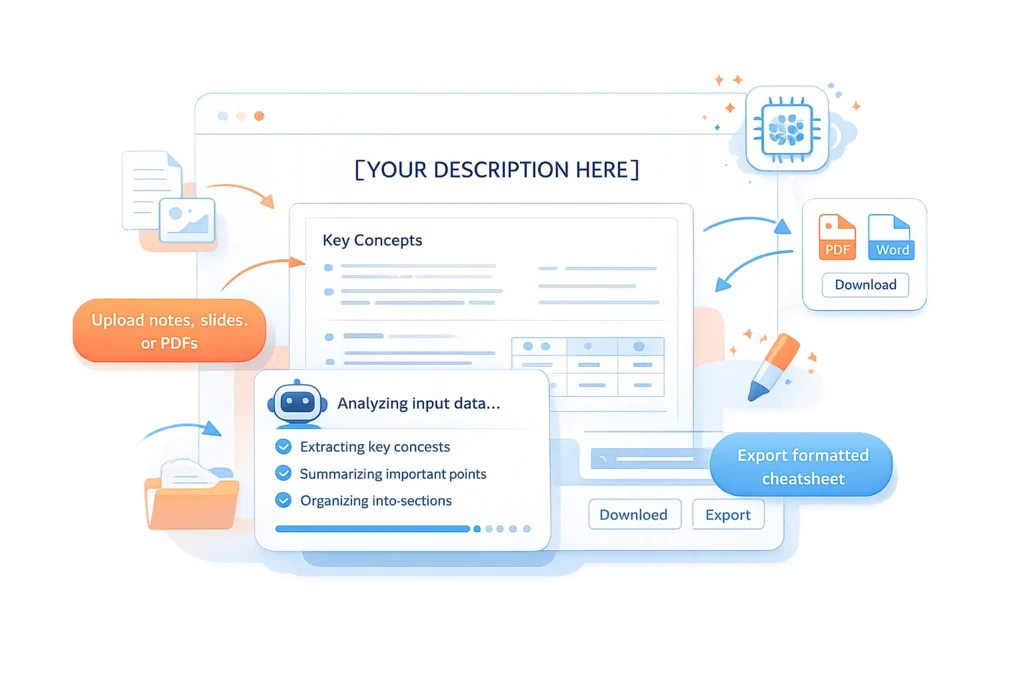
Most AI-powered cheat sheet generators follow the same basic pipeline, whether they’re a dedicated cheat sheet tool or something adjacent, like TurboLearn AI, which turns lecture recordings into structured notes:
- You provide the input. A topic name, pasted notes, an uploaded PDF, a slide deck, or sometimes a video or lecture transcript.
- The AI extracts what matters. It reads the entire source, identifies key concepts, definitions, formulas, dates, or rules, and discards filler and repetition.
- It organizes the output. Extracted points get arranged into sections, bullet points, tables, or a visual layout — built to be scanned, not read top to bottom.
- You review and export. Tweak wording, reorder sections, or adjust layout, then download as PDF or Word, or share a link.
The quality difference between tools usually comes down to one thing: how well the AI tells the difference between a fact worth keeping and a sentence that’s just padding.
Why Use a Cheatsheet Maker Instead of Writing Notes by Hand
Manually compressing forty pages of notes into one page is a real skill, but it’s slow, and it’s easy to miss the one formula or rule that actually shows up on the exam. A cheatsheet maker helps in a few specific ways:
- It saves hours, not minutes. What takes a few hours of highlighting and rewriting by hand can take under a minute with AI.
- It reduces information overload. Working from one page instead of forty forces the kind of distillation that helps you remember things, not just recognize them.
- It catches details you’d skim past. AI reads every line of a source document; tired eyes at 1 a.m. don’t.
- It keeps formatting consistent. Headings, bullets, and emphasis are applied automatically, so the page is actually readable.
None of this replaces studying. A cheat sheet is a memory aid and a fast-reference tool — the real learning still happens when you read, practice, and revisit the material.
Who Actually Uses a Cheatsheet Maker?
It’s not just students, although that’s the biggest group.
Students build formula sheets, vocabulary lists, and exam-day reference pages for any subject — math and science formulas, history timelines, language vocabulary, programming syntax — turning long lecture notes into something they can review in the ten minutes before a test.
Teachers and educators turn textbooks or curriculum standards into lesson plans and teaching aids, or hand students a clean reference sheet for a unit.
Test-takers and professionals studying for certifications — CFA, bar exam, board exams, IT certifications — compress huge prep materials into a single page they can review the morning of the test.
Professionals and knowledge workers use them differently: turning a technical doc, a meeting transcript, or a webinar into a quick reference they can pin next to their monitor instead of re-reading the source later.
Must-Have Features in a Good Cheat Sheet Maker
If you’re comparing tools, these are the features that actually matter:
- Multiple input types. PDFs, slide decks, pasted notes, a topic name, or video/transcript input.
- Accurate extraction. It should pull out formulas, definitions, and named rules specifically, not just shorten paragraphs.
- Editable output. You should be able to adjust wording, sections, and layout before exporting.
- Export options. PDF and Word export, at minimum.
- No watermarks, no signup friction. Many of the better free tools skip account creation entirely.
- Privacy and file handling. Look for tools that encrypt uploads and delete files after processing rather than storing them indefinitely.
- Reasonable length support. If you’re uploading a 200-page textbook, check the tool can actually handle that.
How to Create a Cheat Sheet With AI
- Choose your input and a tool. Start from a topic, pasted notes, or an uploaded file like a PDF or slide deck. Options worth trying include Knowt AI, NoteGPT, and Doctrina AI, depending on whether you’re working from notes, a lecture, or exam prep material.
- Let the AI generate a first draft. Usually seconds to about a minute, depending on source length.
- Review for accuracy. AI is good at extraction but not infallible — double-check formulas, dates, and anything high-stakes.
- Edit the layout. Reorder sections, bold the terms you personally tend to forget, trim what you already know cold.
- Export and use it. Download as PDF or Word, print it, or share the link with a study group.
Cheat Sheet Maker vs. Manual Note Compression
| Manual compression | AI cheat sheet maker | |
|---|---|---|
| Time required | Hours per subject | Seconds to a couple of minutes |
| Consistency | Varies by mood and energy level | Consistent structure every time |
| Risk of missing key details | Higher — easy to skip something under time pressure | Lower — AI reads the full source |
| Works from PDFs, slides, video | Only if you transcribe it yourself | Usually built in |
| Personalization | Fully personal by default | Needs a quick manual edit pass |
| Cost | Free, but costs your time | Often free, costs a few seconds of review |
The honest takeaway: AI gets you a strong first draft fast. The few minutes you spend editing it for your specific exam or use case is what makes it genuinely yours.
Best Practices for Building a Cheat Sheet That Actually Helps You Remember
A cheat sheet that looks organized isn’t the same as one that helps you recall information under pressure:
- Keep it to one page. The constraint is the point — it forces you to prioritize.
- Use visual hierarchy. Bold the terms that trip you up, not everything.
- Write it in your own words where you can. Editing the AI’s output in your own phrasing helps it stick better than reading someone else’s wording.
- Test yourself against it, don’t just read it. This is called retrieval practice, and a substantial body of cognitive science research shows it beats passive re-reading for long-term recall — see retrievalpractice.org for an accessible summary of that research if you want to go deeper.
- Update it as you learn more. A cheat sheet built three weeks before an exam should look different the day before.
A Quick Note on Why This Approach Works for Search and AI Answers Too
Google’s core ranking systems — most recently updated again in May 2026 — keep reinforcing the same standard: write content that’s genuinely useful to the person reading it, not content built around keywords. There’s no special trick to “beat” an update like that. The sites that hold up are the ones giving people direct, accurate answers to the questions they actually have.
That same principle now applies beyond classic search results. AI tools like Google’s AI Overviews, ChatGPT, and Perplexity increasingly answer questions like “what’s a good cheat sheet maker” directly, often citing pages that lead with a clear definition, answer the question early, and back up claims with specifics rather than vague marketing language. That’s why this guide leads with plain definitions and a direct how-it-works breakdown before anything else.
Frequently Asked Questions
What are the best apps to create a cheat sheet?
It depends on your source material — tools like Knowt AI and NoteGPT work well from notes or lectures, while Doctrina AI is built specifically for exam prep. Pick one that matches your input type and lets you edit the output before exporting.
How do you make an effective cheat sheet?
Keep it to one page, bold only the terms you actually forget, and write key points in your own words rather than copying the source text. Test yourself against it instead of just rereading it — that’s what actually helps it stick.
Can AI generate a cheat sheet for you?
Yes — AI tools can read a PDF, lecture, or topic and extract the key concepts, formulas, and definitions into a structured one-page draft in seconds. Just double-check it for accuracy before relying on it for an exam.
Final Thoughts
A good cheatsheet maker doesn’t replace studying — it removes the slow, manual part so you can spend your time actually learning the material instead of formatting it. Whether you’re cramming for finals, prepping for a certification exam, or making sense of a dense technical document, the right tool turns hours of compression work into a couple of minutes of review.
Ready to try it? Upload a PDF, paste your notes, or just type in a topic — your first cheat sheet is one click away.


