How to Put a Line Through Text: Full Guide

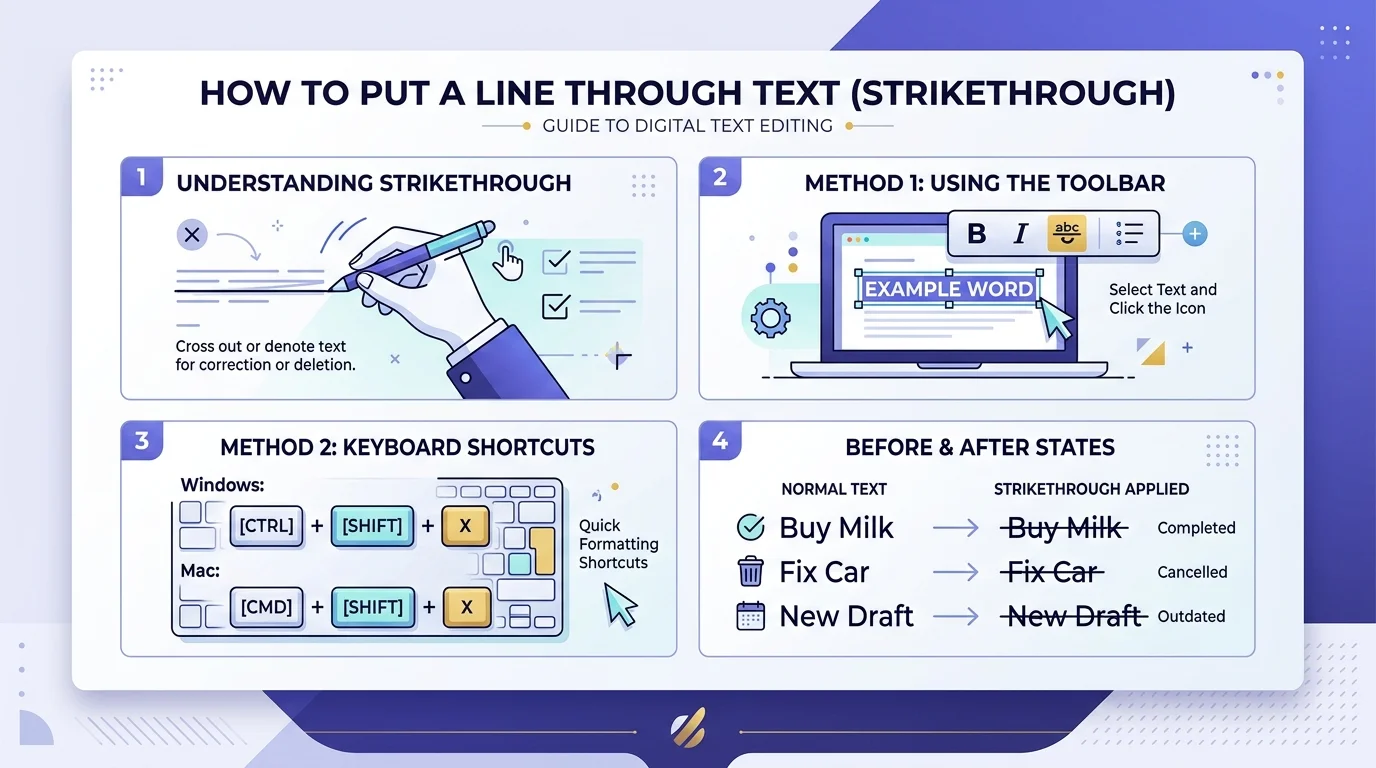
If you want to put a line through text, select it and use the strikethrough shortcut for your app — usually Ctrl/Cmd + Shift + X in Google apps, Ctrl + 5 in Excel, or the ~~text~~ syntax in Markdown. Below, I’ll walk you through every method, app by app, plus how to remove it and fix it when it doesn’t work.
I’ll be honest with you — strikethrough is one of those tiny formatting tricks nobody teaches you, but once you know it, you’ll use it constantly. Maybe you’re crossing off a finished to-do. Maybe you’re showing a discounted price. Or maybe you just want your document to look a little more human.
Whatever the reason, I’ve tested every method across every major app, so you don’t have to. Let’s get into it.
What Does “Strikethrough” Actually Mean?
Before you go clicking buttons, it helps to know what you’re actually doing — and why it matters more than you’d think.
Strikethrough — also called a line through text, crossed-out text, or struck-through text — is a horizontal line drawn across a word or sentence. It doesn’t delete anything. The text is still there, still selectable, still searchable. You’re just visually marking it as outdated, canceled, or no longer relevant.
Think of it like a pen crossing off an item on a paper list. The item’s still written down — you just know it’s done.
According to MDN Web Docs, this distinction matters even more in code, because there’s a real difference between text that’s simply outdated and text that was formally deleted — which affects accessibility and how screen readers announce it.
If you’re also curious about other text symbols people search for, I broke down the does not equal sign meaning and its history in a separate guide — worth a read if formatting quirks like this interest you.
Strikethrough Shortcuts at a Glance
Here’s the fast version — bookmark this table if you don’t want to read the whole guide.
| App | Windows | Mac | Notes |
|---|---|---|---|
| Word | Alt, H, 4 | Cmd + Shift + X | No dedicated single shortcut by default |
| Google Docs | Alt + Shift + 5 | Cmd + Shift + X | Same shortcut in Sheets and Slides |
| Excel | Ctrl + 5 | Ctrl + 5 | Doesn’t work in Excel Online |
| PowerPoint | Alt, H, 4 | Cmd + T → check box | No direct Mac shortcut |
| Gmail | Alt + Shift + 5 | Cmd + Shift + X | Same as Google Docs |
| Markdown | ~~text~~ | ~~text~~ | Requires GFM support |
Now let’s go deeper into each one.
How to Strikethrough Text in Microsoft Word
Word’s a workhorse, but it hides this feature a little.
Step-by-step method
- Select the text you want to cross out.
- Head to the Home tab.
- Click the strikethrough icon (it looks like “abc” with a line through it).
Keyboard shortcut method
On Windows, press Alt, H, then 4 — one after another, not all at once. On Mac, it’s Cmd + Shift + X.
Here’s a fun fact I didn’t expect: Word doesn’t give strikethrough its own dedicated shortcut the way it does for bold and italics, according to Smartupworld’s shortcut breakdown. Weird, right? You can fix that yourself by assigning a custom keyboard shortcut through File → Options → Customize Ribbon.
How to remove strikethrough in Word
Select the struck-through text and press Ctrl + Spacebar — this clears strikethrough along with any other manual formatting, resetting the text to default.
How to Strikethrough Text in Google Docs
If you live in Google Docs, you’re in luck — this one’s fast.
Desktop method
- Highlight your text.
- Press Alt + Shift + 5 (Windows) or Cmd + Shift + X (Mac).
That’s it. Two seconds, done.
Mobile method
Tap the “A” formatting icon, then select Strikethrough. Works the same on Android and iOS.
One thing worth mentioning: if you’re collaborating using Suggesting mode, Google Docs automatically displays deleted text with a strikethrough so your teammates can see exactly what’s being proposed. Pretty slick.
To remove it, just select the text and reapply the same shortcut — toggling it twice removes it.
How to Strikethrough Text in Excel
Excel handles this differently than Word, but it’s arguably the easiest app on this whole list.
Select your cell (or the specific text inside it), then hit Ctrl + 5. Same shortcut on Windows and Mac — no need to memorize two versions.
Prefer the dialog-box route? Press Ctrl + 1 to open Format Cells, click over to the Font tab, and check the Strikethrough box.
Quick heads-up: per Smartupworld’s testing, Excel Online doesn’t support the Ctrl+5 shortcut at all — you’ll need to go through the Format Cells menu manually there.
How to Strikethrough Text in HTML and CSS
Now it gets a little more technical — but stick with me, because getting this right actually matters for SEO and accessibility.
You’ve got three options, per W3docs:
1. The <del> tag
Use this when content was literally deleted or removed — revision histories, price changes, edited documents.
html
<del>$120</del> Now only $85!2. The <s> tag
Use this when something is no longer accurate or relevant, but you still want it visible for context, as MDN explains.
html
<s>Support for Internet Explorer 11 continues.</s>3. CSS text-decoration: line-through
Use this when the line is purely visual and carries no semantic meaning.
css
.struck { text-decoration: line-through; }Avoid the old <strike> tag — it’s officially obsolete in HTML5, and using it can trigger validation errors and hurt accessibility, since screen readers won’t announce it as meaningfully as <del>.
How to Strikethrough Text in Markdown
If you write in Markdown — for a blog, README file, or note-taking app — this one’s refreshingly simple.
Wrap your text in double tildes:
~~this text is struck through~~That renders as this text is struck through.
Here’s a gotcha that trips people up constantly: per Guidest’s Markdown guide, this syntax is part of GitHub Flavored Markdown (GFM), not the original CommonMark spec. Older or stricter Markdown parsers won’t render it.
If that happens, swap in the <del> tag instead — a reliable fallback that works almost everywhere. And if you’re working with AI writing tools that sometimes mangle formatting like this, my guide to humanizing AI text covers a few tools worth checking out.
Strikethrough in Notion, Slack, and Other Apps
You’ll find the same basic pattern almost everywhere:
- Notion: Select text, press Cmd/Ctrl + Shift + S, or use
~~text~~inline. - Slack: Wrap your message in single tildes:
~text~. - Gmail: Highlight text, press Alt + Shift + 5 (Windows) or Cmd + Shift + X (Mac).
- PowerPoint: On Windows, Alt, H, 4. On Mac, there’s no direct shortcut — press Cmd + T to open the Font dialog and check the box manually.
Troubleshooting: When Strikethrough Won’t Work
If your shortcut isn’t doing anything, run through this checklist:
- Make sure text is actually selected — most shortcuts do nothing on an empty cursor.
- Check for shortcut conflicts — antivirus tools, screen readers, or browser extensions sometimes hijack combinations like Ctrl+Shift+X.
- Try the menu-based method instead — Format Cells in Excel, or the Font dialog in Word (Ctrl + D).
- Restart the app — a stuck formatting toolbar is a surprisingly common, boring cause of shortcuts failing silently.
FAQ: Quick Answers About Strikethrough
How do I put a line through text in Word?
Select the text and press Alt, H, 4 (Windows) or Cmd + Shift + X (Mac), or click the strikethrough button on the Home tab.
What’s the fastest way to strikethrough in Google Docs?
Highlight the text and press Alt + Shift + 5 (Windows) or Cmd + Shift + X (Mac).
Does strikethrough delete the text?
No. It’s formatting only — the text stays visible, searchable, and copyable unless you separately delete it.
Which HTML tag should I use for strikethrough?
Use <del> for removed content, <s> for outdated-but-relevant content, and CSS text-decoration: line-through for purely visual styling. Avoid the obsolete <strike> tag.
Why doesn’t my strikethrough shortcut work?
Usually a text-selection issue or a conflicting shortcut from another app. Try the menu-based method as a fallback.
Wrapping Up: Which Method Should You Use?
At the end of the day, strikethrough is a small feature that says a lot when used right. If you’re working in Word, Docs, or Excel, the keyboard shortcut is always your fastest bet. If you’re coding, pick your HTML tag based on meaning, not just looks — that’s what actually helps your accessibility and SEO.
So next time you need to put a line through text, you won’t have to Google it again — you’ll already know exactly which method fits what you’re doing.