Does Not Equal Sign (≠): Meaning, History & Uses

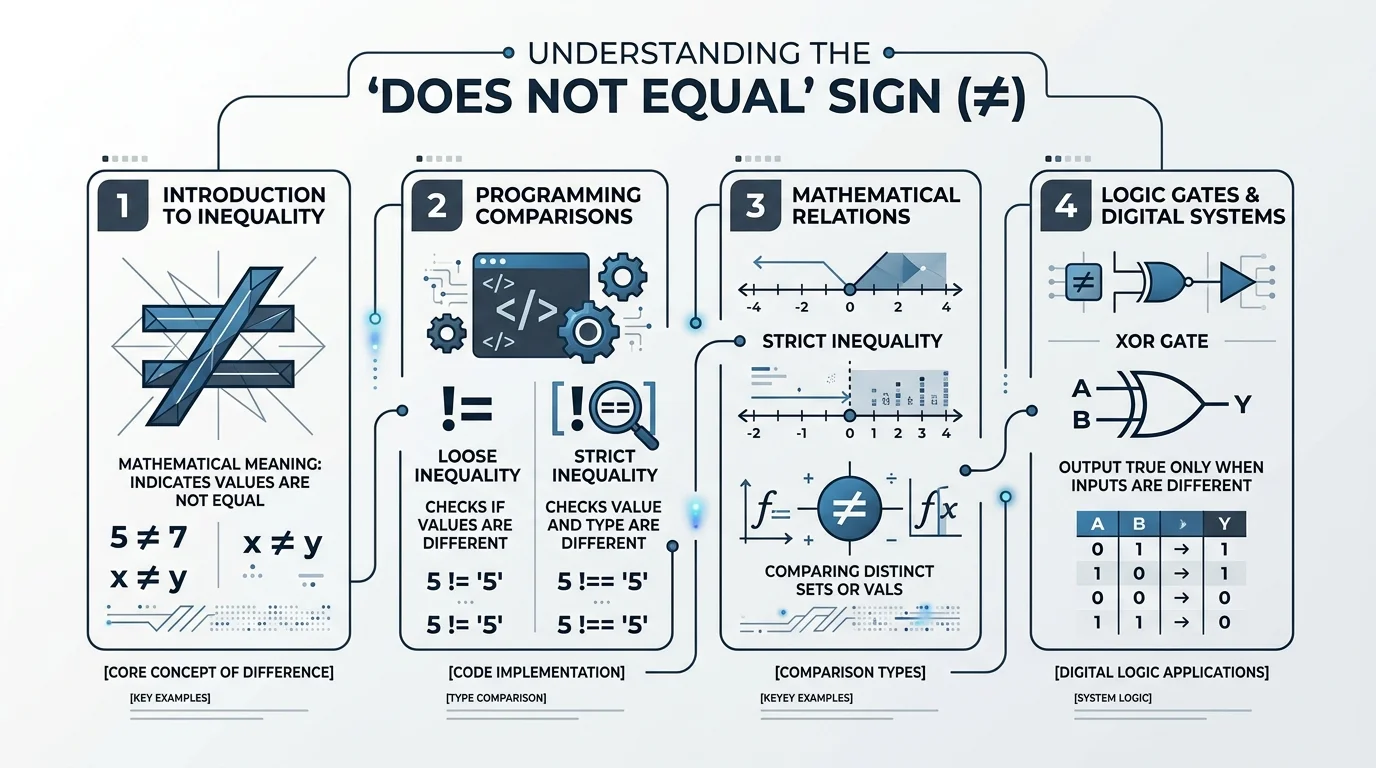
The does not equal sign (≠) means two values, numbers, or expressions are different. It’s the direct opposite of the equals sign (=), and you’ll see it everywhere from basic math class to programming code, where it’s typically written as != or <> since most keyboards don’t have a dedicated ≠ key.
That’s the short version. Now let’s go deep.
Because once you understand the not equal to symbol — its history, its Unicode code, how to type it, and how it works across programming languages — you’ll never have to google “how to type ≠” again.
Let’s dive in.
What Is the Does Not Equal Sign, Really?
Quick gut-check before we go further: the ≠ symbol simply means two things are not the same.
That’s the whole concept.
Visually, it’s the standard equals sign (=) with a diagonal slash through it — a clean, universal way of saying “these values are distinct.” You’ll bump into it in math class, in logic puzzles, and (if you’re a developer like me) constantly in your code editor.
Here’s a simple example:
- 5 ≠ 3 → “five is not equal to three”
- x ≠ y → “x does not equal y”
A (Surprisingly Cool) History of the Equals Sign
I’ll admit — I did not expect to find myself geeking out over 16th-century math notation. But here we are.
Before symbols existed, mathematicians just… wrote it out in words. People used terms like aequales, gleich, or faciunt to express equality, because there was no shared symbol for it yet. Imagine writing an entire equation using full sentences. Exhausting.
Then, in 1557, everything changed.
A Welsh mathematician named Robert Recorde invented the equals sign (=) in his book The Whetstone of Witte, reportedly because he was tired of repeating the phrase “is equal to” over and over. (Honestly? Relatable.)
And get this — one of the earliest known equality notations actually dates back to Diophantus’s Arithmetica around AD 250, where he used a shortened form of the Greek word for “equals.”
So the concept is ancient. The symbol itself is a Renaissance invention. The “not equal” version came along much later to formalize an idea people had been expressing informally for centuries.
The Not Equal Symbol in the Unicode World
Here’s where it gets a little technical, but stick with me — this part is genuinely useful.
The not equal to symbol has an official home in the Unicode standard, which acts as the universal library of every character your computer can display.
- Unicode code point: U+2260
- Official name: NOT EQUAL TO
- Category: Sits in the “Relations” subblock of the Mathematical Operators block
- Approved: As part of Unicode version 1.1, back in 1993
Screen readers even have their own shorthand for it. Accessibility tools like CLDR label it simply as “not equal,” with search tags like equal, inequality, inequation, and not.
How to Type the Does Not Equal Sign (Step-by-Step)
This is the part everyone actually searches for. So let’s make it dead simple.
On Windows
- Make sure Num Lock is on.
- Hold Alt.
- Type 8800 on your numeric keypad.
- Release Alt — boom, ≠ appears.
If you’re working in Microsoft Word specifically, there’s an even faster trick: type 2260, then hit Alt + X, and Word will auto-convert it into the ≠ symbol for you.
On Mac
Just press Option + = and the ≠ symbol appears instantly. Works across Pages, Keynote, Notes — basically everywhere.
On the Web (HTML)
Use ≠ or ≠ in your HTML, and both will render the ≠ symbol correctly in any browser.
In LaTeX
Use the \neq command, or alternatively \not= to achieve the same result.
Quick Reference: Shortcuts by Platform
| Platform / App | Shortcut |
|---|---|
| Windows (general) | Alt + 8800 |
| Microsoft Word | 2260, then Alt + X |
| Mac (any app) | Option + = |
| HTML | ≠ or ≠ |
| LaTeX | \neq or \not= |
| Excel / Google Sheets | See formula section below |
The “Not Equal” Operator in Programming
Since most keyboards don’t have a dedicated ≠ key, programming languages needed an ASCII-friendly workaround. That’s where the not equal operator comes in.
Python
In Python, != is the standard not equal operator, used in both Python 2 and Python 3. There used to be an alternative, <>, but it’s deprecated in modern Python — so stick with !=.
python
x = 10
y = 20
print(x != y)  # Output: True
JavaScript
The loose inequality operator (!=) checks whether two values are different, regardless of their data type. The strict inequality operator (!==), on the other hand, does not attempt type coercion — it returns false only when values (and types) match exactly.
javascript
console.log(10 != '10');   // false (loose comparison)
console.log(10 !== '10');  // true (strict comparison)
Pro tip: always default to !== in JavaScript unless you have a specific reason not to. It saves you from confusing bugs down the road.
SQL, Pascal, and BASIC
Languages like Pascal, SQL, and BASIC often use the <> notation instead of !=, since it more closely mirrors traditional mathematical inequality.
Haskell
Haskell breaks from the != convention entirely and uses /= for “not equal,” which visually echoes the mathematical ≠ symbol much more closely than the C-style != does.
Excel, Google Sheets, and R (the gap most guides skip)
If you work in spreadsheets or data analysis, you’ll hit “not equal” constantly — and the syntax is different from what you’d expect:
- Excel & Google Sheets: Use
<>— for example,=IF(A1<>B1, "Different", "Same") - R: Use
!=— for example,x != y - SQL (most dialects): Both
<>and!=typically work, though<>is the ANSI SQL standard
If you’re building spreadsheet-heavy workflows and want an AI to generate these formulas for you automatically, it’s worth browsing AI-powered Excel formula tools — several listed there can turn a plain-English request straight into a working <> comparison formula, so you don’t have to remember the syntax at all. One good example is Formulaizer, an AI Excel formula generator that handles exactly this kind of comparison logic.
Full Comparison Table
| Language / Tool | Not Equal Operator |
|---|---|
| Python | != |
| JavaScript (loose) | != |
| JavaScript (strict) | !== |
| SQL (ANSI standard) | <> |
| Pascal / BASIC | <> |
| Excel / Google Sheets | <> |
| R | != |
| Haskell | /= |
| C / C++ / Java | != |
Related Symbols You Should Know
While we’re here, it’s worth quickly covering the ≠ symbol’s close cousins:
- ≈ — almost equal to
- ≡ — identical to (used heavily in logic and modular arithmetic)
- ≤ — less than or equal to, defined in Unicode at code point U+2264 since ASCII never included a native character for it
Frequently Asked Questions
What does ≠ mean in math?
It means two values are not equal — the opposite of =. For example, 5 ≠ 3 means five is not equal to three.
Is != the same as ≠?
Yes. != is the ASCII-keyboard-friendly version of ≠, used across most programming languages and some spreadsheet tools.
How do I type ≠ on a Mac?
Press Option + = and the symbol appears instantly in any app.
How do I type ≠ on Windows?
Hold Alt and type 8800 on your numeric keypad. In Microsoft Word, type 2260 and press Alt + X instead.
What’s the HTML code for ≠?
Use either ≠ or ≠ — both render correctly in every modern browser.
Does Excel use != or <> for “not equal”?
Excel and Google Sheets use <>, not !=. For example: =IF(A1<>B1, "Different", "Same").
When was the not equal symbol officially standardized?
It was approved as part of Unicode version 1.1 in 1993, though the equals sign it’s based on dates back to 1557.
Wrapping This Up
So there you have it — the full story behind a symbol most of us use without a second thought.
From a 16th-century math book to a Unicode code point to a programming operator you type dozens of times a day, the does not equal sign carries way more history than its tiny footprint suggests.
If you take one thing away from this: next time you type != or <> in your code, you’re channeling something that traces back over 400 years.
Got questions about a specific language’s inequality operator? Drop them in the comments — happy to dig in further.
Read Also: How to Put a Line Through Text: Full Guide