How to Track Flights in Real Time: Step-by-Step (2026)

Quick answer: To track a flight, enter its flight number and date into a tracker such as FlightAware or Flightradar24. Check the live position and status, then turn on alerts. Confirm gate changes and cancellations with the airline, because trackers can lag behind official systems.
Want to know how to track flights without refreshing an airline page every two minutes?
You can do it in under a minute once you know where the data comes from.
In this guide, I’ll walk you through the tools, the exact steps and the mistakes that trip people up. Let’s get into it.
Why Learning How to Track Flights Pays Off
Knowing how to track flights saves you time and stress. You can spot a flight delay before the airline announces it, time an airport pickup to the minute, and judge whether a tight connection is realistic. It’s a small skill with a big payoff, especially during holidays and storm season. I’ll also show you what a tracker can’t tell you, so you don’t expect more than it delivers.
Most people start because someone they love is in the air. Fair enough.
Business travelers watch delays to protect meetings. Parents check the estimated time of arrival (ETA) so a kid isn’t left at the curb. Plane spotters just enjoy the show.
One honest limit: a tracker shows the aircraft, not the people inside it. You’ll see route, altitude, speed and status, but never passengers.
How Flight Tracking Works Behind the Scenes
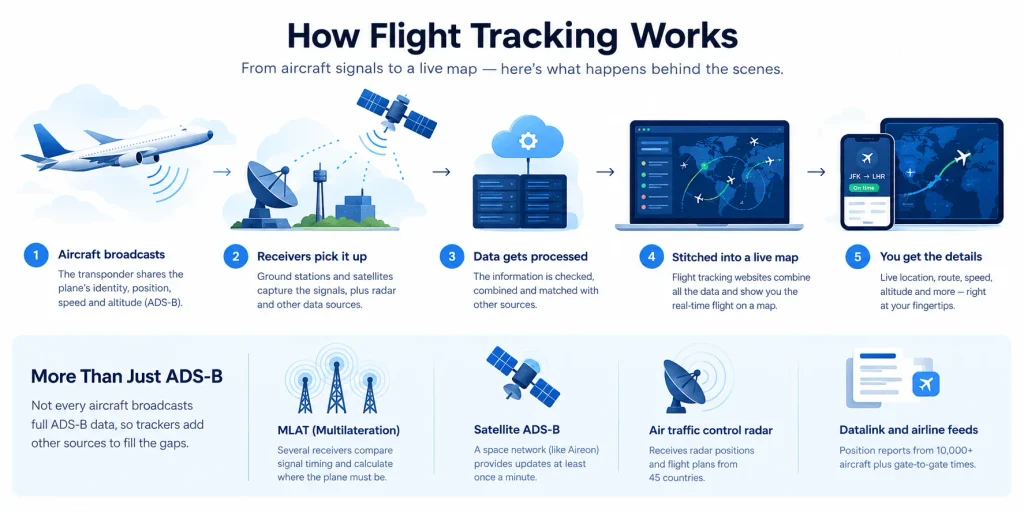
Before the steps, let me show you the machinery, because it explains why a plane sometimes “disappears” over an ocean. Aircraft broadcast their position, receivers on the ground and in space pick it up, and websites stitch everything onto a live flight tracker map. Understanding this makes every status screen easier to read. It’s simpler than it sounds, I promise.
ADS-B: The Signal Behind Almost Every Tracker
ADS-B (Automatic Dependent Surveillance-Broadcast) is the star of the show. The aircraft’s transponder shares its identity, position, speed and altitude, and anyone with a receiver can listen. That’s why trackers can show so much detail for free, and why the signal is so widespread across the world’s airspace today.
Flightradar24 describes ADS-B as its primary tracking technology, collected by more than 50,000 receivers on seven continents and in space.
Why so common? Regulation. As of January 1, 2020, FAA rules require ADS-B Out in most controlled airspace.
MLAT, Satellites and Radar Fill the Gaps
Not every aircraft broadcasts full ADS-B data, so trackers add other sources to cover the holes. Some older planes only send Mode S signals. Others fly where ground receivers can’t reach. Combining several feeds gives you a more complete picture, and it also explains why two apps can show slightly different results for the same flight.
Here’s how each source works:
- Multilateration (MLAT): several receivers compare signal timing and calculate where the plane must be.
- Satellite ADS-B: FlightAware fuses Aireon’s space network for updates at least once a minute.
- Air traffic control radar: FlightAware receives radar positions and flight plans from 45 countries.
- Datalink and airline feeds: position reports from 10,000+ aircraft plus gate-to-gate times.
Prefer the short version? Small differences between apps are normal. When two sources agree, relax. When they don’t, check the airline.
How to Track Flights Step by Step
This is the part you came for. You only need about two minutes and one detail from your booking. Follow these steps in order and you’ll have real-time flight tracking running before your coffee cools. I’ve also added a few shortcuts I’d want anyone to know. Each step is short, so you can skim, act and move on.
Step 1: Grab the Right Identifier and Pick a Tracker
Start with the flight number on your ticket, such as BA288 or UA902. Then choose a flight tracking app or website. If you don’t have the number, most tools let you search by route or airport instead. For one specific aircraft, you’ll need its aircraft registration (tail number). We’ll cover that case in a moment.
Here’s my quick take on the main options:
- Flightradar24: great for a live global map.
- FlightAware: strong on status, history and delay detail.
- Plane Finder: a clean alternative if you find the others busy.
- The airline’s app: the best word on gates and cancellations.
Step 2: Track a Flight by Flight Number and Read the Status
Type the flight number into the search bar and hit enter. Then check the date. Seriously. Daily flights share the same number, so a wrong date gives you a wrong answer. You’ll see position, altitude, speed and estimated arrival, plus the flight status, which is where people get confused.
OAG’s flight status definitions clear it up:
- Scheduled: the carrier has the flight on the timetable.
- OutGate: the aircraft left the gate (chocks off).
- InAir: wheels up, so it’s airborne.
- Landed: wheels down.
- InGate: it’s at the arrival gate (chocks on).
- Canceled or Diverted: the plan changed.
Here’s a detail most people miss. “Landed” doesn’t mean your passenger is at the curb yet. Taxiing, parking and baggage claim still take time.
Step 3: Set Up Alerts and Cross-Check
Don’t just stare at the screen. Let the app tap you on the shoulder. Most trackers and airline apps send push, email or SMS notifications when a flight’s status changes, so turn them on for departure, gate changes and arrival.
Once the trip is over and the pings get noisy, here’s how to turn off notifications so you aren’t buzzed for a flight you’ve already finished.
Alerts only reach you with a signal, so check your carrier’s coverage map for the airport or your destination. This one applies mainly to T-Mobile users.
Then cross-check anything big with the airline before you act, because trackers can lag behind official systems.
Best Flight Trackers Compared
Choosing a tracker comes down to what you need: a live map, delay detail or official status. The table below compares the main options using each operator’s own published information. Use it to pick one quickly, then keep the airline’s app as your backup. I’ve kept the table short on purpose, so you can scan it in seconds.
| Tool | Best for | What feeds it |
|---|---|---|
| Flightradar24 | Live global map | ADS-B from 50,000+ receivers, MLAT, satellite, radar (North America and Australia) |
| FlightAware | Status, delays, history | 41,000+ ADS-B receivers, radar from 45 countries, 10,000+ datalink aircraft |
| Plane Finder | Simpler map layout | ADS-B, MLAT, FAA feed for North America |
| FAA NAS Status | US ground stops and closures | FAA air traffic data |
| Airline app | Gates, cancellations, rebooking | The airline’s own operations data |
Both Flightradar24 and FlightAware offer a free website and app. FlightAware also sells premium subscriptions with unlimited alerts.
How to Track Flights by Tail Number
Let me save you some frustration. Searching by tail number feels like it should always work, but airlines operate under their flight numbers, not registrations. A tail search for an airliner can come up empty. Once you know that, the quirk makes sense. Here’s when a tail number is the right tool, and how to get around the problem.
If you want to track a flight by tail number, it works best for private jets, cargo and general aviation. It’s also handy for an aircraft’s recent history.
For airliners, try this instead. Look up the flight first. Then use the registration the tracker shows to view that plane’s recent trips. FlightAware users describe the same quirk on its public forum.
Here’s a sneaky tip. Airlines often fly one aircraft on several flights a day. So your plane’s earlier delay can quietly become your delay. Check where your aircraft is coming from.
Using Official Sources for Delays
Trackers are brilliant, but official sources often give you the cause of a delay, not just the symptom. That context helps you decide whether to rebook or wait. I check two places whenever weather or air traffic looks messy. Together with a tracker, they give you a mini control room in your pocket without much effort.
For US flights, visit the FAA’s National Airspace System status page. It lists ground stops, ground delay programs and airport closures. If your departure airport has a ground stop, you now know it’s bigger than your airline.
Then check the airline’s app, which owns the truth on cancellations and rebooking. The airport’s arrivals board covers local details like gate and baggage belt.
Why Your Flight Might Vanish From the Map
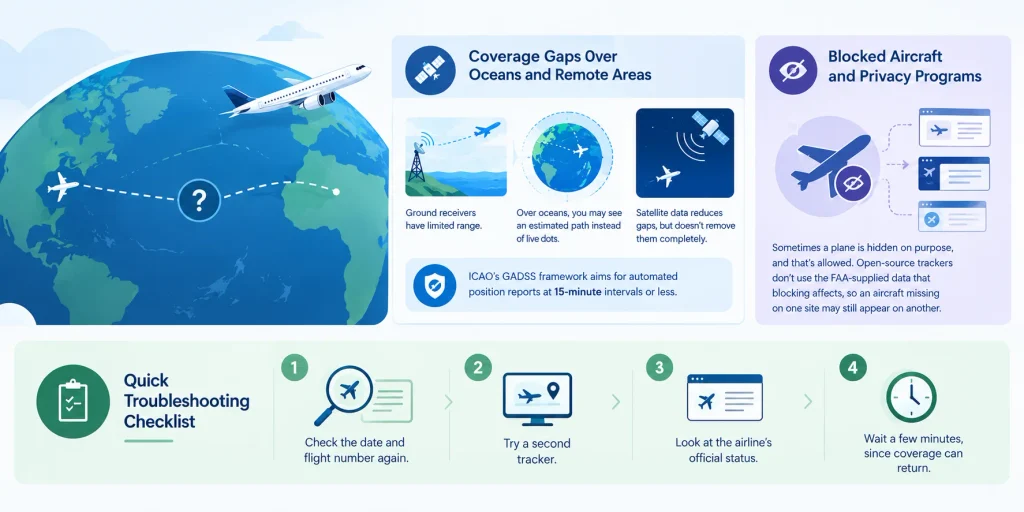
Panic moment: the plane icon stops moving or disappears. Take a breath. Usually the aircraft is fine and the data is the problem, because trackers rely on receivers and receivers have limits. This matters most on long-haul trips over water. Here’s what’s typically happening and what you should do about it before you worry.
Coverage Gaps Over Oceans and Remote Areas
Ground receivers only reach so far, so over oceans you may see an estimated path instead of live dots. FlightAware’s FAQ lists entering a coverage gap as one reason in-flight data stops. Satellite data shrinks those gaps but doesn’t erase every one, so short silences are normal.
ICAO’s GADSS framework aims for automated position reports at 15-minute intervals or less.
Blocked Aircraft and Privacy Programs
Sometimes a plane is hidden on purpose, and that’s allowed. The FAA runs a Privacy ICAO Address program, and Plane Finder says it reviews requests to block aircraft. The Points Guy reports that open-source trackers don’t use the FAA-supplied data that blocking affects. So an aircraft missing on one site may still appear on another.
Quick Troubleshooting Checklist
- Check the date and flight number again.
- Try a second tracker.
- Look at the airline’s official status.
- Wait a few minutes, since coverage can return.
Tips to Get More From Your Flight Tracker
You’ve got the basics. Now a few small habits turn a casual tracker into a real planning tool. They take seconds, but they help you avoid long waits and missed connections. Pick the ones that fit your trip and ignore the rest. Here’s what I’d do, in order of how much it helps.
Track early, not just in the air. Many apps let you save a flight ahead of time, and the inbound aircraft’s status often tells you more than the departure board. If that plane hasn’t left its previous city, your on-time status is shakier than it looks.
Cross-check before you act. Never rely on one screen for a big decision.
Take a screenshot of any delay or gate-change status, so you have proof when you talk to the airline. Here’s how to screenshot on Windows if you’re tracking from a laptop.
Want more depth on the data? Flightradar24’s own explainer shows how it blends its sources.
Common Mistakes When You Track a Flight
I’d rather you skip the headaches. A few tiny errors cause most of the confusion people have with trackers, and they’re easy to avoid once you know them. Skim this list before your next trip and you’ll sidestep the problems that catch even experienced travelers. Here are the big five.
- Searching the wrong date. Same flight number, different day, totally different result.
- Trusting “landed” too much. Landing isn’t the same as arriving at the gate.
- Using a tail number for an airliner. Use the flight number first.
- Ignoring time zones. Check whether times are local.
- Relying on a single source. Cross-check big decisions.
Flight Tracking FAQ
How do I track a flight in real time?
Enter the flight number and date into a tracker like FlightAware or Flightradar24. You’ll see live position, altitude, speed and status on a map. Turn on alerts so the app notifies you when the status changes.
Can I track a flight for free?
Yes. Flightradar24 and FlightAware both offer a free website and app. Paid plans add extras, such as FlightAware’s premium subscriptions with unlimited alerts, but the free versions cover basic tracking.
Can I track a flight by tail number?
Sometimes. It works well for private and general aviation aircraft. Airliners fly under flight numbers, so look up the flight first, then use the registration it shows.
Why did my flight disappear from the tracker?
Usually the plane left receiver coverage, often over an ocean or remote area. Check the date, try a second tracker and confirm with the airline.
Can I see who is on a flight?
No. Trackers show the aircraft’s route, status and position, not passengers or crew.
How do I track someone else’s flight?
Ask them for the flight number and date, then search it in any tracker. You can follow the flight and its ETA, but not the person.
Final Thoughts on How to Track Flights
So, that’s the full picture of how to track flights with confidence.
Start with the flight number. Open a reliable flight tracker. Read the status carefully, set alerts and cross-check with the airline when it counts.
Do that, and you’ll rarely be caught off guard again.
Now it’s your turn. Pick a flight, open a tracker and watch it move. Once you see it live, it all clicks.