What Is a Vector Image? The Complete Guide (2026)

A vector image is a digital graphic built from mathematical formulas — points, lines, and curves — instead of pixels. Unlike a photograph, it can be scaled to any size, from a phone icon to a billboard, without losing sharpness or clarity. This guide breaks down how vector images work, how they differ from raster images, which file formats to use, and how to create one step by step.
Have you ever zoomed into a logo on your phone and noticed it stayed perfectly crisp? That’s not magic — that’s a vector image doing exactly what it was built to do. Let’s dig in.
What Is a Vector Image, Exactly?
A vector image doesn’t store a picture of a shape — it stores the instructions for that shape, like “draw a curve from point A to point B” and “fill this path with blue.” That’s a big deal, because math doesn’t degrade. A circle described by an equation is still a perfect circle whether it’s the size of a coin or the size of a wall.
This is why vector graphics are the backbone of logo design, icon design, and brand identity graphics — a company logo needs to look identical on a tiny app icon and a massive trade-show banner, and only vector can pull that off cleanly.
I like to think of vectors as recipes, not photographs. A photo captures one frozen moment. A recipe can be “cooked” at any scale — one serving or a hundred — and still comes out right.
The Building Blocks of a Vector Graphic
Here’s what actually makes up a vector illustration:
- Points (anchor points) — the “pins” that define where a shape starts, bends, or ends
- Paths — the lines or curves connecting those points
- Bezier curves — the mathematical curve type used to create smooth, organic shapes
- Fills and strokes — the color and outline applied to a closed path
Once you start thinking in points and paths instead of pixels, the whole concept clicks.
Vector vs. Raster: What’s Actually the Difference?
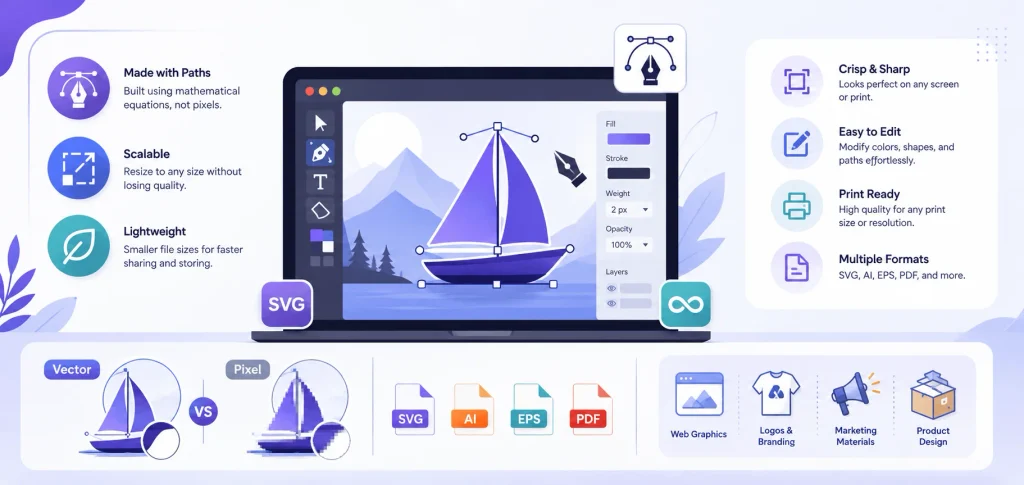
The core difference: raster images are made of pixels, while vector images are made of paths. A raster image — also called a bitmap image — is a fixed grid of colored dots, like your phone photos or a JPEG. Zoom in far enough and you’ll see the individual squares; that blurry, blocky look is called pixelation, and it’s raster’s biggest weakness.
Vector images sidestep that problem entirely. Because they’re rebuilt from math every time you resize them, there’s no pixel grid to run out of — this is what’s known as resolution independence.
Vector vs. Raster: Side-by-Side Comparison
| Feature | Vector Image | Raster Image |
|---|---|---|
| Built from | Points, paths, math formulas | Pixels (grid of colored dots) |
| Scalability | Infinite, no quality loss | Limited — pixelates when enlarged |
| Typical file size | Small | Large, grows with resolution |
| Best for | Logos, icons, typography, line art | Photos, paintings, scanned images |
| Common formats | SVG, AI, EPS, PDF, DXF | JPG, PNG, GIF, TIFF |
| Editability | Each shape edited independently | Pixel-by-pixel editing only |
According to a GeeksforGeeks breakdown of the two formats, a 640×480 raster image needs data stored for 307,200 individual pixels — while a 3072×2048 image from a 6.3-megapixel camera needs over 6.29 million pixels stored. Vector files skip that entirely, since they only store shape instructions rather than pixel-by-pixel data — which is exactly why they tend to load faster on a website.
Quick gut-check test: enlarge the image. Stayed sharp? Probably vector. Got fuzzy or blocky? Raster.
When Should You Use Vector Images? (And When Should You Not?)
Use vector when you need:
- Logos
- Icons
- Typography and lettering
- Infographic design elements
- Line art and illustrations
- Anything scaling from a business card to a billboard
If a logo is on your list, tools like Looka’s AI logo maker can generate vector-ready logo files automatically if you want an AI-assisted starting point.
Use raster when you need:
- Photographs
- Digital paintings
- Scanned documents
- Anything with soft gradients, complex shadows, or photorealistic texture
It’s not “vector vs. raster” like rivals — they’re two tools in the same toolbox. Vector nails clean shapes and flat colors but struggles with photorealistic blending. Raster nails realism but falls apart when scaled up. Know the job, pick the tool.
Common Vector File Formats You’ll Actually Run Into
SVG (Scalable Vector Graphics)
SVG files are built specifically for the web. They’re XML-based — written in readable text code rather than binary data — which means developers can style them with CSS, animate them with JavaScript, and every modern browser renders them natively. If you’re designing icons, logos, or illustrations for a website, SVG is your default choice.
AI (Adobe Illustrator)
The AI file format is native to Adobe Illustrator and usually your “source” file — the master copy with every layer and editable object intact. You’ll typically export to SVG or PDF once the design is finalized.
EPS (Encapsulated PostScript)
EPS is one of the oldest vector formats still in use, mainly in professional printing workflows. Worth noting: Apple deprecated system-level EPS support starting with macOS 14 Sonoma, so it’s steadily being phased out in favor of PDF.
PDF (Portable Document Format)
PDF files can actually be either vector or raster, depending on how they were created. Most PDFs exported from design software like Illustrator are vector, and PDF is often considered the safest format for sharing design work with clients or printers since it preserves fonts, layers, and color profiles.
DXF
DXF files are mostly used in CAD and CNC workflows — laser cutting, engraving, and similar production processes.
Vector Format Cheat Sheet
| Format | Best For | Editable? |
|---|---|---|
| SVG | Websites, apps, icons | Yes (code-based) |
| AI | Master/source design file | Yes (full layers) |
| EPS | Legacy print workflows | Limited |
| Sharing with clients/printers | Depends on source | |
| DXF | CNC and laser cutting | Yes (in CAD software) |
How to Create a Vector Image (Step-by-Step)
Step 1: Choose your software. Popular options include Adobe Illustrator, Affinity Designer, and the free open-source tool Inkscape.
If you’re looking for logo-specific tools rather than general vector software, our best logo makers guide breaks down the top options for 2026.
Step 2: Start with basic shapes. Build your design using simple paths — circles, rectangles, and lines — rather than freehanding everything.
Step 3: Use the pen tool for custom curves. This is where anchor points and Bezier curves come in — click to place a point, drag to shape the curve.
Step 4: Apply fills and strokes. Add color to your shapes and adjust outline thickness as needed.
Step 5: Export in the right format. Save as SVG for web use, or EPS/PDF/AI for print, depending on where the graphic is headed.
Step 6 (optional): Convert an existing raster image. If you’re starting from a photo or scanned sketch, you can use image tracing — also called vectorization — to convert raster artwork into vector paths. Highly detailed images like photos rarely convert cleanly, so this works best on simple logos and line art. Before you try it, it’s worth skimming our guide on vectorizing mistakes to avoid — it covers the most common ways this process goes wrong.
Common Mistakes to Avoid
- Trying to vectorize a photograph. It almost never looks good — vectors aren’t built for photorealism.
- Using PNG when you meant SVG. PNG is raster, not vector — it supports transparency but still pixelates when scaled up.
- Forgetting to check export settings. Some “PDFs” are actually rasterized, which defeats the purpose.
- Ignoring file compatibility. Not every platform supports every vector format — always confirm before sending files to a printer or developer.
Frequently Asked Questions
Is a PNG a vector image?
No. PNG is a raster format made of pixels, even though it supports transparent backgrounds. It pixelates when scaled up too far, unlike a true vector file.
Is a PDF vector or raster?
It depends on how the PDF was created. Most PDFs exported from design software like Illustrator are vector, but a PDF can also contain rasterized content.
Can I convert a photo into a vector image?
Technically yes, using image tracing software, but results are usually rough. Vectorization works best on simple graphics like logos, not detailed photographs.
What’s the best vector format for a website?
SVG. It’s lightweight, scales perfectly on any screen, and can be styled or animated with code.
Do vector images lose quality when resized?
No. Since vector graphics are rebuilt from mathematical formulas every time they’re resized, there’s no pixelation regardless of scale.
Is Adobe Illustrator the only way to make vector images?
No. Illustrator is popular, but tools like Affinity Designer, CorelDRAW, and the free open-source Inkscape can all create vector graphics too.
What’s the difference between EPS and SVG?
EPS is an older format built for print workflows, while SVG is a modern, code-based format built for the web. As of 2026, SVG is the more actively supported and widely recommended choice for digital use.
Wrapping It Up
A vector image is a graphic built from math, not pixels — which is exactly why it scales to any size without losing quality. If you’re designing a logo, icon, or anything that needs to look sharp everywhere from a phone screen to a billboard, vector is the way to go. Save raster formats for photos and anything with rich, photorealistic detail.
Now you know the difference, the formats, and exactly when to use each one. Go build something sharp.