What it actually takes to run your own AI model in 2026

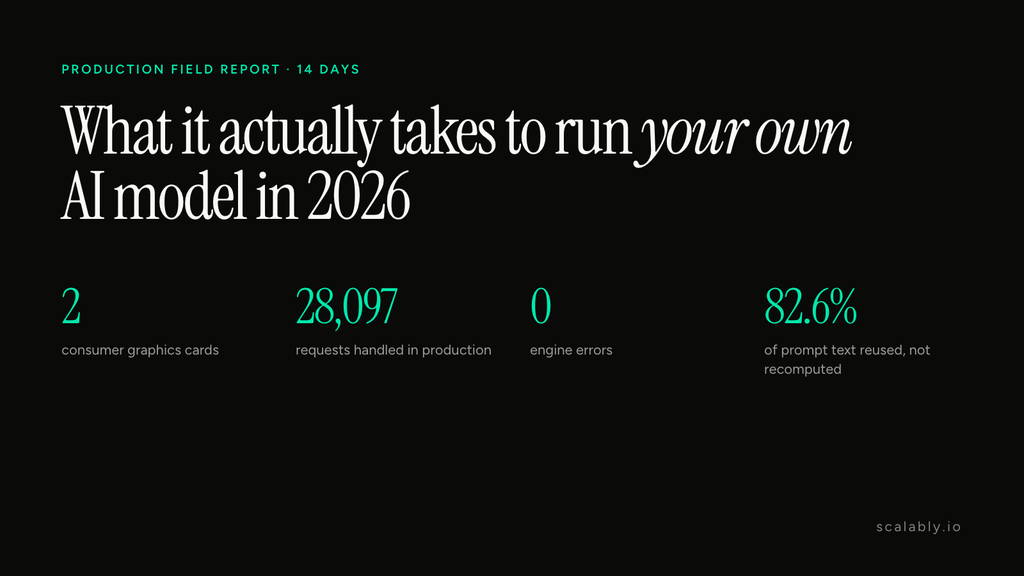
Quick verdict: You can now run a capable AI model on two high-end gaming graphics cards and have it do real work for a business. I ran one in production for 14 days: 28,097 requests and not one engine error. But the hardware is the easy part. Most of the work is tuning, guardrails and knowing which jobs to give it. If your tasks are repetitive and your prompts repeat, it pays off. If you need the smartest possible answer every time, keep paying for a frontier model.
I run Scalably, a small company that builds and operates an AI workforce for businesses: agents that run tasks, draft documents and read paperwork. Much of that runs on frontier models from the big labs. In late August I moved part of the work onto a machine we own. This is what that looked like from the inside, written for people deciding whether to try the same thing.
The setup, in plain words
Three pieces had to fit together.
- The model: Qwen3.8-27B, an open model from the Qwen team. “27B” means 27 billion parameters. That’s mid-sized: far smaller than the frontier models, but good enough to call tools, write drafts and read documents.
- A compressed version of it: Unsloth, a team that publishes optimized model files, released a version that stores the big layers in 4-bit numbers and keeps the sensitive parts at 8 or 16 bits. NVIDIA puts the saving of its 4-bit format at roughly 3.5 times less memory than 16-bit, which is what lets it fit on consumer cards.
- The software that serves it: vLLM, an open-source engine that takes requests, schedules them on the graphics cards and sends answers back.
The hardware is two NVIDIA GeForce RTX 5090s, the top consumer cards of this generation, in a normal desktop with 128 GB of memory. With one card you can still run the model, but only with a short memory of the conversation (32,768 tokens). Two cards give it the full 262,144-token window, which is what agents need when they carry a long task.
What it did for 14 days
Between 29 August and 12 September the machine handled two kinds of work:
- AI agents doing tasks. Each run is a loop: the agent reads its instructions, calls a tool, reads the result, decides the next step. Agent prompts get long, around 30,000 tokens a turn.
- Reading paper documents. Every fifteen minutes a job took pages from a partner’s paper archive and asked the model to transcribe them and pull out fields like dates, totals and VAT. By 12 September it had read 2,526 documents and 7,183 pages.
The results, counted by the serving software itself:
| What we counted | Result |
|---|---|
| Requests completed | 28,097 |
| Engine errors | 0 |
| Restarts | 0 |
| Typical wait for the first word of an answer | 0.61 seconds |
| Share of prompt text reused from memory instead of recomputed | 82.6% |
These are production counters, not a lab benchmark. Real traffic is messy, so treat them as what one business saw, not as a promise.
The number that surprised me
The most important figure isn’t speed. It’s that 82.6%.
An agent resends its whole conversation every time it takes a step. That sounds wasteful. On your own machine, the engine notices it has already processed the start of that conversation and reuses the work. So a 30,000-token step usually costs only a few thousand tokens of new work. That reuse, not raw speed, is why two gaming cards could keep up with a fleet of agents.
What went wrong before it went right
The 14 clean days came after two weeks of things breaking.
- The queue collapsed under load. With the limit set at 32 requests running at once, the wait time exploded: in the worst 5% of cases it rose from 9.4 seconds to 233.6 seconds. Capping it at 12, with extra requests sent to a cloud model, fixed it.
- The machine kept squeezing itself. Letting new work in when its memory was nearly full forced the engine to pause running requests. Keeping 8% of the model’s working cache free stopped it: 29 of those interruptions in the two weeks of tuning, 2 in the 14 days after.
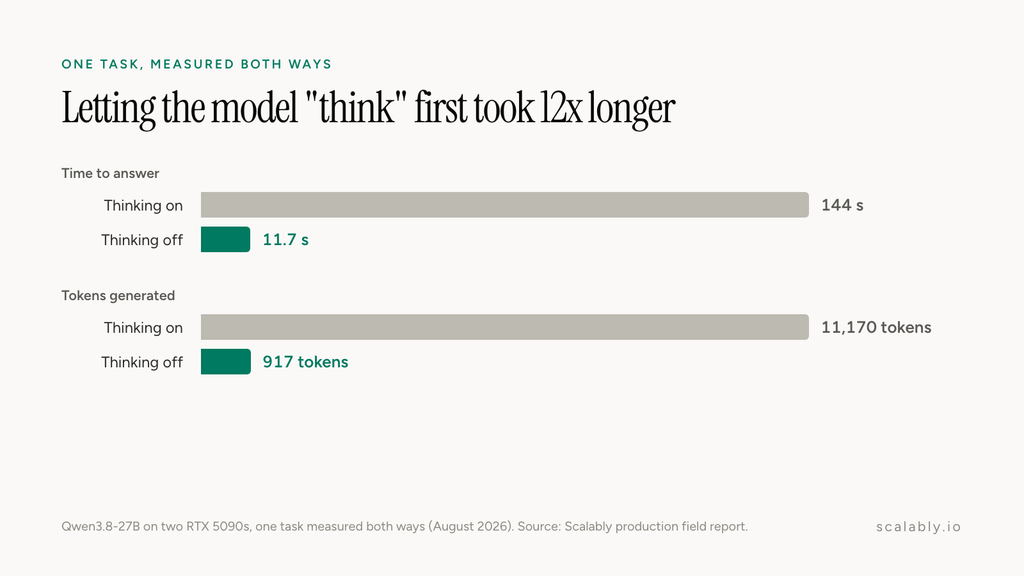
- “Thinking” can stop a model from working. Open models can reason out loud before answering. On one task, thinking took 11,170 tokens and 144 seconds; with thinking off, the same answer took 917 tokens and 11.7 seconds. For tool work, we turn it off. For drafting, we turn it on with a limit.
- One small software choice caused stalls. The component that reads the model’s tool calls froze on very long inputs in 2 of 12 runs of one experiment. Switching to a different one passed our tests and has run since.
None of this is exotic. But each one would have cost you a bad week if you met it in front of a customer.
The rule that makes a smaller model safe to use
A 27B model is good, not perfect. So in our system its answer is never the last word.
When it reads a receipt, a field is saved only if the exact printed value appears in its own transcription. It isn’t allowed to calculate or guess. Dates are never saved automatically, because in an early test a misread handwritten digit turned a 2026 receipt into a 2018 one. Every tool result is classified before the model can treat it as a success. In workspaces that turn it on, a separate check runs when an agent finishes, looking for errors it never mentioned and numbers that don’t match what its tools returned.
Our split: repetitive work goes to the machine we own, code checks what it produces, and the hard calls go to frontier models.
What it takes to keep it running
A wall-plug reading in August showed about 175 W idle and 876 to 891 W when it’s working hard. Over the 14 days the cards were busy about 16% of the time. One card ran hotter than the other, peaking at 87 °C against 71 °C, so airflow is on the to-do list. There’s no per-token bill for the local work: once the hardware is paid for, a repeated task costs electricity, plus cloud fees for anything that spills over the 12-request limit.
Should you do it?
Run your own model if:
- your work is repetitive: the same kind of task, document or tool call, many times a day
- your prompts repeat (agents, templates, fixed instructions), so the reuse effect works for you
- you can afford a couple of weeks of tuning before trusting it
- you have code, or a person, checking what it produces
Stay on a frontier API if:
- you need the best possible reasoning on every request
- your volume is low, so a per-token bill is cheaper than hardware
- nobody on your team wants to own a server
For us, the answer was both: local for the steady work, frontier for the hard calls. That mix is how we built the Scalably AI workforce.
Most of what you’ll find online about running models locally is a benchmark on an idle machine. This was a real business workload, with all the mess that comes with it, and I’d rather you see the mess before you buy the cards.
If you want the exact configuration, the full counters and every failure with its date, I published them in the production field report on Qwen3.8-27B on two RTX 5090s. Every number above comes from it.
Pavle Lazic is the founder of Scalably, where he builds and runs AI agents in production for businesses.