Lenovo Legion Go 2 Review: Worth $1,199 in 2026?

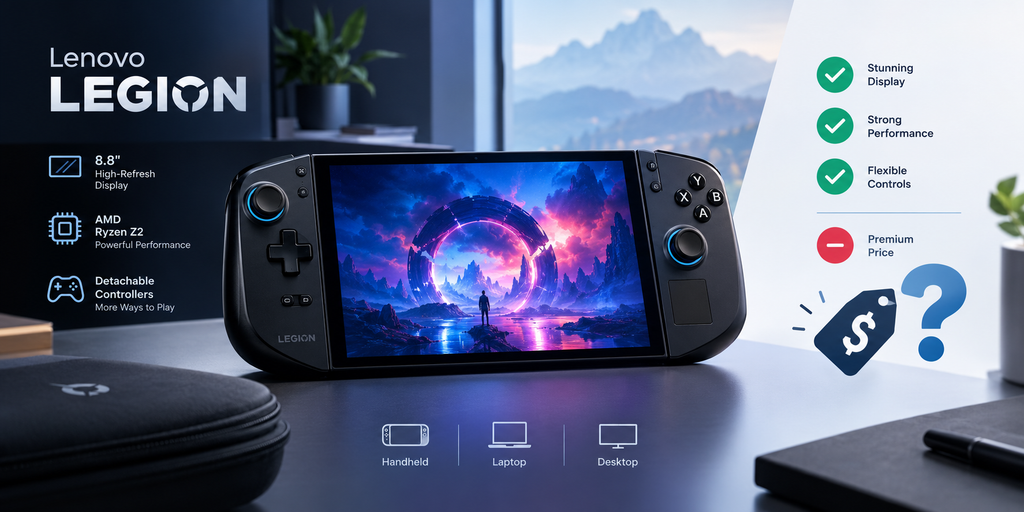
The Lenovo Legion Go 2 is a premium gaming handheld built around AMD’s Ryzen Z2 Extreme chip, an 8.8-inch 144Hz OLED display, and a 74Wh battery, starting at $1,099 for Windows or $1,199 for SteamOS. It’s one of the most powerful handhelds you can buy right now — but it’s heavy, and battery life lags behind rivals like the Asus ROG Ally X.
That’s the short version. Now let me walk you through everything, because there’s a lot more you need to know before you spend over a thousand dollars on this thing.
I spent way too many hours digging through reviews, spec sheets, and forum threads before I felt confident writing this. And honestly? This handheld surprised me.
Let me back up for a second.
The gaming handheld market has exploded over the last couple of years. You’ve got the Steam Deck OLED, the Asus ROG Ally X, and now Lenovo’s second swing at the crown with the Legion Go 2. Each one promises “desktop-class gaming on the go.” Most fall short somewhere.
Does the Legion Go 2 actually deliver? Let’s find out together.
By the end of this guide, you’ll know exactly what’s under the hood, how it stacks up against rivals, whether the SteamOS version is worth the wait, and if this thing is actually worth your hard-earned cash. If you’re still deciding between handhelds, check out our best gaming handhelds 2026 buying guide once you’ve finished here.
What Is the Lenovo Legion Go 2?
Quick intro before we get technical. The Legion Go 2 is Lenovo’s follow-up to the original Legion Go, and it’s built to be a genuine portable gaming PC — not a toy, not a gimmick. Think of it as a mini gaming laptop that fits in your hands.
Here’s the thing though.
This isn’t just a spec bump. Lenovo rebuilt the display, reshaped the controllers, and swapped in a beefier battery. According to Tom’s Hardware, it’s powered by AMD’s latest silicon and pairs it with a genuinely gorgeous screen.
I’ll break every piece of this down below, step by step, so you’re not left guessing.
If you’re comparing premium hardware purchases this year, it’s worth checking out our breakdown of the Google Pixel 10 Pro or the MacBook Air — both represent the same “pay more, get more” tradeoff you’ll see with the Legion Go 2.
Key Specs at a Glance
Before you scroll further, here’s the TL;DR so you have context for everything else in this article.
- Processor: AMD Ryzen Z2 Extreme (8-core/16-thread, Zen 5)
- GPU: AMD Radeon 890M (16 RDNA 3.5 cores)
- RAM: 32GB LPDDR5X at 8,000 MT/s
- Storage: Up to 1TB (or 2TB on some SKUs) NVMe Gen4 SSD
- Display: 8.8-inch OLED, 1920×1200, 144Hz, VRR
- Battery: 74Wh
- Weight: ~920g with controllers attached
Okay. Now let’s actually talk about why these numbers matter.
How Does the Lenovo Legion Go 2 Compare to Competitors?
Before diving into each feature individually, it helps to see the full picture side by side. This is the table I wish I’d found before buying my own handheld.
| Feature | Legion Go 2 | Steam Deck OLED | ROG Ally X | MSI Claw 8 EX AI+ |
|---|---|---|---|---|
| Starting Price | $1,099 (Win) / $1,199 (SteamOS) | ~$549 | ~$799 | $1,699 |
| Chip | Ryzen Z2 Extreme | Custom AMD Zen 2 | Ryzen Z1 Extreme | Intel Arc G3 Extreme |
| RAM | 32GB LPDDR5X | 16GB LPDDR5 | 24GB LPDDR5X | Varies |
| Display | 8.8″ OLED, 144Hz | 7.4″ OLED, 90Hz | 7″ IPS, 120Hz | 8″ IPS, 120Hz |
| Battery | 74Wh | 50Wh | 80Wh | 80Wh |
| OS | Windows 11 or SteamOS | SteamOS | Windows 11 | Windows 11 |
| Weight | 920g | 640g | ~678g | Heavier class |
The takeaway? You’re paying a premium for the biggest, brightest screen and the most RAM in this category — but you’re trading off portability and battery runtime to get it.
The Display: Where the Legion Go 2 Really Shines
Honestly, this is where I got excited.
The 8.8-inch OLED display on the Legion Go 2 isn’t just “good for a handheld.” It’s genuinely impressive, full stop. Lenovo went with a 1920×1200 resolution instead of cramming in more pixels than the hardware could handle — smart move, if you ask me.
Why does that matter to you?
Well, according to Trusted Reviews, the panel measured a peak brightness of 435.6 nits, an incredibly deep 0.03 black level, and a jaw-dropping 15740:1 contrast ratio. Those aren’t marketing numbers — those are real lab measurements.
And here’s the kicker: it runs at a buttery-smooth 144Hz refresh rate with Variable Refresh Rate (VRR) support between 30-144Hz. That means no screen tearing, no stutter, just smooth motion whether you’re grinding through a shooter or exploring an open world.
Compare that to the Asus ROG Ally X, which is stuck with a standard 1080p IPS panel. Not bad, but not this.
Why OLED Actually Matters Here
You might be wondering — is OLED just a buzzword, or does it actually change your gaming experience?
Short answer: it changes everything.
OLED panels produce true blacks (because pixels literally turn off), richer colors, and way better contrast than IPS displays. For dark, moody games — think horror titles or noir-style RPGs — this is a massive upgrade.
Stuff’s review put it bluntly: the screen is “just plain prettier to look at,” even compared against similarly-specced rivals, and according to their testing, it accounts for a lot of the overall experience.
Performance: Can It Actually Run AAA Games?
Alright, let’s talk performance, because specs on paper mean nothing if the thing chugs during actual gameplay.
The Legion Go 2 runs on AMD’s Ryzen Z2 Extreme, part of a whole new family of chips purpose-built for handheld gaming. This isn’t a repurposed laptop chip — it’s designed from the ground up for this form factor.
According to Thurrott’s hands-on review, the device handled AAA titles impressively well, including demanding games like Call of Duty: Black Ops 6. That’s a big deal — a lot of handhelds struggle the moment you push graphics settings past “medium.”
Here’s what stood out to me:
- 32GB of unified RAM — shared between CPU and GPU, a full 8GB more than the Ally X’s 24GB configuration
- 16-core Radeon 890M GPU — a genuine step up from the previous Z1 Extreme
- FSR upscaling support — boosts frame rates significantly, even if it introduces some shimmer compared to Nvidia’s DLSS
Tom’s Hardware confirmed the extra RAM headroom actually helps real-world performance, since the CPU and GPU are sharing that same memory pool.
A Quick Heads-Up on VRAM Settings
Here’s something you need to know before you dive in.
By default, the system only allocates 2GB of VRAM to the GPU — which, frankly, is way too low for a lot of modern titles. You’ll need to manually adjust this in the BIOS to unlock the device’s real performance potential.
I know, I know. Not exactly plug-and-play. But once you do it, you’ll notice a real difference in how games run.
Design and Build Quality
Let’s shift gears and talk about how this thing actually feels in your hands, because specs don’t tell you everything.
Full disclosure: it’s big. Like, really big.
Stuff’s reviewer didn’t hold back, saying it “makes a Nintendo Switch 2 seem titchy and eclipses a Steam Deck OLED.” At 920 grams with the controllers attached, it’s heavier than pretty much every Windows-powered handheld currently on the market.
But — and this surprised me — reviewers consistently note it’s still comfortable to hold for extended sessions. Lenovo reshaped the controller edges to match the smaller Legion Go S, ditching some of the sharper angles from the original model.
The TrueStrike Controllers
You’ll notice the detachable TrueStrike controllers immediately. They snap off the sides of the screen, similar to a Nintendo Switch, and include Hall effect sensors for drift-free stick input.
Here’s the fun part: one of the controllers can convert into an FPS mouse mode by attaching to a small puck accessory. If you’ve ever wished your handheld could play like a mouse-and-keyboard shooter, this is Lenovo’s answer.
Other nice touches include:
- A built-in kickstand for tabletop play
- A trackpad for desktop-style navigation
- Dedicated buttons for Legion Space, settings, and window switching
Battery Life: The Achilles Heel?
Okay, time for some real talk.
Battery life has been a recurring complaint across multiple reviews, and I want to be upfront with you about it.
The Legion Go 2 packs a 74Wh battery — a big jump from the 49.2Wh cell in the original Legion Go. That sounds great on paper. But Trusted Reviews specifically flagged battery life as poor against rivals, especially when you’re running demanding AAA titles at high settings.
For comparison, the Ally X actually edges it out slightly with an 80Wh cell.
So what’s the takeaway here?
If you’re planning marathon gaming sessions away from a power outlet, you’ll want to manage your expectations — or invest in a solid USB4 power bank for backup. Lowering the refresh rate to 60Hz and dropping brightness a notch also stretches runtime noticeably, based on tester feedback across multiple reviews.
While you’re optimizing your setup, pairing the Legion Go 2 with a solid pair of headphones makes a real difference for on-the-go sessions — our Sony XM6 noise-cancelling headphones guide covers a great option if you want to block out background noise during long gaming sessions.
Windows vs SteamOS: Which Version Should You Buy?
This is probably the biggest decision you’ll need to make, so let’s walk through it properly.
Step 1: Understand the Windows 11 Version
The original Legion Go 2 launched with Windows 11 in late 2025, starting around $1,099. Windows gives you full compatibility with any PC game, launcher, or anti-cheat system — no exceptions.
The downside? Windows wasn’t built for a touchscreen-and-controller experience. Multiple reviewers noted clunky navigation and inconsistent sleep/wake behavior.
Step 2: Consider the SteamOS Version
In June 2026, Lenovo released a SteamOS edition of the Legion Go 2, starting at $1,199. According to TechTimes, the hardware is identical — same chip, same OLED panel, same 74Wh battery. The only difference is the operating system.
SteamOS is built specifically for handhelds, so you get:
- Faster suspend and resume
- Better battery efficiency
- A controller-first interface that just makes more sense on a small screen
The trade-off? You’ll be relying on Proton for Windows game compatibility, which handles most titles well but occasionally struggles with games using kernel-level anti-cheat.
Step 3: Compare Against Competitors
Before you commit, it’s worth checking out what else is on the market. The Legion Go 2 SteamOS edition currently competes directly with the MSI Claw 8 EX AI+, which runs $500 more and lacks an OLED screen entirely.
That price gap alone makes the Legion Go 2 look like the smarter buy for most people. For a deeper breakdown of how Proton handles anti-cheat titles, see our SteamOS compatibility guide.
Price: Is It Actually Worth It?
Let’s not dance around this — the Legion Go 2 isn’t cheap.
You’re looking at $1,099 to start for the Windows model, and $1,199 for SteamOS. That’s a serious chunk of change, especially when you consider the Steam Deck OLED starts hundreds of dollars lower.
But here’s my honest take: you’re paying for genuinely premium hardware. The OLED screen alone, according to Stuff, is “worth it” on its own. Add in the Ryzen Z2 Extreme chip, 32GB of RAM, and the versatile controller design, and the value proposition starts making a lot more sense — assuming you actually need that level of performance.
If you’re a casual gamer who just wants to play indie titles and older games, this is probably overkill. But if you want to run modern AAA titles at real settings, this is one of the most capable handhelds you can currently buy.
Frequently Asked Questions
Is the Lenovo Legion Go 2 better than the Steam Deck OLED?
For raw power and screen quality, yes — the Legion Go 2’s larger 144Hz OLED display and Ryzen Z2 Extreme chip outperform the Steam Deck OLED. But the Steam Deck is lighter, cheaper, and has better battery efficiency, so it depends on what you value more.
Does the Legion Go 2 support SteamOS?
Yes. Lenovo released a dedicated SteamOS version in June 2026, starting at $1,199, with identical hardware to the Windows model.
How much does the Lenovo Legion Go 2 cost?
The Windows 11 version starts at $1,099, and the SteamOS version starts at $1,199.
What is the battery life like on the Legion Go 2?
Battery life is a weak point. With its 74Wh battery, reviewers found it underperforms rivals like the Ally X during demanding AAA gameplay, though efficiency improves with the SteamOS version.
Is the Legion Go 2 too heavy to hold comfortably?
At 920g, it’s one of the heaviest handhelds on the market, but Lenovo’s reshaped controller grips make it more comfortable than the weight alone suggests.
Final Verdict: Should You Buy the Lenovo Legion Go 2?
The Lenovo Legion Go 2 is the most powerful gaming handheld you can buy in 2026, thanks to its Ryzen Z2 Extreme chip and standout 144Hz OLED display — but its weight and battery life mean it’s built for power users, not portability seekers.
If raw performance and screen quality top your list, buy it with confidence. If battery life and pocketability matter more, the Steam Deck OLED or ROG Ally X are worth a look instead.
You came here looking for clarity — I hope this gave it to you. Now it’s your call.