What Is a Checksum Error? Causes & Fixes (2026 Guide)


What is a checksum error? It’s your computer telling you that a file, a setting, or a packet of data doesn’t match the fingerprint it’s supposed to match. That’s it. That’s the whole thing. I’ve hit this checksum mismatch message on BIOS screens at 2 a.m., inside half-downloaded ISO files, and in ZFS storage pools carrying data I really didn’t want to lose. So let me walk you through what it means, why it happens, and exactly what to do — no jargon walls, I promise.
Here’s the part most articles skip.
A checksum error is not one problem. It’s four completely different problems that happen to share a name. And if you don’t know which one you’re staring at, you’ll waste an afternoon replacing a battery when your real issue was a flaky Wi-Fi connection.
What Is a Checksum Error, Exactly?
Before we chase fixes, you need the mental model. A checksum is a small value calculated from a chunk of data — think of it as a receipt. You save the receipt. Later, you recalculate it. If the two receipts match, the data almost certainly didn’t change. If they don’t match, something happened in between, and your system throws a checksum error to warn you. Simple idea, enormous consequences.
Now here’s what I love about this concept.
A checksum is a small-sized datum derived from a block of digital data for the purpose of detecting errors — and the integrity of the data gets verified by recomputing that value and comparing it against the stored one.
Think of it like a tamper-evident seal on a bottle of medicine.
The seal doesn’t tell you what went wrong inside. It just tells you the bottle isn’t sealed anymore. Your job is to figure out why.
Detection Versus Correction (This Trips Everyone Up)
I want to kill a myth right now, because it causes real damage. People assume a checksum fixes data. It doesn’t. It flags data. Most error detection methods — parity bits, modular sums, cyclic redundancy checks — are detection-only tools. Correction requires redundancy stored somewhere else. Knowing that difference changes how you respond to a failure, and it changes what you back up.
Here’s the honest limitation.
According to the Wireshark documentation, using a checksum drastically reduces the number of undetected transmission errors — but the usual algorithms cannot guarantee 100% detection, so a very small number of errors slip through.
GeeksforGeeks shows this beautifully with a worked example: when bit errors in two data segments cancel each other out, the total sum stays identical and the corruption goes completely unnoticed.
Rare? Yes. Impossible? Nope.
Checksum Error Quick Diagnosis Table
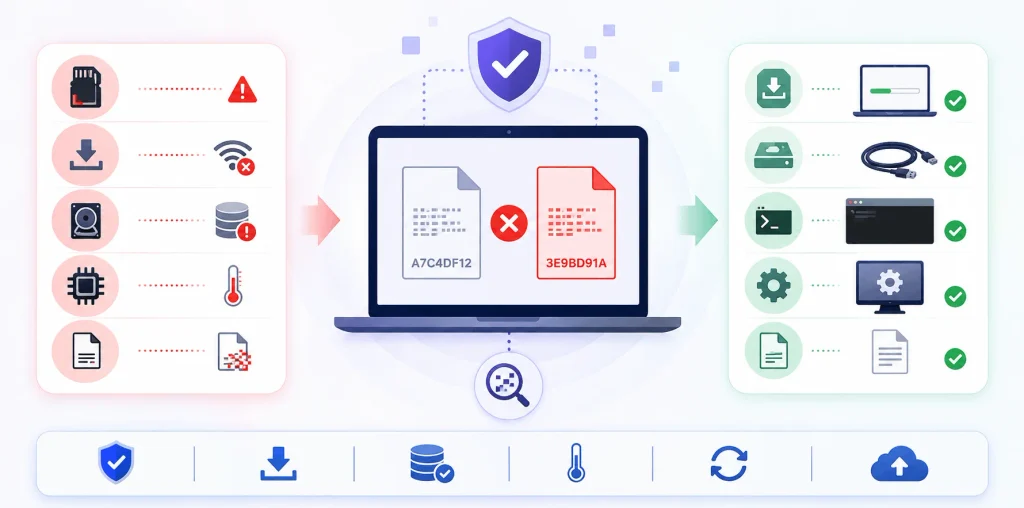
Start here. Read the message on your screen, find the matching row, and you’ll know within seconds which of the four layers you’re dealing with. I built this table after years of watching people replace perfectly good hardware because they misread the error. Match your symptom first — the fix almost always follows automatically once you’ve identified the layer correctly.
| Error message you see | Layer | Most likely cause | First fix to try |
|---|---|---|---|
| “CMOS checksum error – defaults loaded” | Firmware / BIOS | Dead CR2032 battery or interrupted BIOS update | Load optimized defaults, then replace the battery |
| “CRC failed in [file]. The file is corrupt” | Archive | Incomplete or interrupted download | Re-download from the official source |
| “Checksum error in the encrypted file” | Archive | Wrong password, or real corruption | Re-enter the password before assuming corruption |
| “Unexpected end of archive” | Archive | Truncated transfer | Re-download; then try Repair archive |
| Hash doesn’t match publisher’s value | File integrity | Truncated download or updated file | Re-verify with SHA-256, re-download once |
CKSUM count rising in zpool status | Storage | Bit rot, failing disk, or bad cable | Run a scrub, check SMART data |
| Dropped packets, repeated retransmits | Network | Failing NIC, bad cable, buggy proxy | Swap the cable, test another port |
Bookmark that. It saves more time than anything else in this article.
The Four Places You’ll Meet a Checksum Error
This is the section I wish existed when I started troubleshooting. The message looks similar everywhere, but the root cause lives in totally different hardware. I’ve grouped them by layer — firmware, archives and downloads, networking, and storage — so you can identify yours in about ten seconds. Read the four descriptions below, find the one that matches your screen, and skip straight to that fix.
Let’s go one by one.
1. CMOS Checksum Error – Defaults Loaded (The Boot Screen One)
You power on. You get a black screen that says “CMOS checksum error – defaults loaded. Press F1 to continue, DEL to enter setup.” Your stomach drops. Relax — this is usually the cheapest fix on the entire list. Your motherboard stores BIOS settings in a tiny memory chip, calculates a checksum over them, and re-verifies it at every single boot.
When those numbers disagree, you get the warning.
Some BIOS versions warn and continue with existing settings. Others assume corruption and load safe default values from the BIOS chip instead.
The most common culprit? A dying coin cell.
As The Windows Club explains, the CMOS checksum can go bad after a power failure or a reset during BIOS boot, and a damaged or dead RTC battery produces the same message.
Secondary triggers to rule out: an interrupted BIOS update, a recently added stick of RAM, or malware that mangled firmware settings.
2. CRC Failed / Checksum Error in the Encrypted File (The Archive One)
You download a 4 GB archive, wait patiently, then WinRAR slaps you with “CRC failed in [filename]. The file is corrupt.” Annoying, but informative. Cyclic Redundancy Check values get stored inside the archive when it’s created, and they’re only verified at extraction time — which is why a broken file can sit on your drive looking perfectly healthy for months.
That delay is the sneaky part.
Cyclic redundancy checks confirm a RAR file’s integrity, and the check only fires when you actually extract.
One weird gotcha worth knowing: WinRAR also displays a CRC error when you repeatedly enter the wrong password for an encrypted archive. So before you assume file corruption, double-check your password.
3. TCP, UDP, and IP Checksum Failures (The Invisible One)
Here’s the good news — you’ll almost never see this one, and that’s by design. Every packet crossing the internet carries a checksum in its header. If integrity verification fails at the receiving end, the packet gets silently dropped and retransmitted. Your video keeps playing. Your download keeps going. The network stack absorbs the data corruption before it ever reaches your screen.
The math is genuinely elegant.
RFC 1071, the IETF document that defines the internet checksum for IP, UDP, and TCP, describes it like this: adjacent octets are paired into 16-bit integers, the 1’s complement sum is formed, and the 1’s complement of that sum goes into the checksum field. To verify, the receiver recomputes the sum over the same octets including the checksum field — and if the result is all 1 bits, the check passes.
You only notice packet corruption when it’s relentless — think failing NIC, bad cable, or a badly behaved proxy.
4. Storage Checksum Errors and Silent Data Corruption (The Scary One)
Now the one that actually keeps me up at night. Modern filesystems like ZFS and Btrfs checksum every block they write and verify it on every read. When they report a checksum error, they’re catching something your hard drive’s own error correction missed entirely. That’s called silent data corruption, or bit rot, and it’s far more common than the average person assumes.
The official ZFS documentation defines the CKSUM counter plainly: the device returned corrupted data in response to a read request. In a redundant pool, ZFS pulls good data from a replica and heals the damaged copy automatically.
And when it can’t?
Klara Systems puts it well: ZFS follows a strict rule — if it lacks the redundancy to rebuild correct data, it reports an error instead of handing you corrupted bytes.
The scale here is not theoretical, and the numbers are worth memorising:
- CERN, 2007: a six-month study wrote roughly 97 petabytes across 3,000 nodes and found 128 MB permanently corrupted — with 500 errors detected across 100 nodes.
- NetApp, 2008: a 41-month study across 1.53 million disk drives documented over 400,000 checksum mismatch instances — and about 30,000 of those were missed by the RAID controller entirely, surfacing only during disk scrubbing.
- Nearline drives corrupted at roughly 10× the rate of enterprise drives in that same study.
That last bullet is why cheap bulk storage and important data are a bad marriage.
How to Fix a Checksum Error: My Step-by-Step Process
Right, enough theory. Below is the exact sequence I run through, ordered from cheapest to most involved. Work top to bottom and stop the moment your problem disappears. Most people resolve this within the first three steps, and I’d guess 60% of readers are done after step two. Don’t skip ahead — the early steps are fast and they eliminate the noisy false positives that make everything else confusing.
Grab a coffee. Let’s fix this.
- Identify which layer you’re on. Read your error message word for word. Does it mention CMOS, BIOS, or defaults? That’s firmware. Does it name a
.rar,.zip, or.isofile? That’s archive corruption. Does it appear inzpool statusor a NAS dashboard? That’s storage. Match first, then act. - Re-download or re-copy the file. For downloads and archives, this fixes it shockingly often. An incomplete download or a dropped connection leaves you with truncated data that still opens, still looks normal, and still fails verification. Pull a fresh copy from the official source rather than a third-party mirror. Seriously — do this before anything clever.
- Verify the checksum yourself. Don’t guess. Measure. Every major OS ships with a built-in hash verification tool, and Akamai’s documentation lists the standard commands:
- Windows (CMD):
certutil -hashfile C:\path\to\file.iso SHA256Windows (PowerShell):Get-FileHash C:\path\to\file.iso -Algorithm SHA256Linux:sha256sum /path/to/file.isomacOS:shasum -a 256 /path/to/file.iso
A-Fequalsa-f. - Windows (CMD):
- Interpret a mismatch correctly. A checksum mismatch has a predictable ranking of causes. One well-structured guide orders them like this: a truncated download first, then bytes rewritten in transit, then a publisher who updated the file but forgot to update the posted hash, and only then genuine tampering. Check the boring explanations before you assume you’ve been attacked.
- Attempt archive repair — carefully. If re-downloading isn’t possible, try WinRAR’s Repair archive tool, or extract with “Keep broken files” enabled to salvage partial media. But manage your expectations: WinRAR’s own support page states that a recovery record won’t help in every scenario, and the only way to know is to run the repair and test the result.
- Handle the hardware cases. These split cleanly in two — see below.
Fixing Firmware-Level Checksum Errors
Enter setup with Del, F2, or F10, then load optimized defaults, save, and reboot. If the clock keeps resetting after that, replace the CR2032 battery — HP’s support community confirms this is the standard remedy. Reflash firmware only if it’s genuinely damaged, because a failed flash is far worse than the error you started with.
Fixing Storage-Level Checksum Errors
Run a disk scrub on your pool, then check SMART attributes for reallocated sectors and pending bad sectors. Swap the SATA or SAS cable before you condemn the drive — cables cause more phantom CKSUM counts than people expect. And if you’re running a serious array, confirm your RAM is ECC.
CRC32 vs MD5 vs SHA-256: Which Checksum Should You Use?
Quick but important. Not every checksum does the same job, and picking wrong gives you false confidence. Some algorithms exist purely to catch accidental corruption fast. Others exist to catch a deliberate attacker. Confusing the two is how people end up “verifying” a malicious download and feeling great about it. Here’s the honest breakdown.
| Algorithm | Output length | Speed | Collision resistance | Best used for |
|---|---|---|---|---|
| CRC32 | 32-bit | Fastest | None (not cryptographic) | ZIP archives, network packets, storage blocks |
| MD5 | 128-bit | Very fast | Broken — practical collisions | Accidental corruption checks only |
| SHA-1 | 160-bit | Fast | Broken — SHAttered, 2017 | Legacy compatibility only |
| SHA-256 | 256-bit | Moderate | Strong | Downloads, signatures, tamper detection |
| SHA-512 | 512-bit | Fast on 64-bit CPUs | Strong | Large files on modern hardware |
My rule of thumb, in one line each:
CRC32 answers “did this break?” SHA-256 answers “did someone change this?” MD5 answers neither reliably anymore.
Practical collision attacks killed MD5’s security value, and SHA-1 fell to the SHAttered attack demonstrated by Google and CWI Amsterdam in 2017. Both remain fine for spotting accidental damage — just never for security.
Why SHA-256 Became the 2026 Default
Here’s the shift I’ve watched happen over the last couple of years. Checksum validation stopped being a manual, occasional habit and became automatic infrastructure. Package managers like pip, npm, and conda now verify SHA-256 hashes on every single install. Container registries verify image digests on every pull. CI/CD pipelines fail the build outright on a mismatch.
That’s a big deal.
It means most checksum errors you encounter in 2026 aren’t things you chose to check — they’re guardrails firing on your behalf, usually in a build log. Treat them as signal, not noise.
Is a Checksum Error Dangerous?
Short answer: usually no, occasionally yes. A one-off CRC failed message on a downloaded file is almost always a bad transfer. A repeated CMOS checksum error is a dying battery. But a checksum mismatch on a file you never touched, sitting on a healthy-looking drive, deserves your full attention — that’s the signature of silent data corruption or a failing disk.
Pattern matters more than any single event.
One error, one time? Re-download and move on.
Same error, same file, every week? Something physical is failing, and your backups just became the most important thing you own.
Frequently Asked Questions About Checksum Errors
Is a checksum error the same as a CRC error?
Effectively, yes. CRC stands for Cyclic Redundancy Check, which is one specific type of checksum. When WinRAR reports “CRC failed”, the integrity check failed because the data no longer matches what was originally stored. The same fixes apply to both error types.
Can I recover a file that has a checksum error?
Sometimes. Enabling “Keep broken files” during extraction salvages whatever data is readable, and media files like video or images often still play afterwards. But a checksum error means bytes are genuinely wrong — full recovery is never guaranteed. Re-downloading from the source is always cleaner than repairing.
Why does a freshly downloaded file fail its checksum?
Usually because the download quietly didn’t finish. Some browsers fail silently on partial downloads, leaving you with a truncated file. Other causes: you hashed the wrong file, or the publisher updated the release without updating the posted hash on a cached page.
Does a CMOS checksum error mean my motherboard is dying?
Rarely. In most cases it’s a CR2032 battery that’s run flat, and the giveaway is a clock that resets every time you power down. Motherboard failure is much less likely — and if the system never reaches the firmware screen at all, the checksum message is a symptom rather than the root cause.
Should I still use MD5 to verify downloads?
Only for spotting accidental corruption. MD5 has practical collision attacks against it, so it cannot prove a file wasn’t deliberately swapped. If a publisher offers both, always take the SHA-256 value.
How often should I scrub a ZFS pool?
Monthly is a common baseline for consumer setups, weekly for production arrays. A handful of repaired blocks across a large pool is normal — occasional bit rot is expected. A rising repair count across consecutive scrubs is your warning sign.
Related Reading
If you want to go deeper on the surrounding topics, these guides pick up where this one stops:
More troubleshooting guides in Tech Insights
How to Fix Dropbox Error Code 8737-IDJ-029-22