
Ezgif: Free Online GIF Maker & Image Editor 2026

If you have ever searched for the best free GIF maker online that actually delivers, you have already landed in the right place. Ezgif is a powerful, browser-based with no download tool that lets anyone create, edit and convert animated GIFs in seconds. Whether you want to make a meme, convert MP4 to GIF, build a GIF animation tool for your GitHub README or resize image for e-commerce, Ezgif handles it all — completely free, with zero sign-up required. This guide covers everything you need to know about ezgif.com in 2026.
What Is Ezgif and How Does It Work?
Have you ever needed to make a quick GIF but didn’t want to download bulky software? That’s exactly where ezgif.com shines. It’s a simple and free online tool that runs entirely in your browser. No installs. No sign-ups. Just open the site and start creating. It is genuinely one of those rare platforms that does exactly what it promises — every single time.
Ezgif is built for everyone — from total beginners to seasoned content creators. Whether you want to make GIF from video, convert image formats or trim audio files, this platform handles it all. It’s one of the most actively maintained websites in the GIF editing space today. Developers use it for GitHub markdown animations. Marketers use it for product demos. Meme creators use it daily. Everyone finds a reason to come back.
Key Features of Ezgif’s GIF and Video Editing Tools
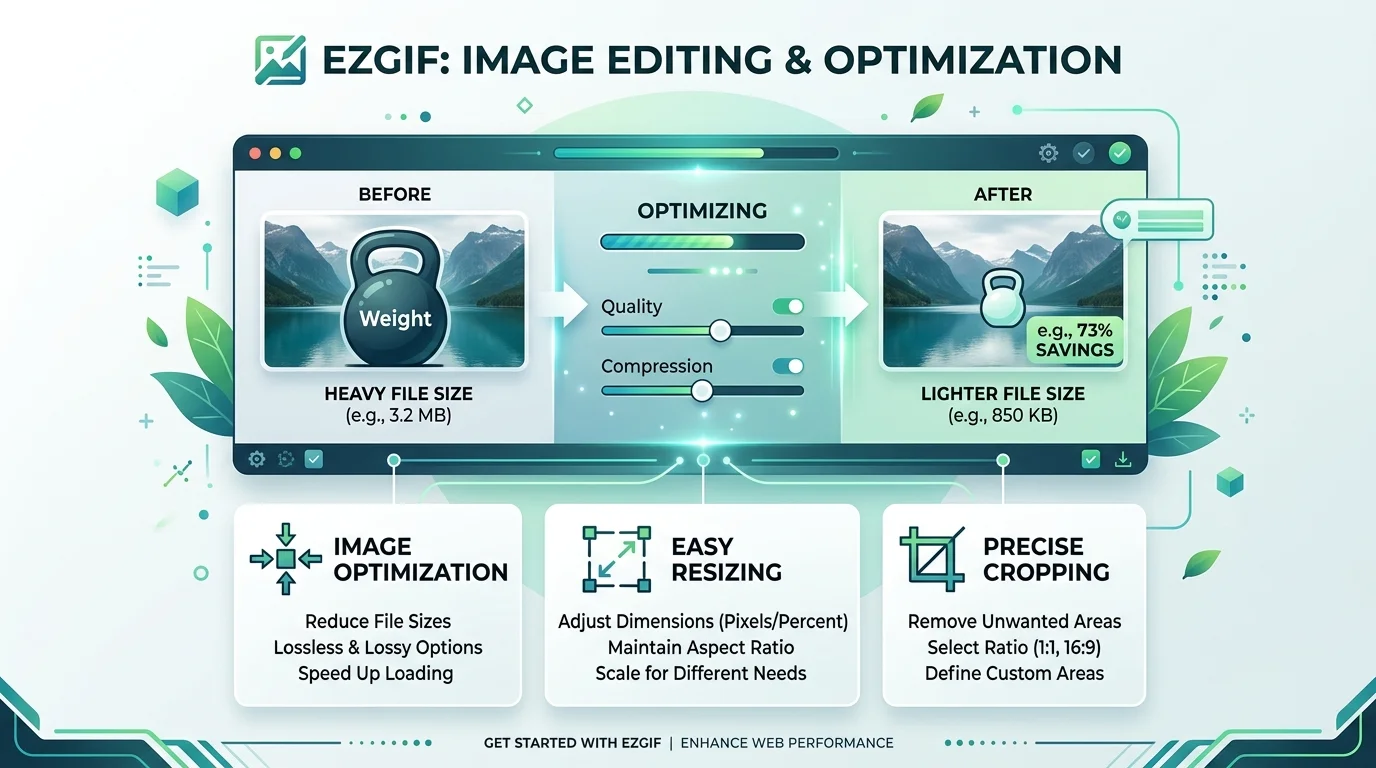
Think of Ezgif as a Swiss Army knife for digital creators. It’s packed with tools that would normally cost money elsewhere. You get a full GIF animation tool, a video to GIF converter, an online image resizer and even an audio compressor online — all under one roof for free. No bloated software. No paywalls on the web version. Just clean, powerful tools at your fingertips.
What makes it stand out is the sheer variety. You can crop GIF online, resize GIF online, reverse GIF online, split GIF frames, merge GIF files and adjust GIF playback speed — all without leaving your browser. It truly is a top class asset for anyone working with animated content regularly. Users on Reddit r/ezgif regularly call it the best web tool site for GIFs — and after looking at the feature list, it’s easy to see why.
Core Ezgif Tools at a Glance
| Tool Category | What You Can Do |
|---|---|
| GIF Creation | Animated GIF maker, GIF frame editor, create GIF from images |
| GIF Editing | Crop GIF online, resize GIF online, add text to GIF, GIF effects online |
| GIF Optimization | GIF optimizer, compress GIF file size, reduce GIF size, GIF quality settings |
| Video Tools | Online video cutter, online video cropper, rotate video online, video filters online |
| Format Conversion | MP4 to GIF, WebP to JPG, PNG to JPG, HEIC to JPG, GIF to MP4 |
| Audio Tools | Audio compressor online, audio fade editor, waveform generator online, audio speed changer |
| Image Tools | Background remover online, EXIF data remover, image vectorizer, image format converter |
How to Create and Edit GIFs with Ezgif (Step-by-Step)
Learning how to make a GIF online has never been easier. Ezgif walks you through every step with a clean and intuitive user interface. You don’t need any design experience. If you can click a button, you can make a GIF. The whole process feels shockingly fast — even on your first try.
Here’s the simplest way to get started with how to convert MP4 to GIF using ezgif.com. It takes under two minutes from start to finish. The result is a clean, watermark-free animated file ready to share anywhere — on social media, in a GitHub markdown file or inside a product demo page.
Step-by-Step: Video to GIF Conversion
| Step | Action |
|---|---|
| 1 | Visit ezgif.com/video-to-gif |
| 2 | Upload your MP4, WebM or MOV file |
| 3 | Set your start time and end time |
| 4 | Choose your frame rate |
| 5 | Click Convert to GIF |
| 6 | Edit using crop, resize or optimize tools |
| 7 | Download your finished GIF — no watermark |
Step-by-Step: How to Create GIF from Images
| Step | Action |
|---|---|
| 1 | Go to ezgif.com/maker |
| 2 | Upload your PNG or JPG frames in order |
| 3 | Set GIF frame delay and GIF loop count settings |
| 4 | Click Make GIF |
| 5 | Optimize and download |
How to crop a GIF, how to reverse a GIF and how to add text to a GIF all follow the same simple pattern. Upload. Adjust. Export. That’s the fast and easy GIF creation workflow Ezgif is famous for. If you enjoy working with AI-powered image tools alongside manual editors, you might also find value in reading our Pixlr AI photo and video editor complete guide for a broader picture of what browser-based creative tools can do today.
Ezgif App Review: Ratings, User Feedback, and Common Complaints
Real users across Trustpilot and Reddit r/ezgif have shared their honest experiences with Ezgif. The numbers speak clearly. Ezgif holds a strong 4.1 TrustScore on Trustpilot with 90% of reviewers giving it five stars. That’s impressive for a completely free tool with no marketing budget and no team of customer service agents managing reputation.
However, not every experience is perfect. Some users have flagged GIF saving upside down fix issues in the mobile app. Others encountered a GIF to WebM VP9 codec error that blocked their conversions entirely. A few hit a processing error on file upload when files were too large or corrupted. These are real pain points worth knowing before you dive in — but they almost exclusively affect the mobile app, not the website.
What Real Users Are Saying
“Fantastic and free — this is a site you’ll love if you want to edit animated GIFs.” — Ant, UK, Trustpilot
“The tools are powerful and precise and the ads are harmless.” — Ishow Meat, Trustpilot
“Hands down the best website I’ve used to crop YouTube videos and make GIFs.” — Les Belcher, UK, Trustpilot
“It’s a lifesaver for e-commerce. Converts WEBP to JPG in moments.” — Syed Abdallah Fuad, Trustpilot
“Worst GIF site ever — kept cutting off frames and GIFs wouldn’t load.” — Neko Neko, Trustpilot
Common Issues Reported by Users
| Problem | Where It Occurs | Fix |
|---|---|---|
| GIF saving upside down fix | Mobile app | Use web version instead |
| GIF frames being cut off | Web version | Reduce file size before uploading |
| GIF to WebM VP9 codec error | Web converter | Switch to V8 codec setting |
| Paywall in mobile app | Mobile app | Use free web version at ezgif.com |
| GIF not loading after conversion | Web version | Try GIF repair tool first |
| Processing error on file upload | Web version | Check file size and format |
Ezgif vs. Other GIF Makers: How It Compares to Competitors
When you stack Ezgif vs other GIF makers, the differences become crystal clear very fast. Most competitors either charge money, slap watermarks on your work or require you to create an account before doing anything useful. Ezgif does none of that. It’s a no watermark GIF tool that just works — every single time, on every device, in any browser.
Tools like ImgPlay GIF maker, GIF Toaster app and GIF Maker by Momento are all mobile-first apps with limited free tiers. Free Convert handles basic conversions but lacks the depth of editing tools that ezgif.com offers. Even Giphy — the world’s biggest GIF platform — doesn’t give you the raw editing control that Ezgif does. For anyone doing serious creative work, the ezgif alternative free search almost always ends right back at ezgif.com. If background removal is high on your priority list, our EZRemove AI review breaks down another strong option worth comparing.
Full Competitor Comparison Table
| Feature | Ezgif | ImgPlay | GIF Toaster | GIF Maker by Momento | Free Convert | Giphy |
|---|---|---|---|---|---|---|
| Completely Free | ✅ Yes | ⚠️ Limited | ⚠️ Limited | ⚠️ Limited | ⚠️ Limited | ⚠️ Limited |
| No Watermark | ✅ Yes | ❌ No | ❌ No | ❌ No | ❌ No | ❌ No |
| Browser-Based | ✅ Yes | ❌ App Only | ❌ App Only | ❌ App Only | ✅ Yes | ✅ Yes |
| No Account Needed | ✅ Yes | ❌ Required | ❌ Required | ❌ Required | ✅ Yes | ❌ Required |
| Audio Tools | ✅ Yes | ❌ No | ❌ No | ❌ No | ⚠️ Basic | ❌ No |
| APNG Support | ✅ Yes | ❌ No | ❌ No | ❌ No | ❌ No | ❌ No |
| Format Support | ✅ 20+ | ⚠️ Basic | ⚠️ Basic | ⚠️ Basic | ⚠️ Moderate | ❌ GIF Only |
| Video Editing | ✅ Yes | ✅ Yes | ✅ Yes | ✅ Yes | ⚠️ Basic | ❌ No |
| Background Removal | ✅ Yes | ❌ No | ❌ No | ❌ No | ❌ No | ❌ No |
| Animated SVG Export | ✅ Yes | ❌ No | ❌ No | ❌ No | ❌ No | ❌ No |
The verdict is clear. For a best free GIF website comparison, nothing else comes close to matching Ezgif’s breadth of features at zero cost. It’s simply the best free GIF maker online available right now.
Ezgif Pricing: Is It Free, or Are There Hidden Costs?
Here’s the honest truth that most reviews skip over entirely. Ezgif.com — the website — is 100% free. There are no subscription tiers. No export limits. No premium upgrades hiding behind a paywall. Every single tool on the website is available to every visitor at no cost whatsoever. It’s a genuinely free online tool no watermark experience that almost feels too good to be true.
The confusion arises because of the Ezgif mobile app built by Whistle Studios LLC. That app is a completely separate product. It has a paywall in mobile app for certain advanced features. Many users download the app expecting the same free experience as the website and feel misled. They’re not the same thing. For a truly free GIF editor no signup experience, always go to ezgif.com in your browser. For a broader look at how free AI-powered creative tools compare against paid alternatives, our best AI image generator guide gives excellent context.
Ezgif Pricing Breakdown
| Version | Cost | Features | Account Needed |
|---|---|---|---|
| Ezgif Website | 100% Free | All tools, all formats | No |
| Ezgif Mobile App | Freemium | Limited free, paid premium | Yes |
| Whistle Studios LLC App | Paid features | Advanced editing locked | Yes |
Ezgif Privacy and Data Safety: What You Need to Know
Before you upload anything to an online tool, you should always know what happens to your files. With ezgif.com, the good news is refreshingly straightforward. The site requires zero personal information. No name, No email and No password. It’s a completely privacy friendly tool with a minimal advertising experience that never feels intrusive or overwhelming.
One Trustpilot reviewer actually ran Ezgif through independent cyber-scanning tools before using it. They found nothing alarming. That kind of third-party validation matters in an era where data privacy concerns are everywhere. Still, as with any online platform, avoid uploading files that contain sensitive personal information. Basic digital hygiene applies everywhere — even on a safe to use website like this one. The EXIF metadata stripping tool is particularly useful if you’re sharing images publicly. It strips GPS coordinates, camera details and timestamps before your files reach anyone else online. Many premium tools charge for that feature. Ezgif gives it to you completely free.
Ezgif Privacy at a Glance
| Data Type | Web Version | Mobile App |
|---|---|---|
| Personal Account Data | ❌ Not Collected | ✅ May Be Collected |
| Analytics Data | Minimal | Collected |
| GPS / Location Data | ❌ Not Collected | ❌ Not Collected |
| Data Linked to You | ❌ No | ⚠️ Some |
| Data Used to Track You | ❌ No | ⚠️ Limited |
| EXIF data remover Available | ✅ Yes | ⚠️ Limited |
Tips, Tricks, and Advanced Techniques for Power Users
Once you’ve mastered the basics, Ezgif opens up a world of advanced capabilities most users never discover. One of the smartest moves you can make is chaining tools together. Use the online video cutter to trim your clip first. Then run it through the video to GIF converter. Then hit the GIF optimizer to shrink the file. Each tool feeds perfectly into the next — like a creative assembly line that never breaks down.
For developers looking to create GIF for GitHub README files or convert screencast to GIF for documentation, Ezgif is genuinely indispensable. The APNG animation format is particularly valuable here. APNG outperforms GIF in color depth and transparency quality. Use ezgif.com/apng-maker to build APNG files that look sharper than standard GIFs at similar file sizes. Another killer trick — use the white box caption tool to add iFunny-style captions to your videos. It now works with MP4, WebM and MOV files as of May 2026. Perfect for meme creators who want that iconic caption format without any design software at all.
Advanced Power User Techniques
| Technique | Tool to Use | Why It Works |
|---|---|---|
| Lossless GIF compression | GIF Optimizer | Shrinks file without visible quality loss |
| Animated SVG frame-by-frame vectorization | SVG to GIF | Preserves frame timing in SVG export |
| Green screen background removal | Background Remover | Clean transparent output |
| Semi-transparent pixel edge cleanup | Effects Tool | Removes fuzzy edges after transparency |
| CSS keyframe animation output | Animated SVG Maker | Converts GIF to scalable SVG animation |
| Encoder selection for WebP APNG AVIF | Converter Settings | Better quality at smaller file sizes |
| Frame delay timing control | GIF Frame Editor | Fine-tune animation speed per frame |
| Bitrate and sample rate adjustment | Audio Compressor | Reduce audio file size precisely |
| VP9 vs V8 codec comparison | GIF to WebM Tool | V8 more stable for most conversions |
| Color transparency replacement | Effects Tool | Replace solid colors with transparency |
You can also embed GIF behind JPEG mockup images by converting your finished GIF and layering it over a product mockup — a technique e-commerce sellers love for stunning product demos. For more advanced image editing and AI-powered background removal capabilities, our Vecteezy background remover review is worth checking out as a complementary tool.
Recent Updates, New Features, and Version History
Ezgif has been shipping updates at a pace that genuinely impresses its community. The ezgif new features 2026 rollout has been particularly substantial. From ezgif audio tools update to animated SVG output added, the platform keeps expanding in ways that leave competitors scrambling to catch up. This is not a stagnant tool sitting on decade-old code — it’s a living, breathing platform that responds to its users.
The Reddit r/ezgif community is actively engaged with the development process. Users suggest features. Bugs get flagged. And the developer actually responds. That feedback loop is rare for a free tool. It’s what keeps ezgif.com feeling like a regularly updated platform rather than an abandoned side project. The ezgif legacy format support added update in June 2026 alone added support for FLIF format, Amiga ANIM format and CDXL animation — formats that archivists and retro computing enthusiasts will find nowhere else for free.
Ezgif 2026 Update Timeline
| Date | Update | What’s New |
|---|---|---|
| June 25, 2026 | Ezgif audio tools update | Audio compressor, fade editor, waveform generator, speed changer |
| June 24, 2026 | FLIF BPG CDXL converter added | Legacy formats: FLIF, BPG, FLI, CDXL, Amiga ANIM format |
| May 31, 2026 | White Box Caption Update | Now supports MP4, WebM and MOV video files |
| May 19, 2026 | Animated SVG output added | CSS keyframe animation output per frame |
| April 25, 2026 | Audio Section Launch | WAV to MP3, FLAC to MP3, volume booster, audio extractor |
| April 6, 2026 | Privacy Tools | EXIF data remover added, subtitle backgrounds improved |
| March 5, 2026 | Edge Cleanup | Semi-transparent pixel edge cleanup in background removal |
| February 26, 2026 | Video Tools Expansion | Video filters, video to WebM converter, video screenshot tool |
| February 17, 2026 | SVG to GIF Tool | Convert static SVG to animated GIF or APNG |
| February 13, 2026 | Quality Improvements | Encoder selection for WebP APNG AVIF improved |
Frequently Asked Questions About Ezgif
Can I Trust Ezgif?
Yes — Ezgif is a trusted, safe to use website that has been running reliably since 2014 with no reported malware, data breaches or deceptive practices on its web version.
What Is Ezgif Used For?
Ezgif is used for creating, editing and converting animated GIFs, processing video and audio files, removing image backgrounds, stripping EXIF metadata and converting between dozens of image and video formats — all for free.
Is Ezgif Broken?
The web version at ezgif.com is not broken. Occasional errors like the GIF to WebM VP9 codec error affect specific tools temporarily. Switching codec settings or using the GIF repair tool usually resolves most processing error on file upload issues quickly.
Is There an Ezgif App?
Yes — there is an Ezgif mobile app built by Whistle Studios LLC, available on the App Store. However, it is a separate product with a paywall in mobile app for premium features. The free web version at ezgif.com is the recommended option for full free access
Is Ezgif Safe to Use?
Yes. Ezgif.com is a safe to use website with a clean track record. One Trustpilot reviewer independently scanned it with external cyber-security tools and found nothing alarming. The site collects minimal data and never requires personal information.
For a deeper look at how to remove backgrounds from images using AI tools in combination with Ezgif, our best free AI face swap online guide and our AI photo editor free tools guide both pair well with your Ezgif workflow.


