Transcribe Audio to Text Free Online 2026 Tool Guide

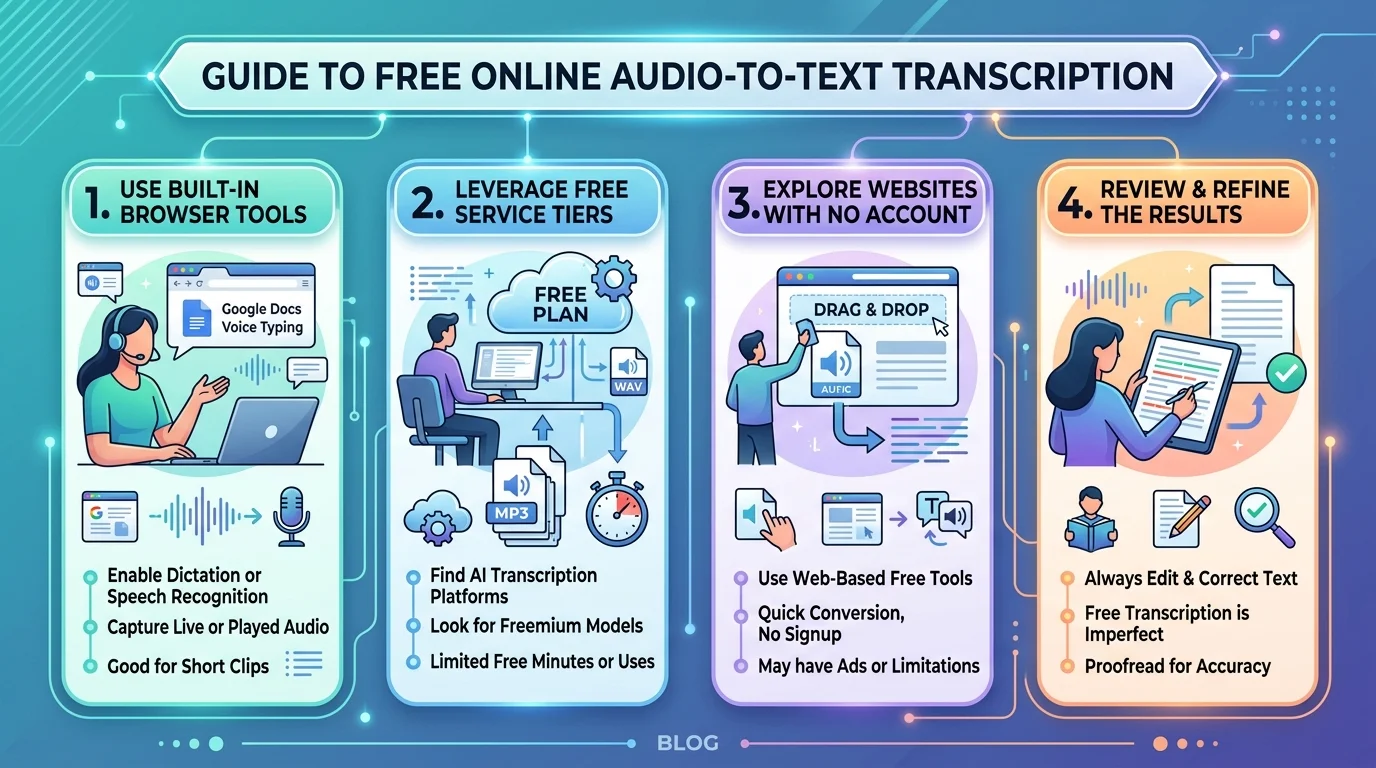
Transcribe audio to text free online in about 60 seconds, without installing anything, and without handing over a credit card. Free tiers like Otter.ai give you 300 minutes a month. Open-source OpenAI Whisper gives you unlimited minutes if you don’t mind a little setup. Google Docs gives you unlimited live dictation but cannot open your MP3 file. Below, I’ll walk you through exactly which one fits your recording, your deadline, and your privacy tolerance.
Let me be blunt for a second.
Most “best free transcription tools” lists are recycled. They don’t tell you that Google Docs can’t open your MP3. They don’t tell you that “free” sometimes means “free trial.” I’m going to.
Why Free Audio Transcription Suddenly Got Good
For years, free transcription software was a punchline. You’d upload a clean recording and get back word salad. That changed when large speech models arrived — and the market noticed hard. Money followed the accuracy, and accuracy followed the money. So before you pick a tool, it helps to understand why the free tiers you’re about to use exist at all. They’re loss leaders in an industry growing at double digits, which is genuinely good news for anyone who doesn’t want to pay.
The numbers back that up.
The AI speech-to-text tool market sat around $3.3 billion in 2025 and is projected to hit $16.42 billion by 2035 — a 17.41% CAGR. Meanwhile, the broader speech and voice recognition market climbed from $19.34 billion in 2025 to $23.58 billion in 2026.
The tech underneath is called automatic speech recognition, or ASR. It listens, predicts, and writes. Modern models fold in natural language processing so your transcript arrives with punctuation already attached — something older tools never managed.
If you’re exploring the wider category, our AI video transcription tools directory lists the platforms covered here side by side.
The 4 Types of “Free” (Read This Before You Click Anything)
Nobody explains this, so I will. When a site says “free,” it means one of four very different things, and picking the wrong bucket wastes your afternoon. I sorted every major free audio transcription tool into these categories after checking their live pricing pages in August 2026. Read the table, pick your bucket, then skip to the step-by-step section. It takes thirty seconds and saves you a refund request later.
| Type of “free” | What you actually get | Example |
|---|---|---|
| Free forever, built in | Unlimited live dictation, zero extra features | Google Docs voice typing |
| Capped free tier | Real product, hard monthly ceiling | Otter.ai — 300 min/mo |
| Free trial only | Full features, then a paywall | HappyScribe |
| Open source | Unlimited, but you host it yourself | Whisper |
Notice the third row. That one stings.
The Otter.ai Reality Check
Otter is the name everyone recommends, so let’s audit it properly rather than repeating the marketing. It’s a genuinely capable meeting assistant with Zoom, Teams, and Meet bots on the free plan, which is unusual generosity. But the caps are stricter than most articles admit, and two of them are lifetime rather than monthly. Here’s exactly what you get before the wall arrives.
- 300 transcription minutes per month
- 30-minute cap on any single conversation
- Three lifetime file imports — yes, lifetime, not monthly
- Playback locked to 1×; exports limited to plain text and MP3
- Only your 25 most recent conversations stay visible
And when you hit 300 minutes, transcription stops dead. No overage, no grace period.
It’s still a good tool. It’s just not the unlimited miracle the listicles imply.
Free Audio to Text Tools Compared (2026)
Here’s the side-by-side I wish someone had handed me two years ago. I’ve weighted this by situation rather than hype, because the best audio to text converter depends entirely on whether you’re dictating live, uploading a finished file, or protecting confidential material. Every tool below has a genuine free path. The “catch” column is the part competitors leave out, and it’s usually the thing that decides your choice.
| Tool | Real free limit | Sign-up? | File upload? | Speaker labels | Export | Best for |
|---|---|---|---|---|---|---|
| Google Docs voice typing | Unlimited | Google acct | ❌ No | ❌ | Docs, DOCX | Live drafting |
| Otter.ai | 300 min/mo, 3 lifetime imports | ✅ Yes | ✅ Yes | ✅ | TXT, MP3 | Meetings |
| Notta | Free tier, capped minutes | ✅ Yes | ✅ Yes | ✅ | TXT, DOCX, SRT | Interviews |
| HappyScribe | Trial only | ✅ Yes | ✅ Yes | ✅ | 45+ formats | One-off precision work |
| Microsoft Word Dictate | Unlimited w/ M365 | ✅ Yes | ❌ No | ❌ | DOCX | Word users |
| Whisper (self-hosted) | Unlimited | ❌ No | ✅ Yes | ➖ Add-on | Any | Privacy, bulk files |
| MacWhisper | Free tier | ❌ No | ✅ Yes | ✅ | TXT, SRT, VTT | Mac, offline |
| whisper.cpp | Unlimited | ❌ No | ✅ Yes | ➖ Add-on | TXT, SRT | Low-spec machines |
How long does a 60-minute file take? Cloud tools like Notta and Otter typically return in two to five minutes. Whisper on a mid-range laptop CPU takes roughly 15–40 minutes; on a GPU, under five. Google Docs and Word Dictate take exactly 60 minutes, because they transcribe in real time.
For a deeper look at one of these, I’ve written a full Notta review covering features and pricing.
How to Transcribe Audio to Text Free Online: Step-by-Step
Right — the practical part. This is the exact sequence I use when someone sends me a recording and needs a transcript before lunch. It works for interviews, lectures, podcasts, and voice notes, and it assumes you already have a file sitting on your drive. Follow it in order. Don’t skip step one, because file prep is the single biggest lever on accuracy, and it costs you about forty seconds.
Step 1 — Check your file format
Most online transcription services accept MP3, MP4, WAV, M4A, and FLAC. If yours is exotic, convert it first. Video to text conversion works identically — the tool simply strips the audio track and ignores the picture.
Step 2 — Clean the audio, roughly
Trim dead air at the start. Cut the cross-talk. Even ten seconds of tidying measurably lifts transcription accuracy. If your recording is noisy, run it through an enhancer first — our AI audio enhancement guide walks through the free options.
Step 3 — Pick your tool by task
Dictating live? Google Docs. Uploading a file? Notta or Otter. Handling something sensitive? Whisper, running locally on your own machine.
Step 4 — Upload and wait
A 60-minute file usually returns in two to five minutes on cloud tools. Keep the tab open — some free tiers drop the job if you navigate away.
Step 5 — Fix, then export
Scan for names, jargon, and numbers. That’s where models slip, every time. Then export to DOCX, TXT, SRT, or VTT subtitles.
Simple, isn’t it?
Quick tip most people miss
If you need speaker diarization — the “who said what” labels — check before you upload. Plenty of voice to text converters skip it entirely on free plans, and retro-fitting speaker names to a 90-minute panel discussion is genuinely miserable work.
How Accurate Is Free AI Transcription, Really?
Let’s talk numbers, because vague claims of “99% accurate” mean nothing without a benchmark attached. The industry metric is word error rate, and understanding it takes about ninety seconds. Once you know how it’s calculated, you’ll immediately spot which vendors are quoting lab conditions and which are quoting reality. The gap between those two figures is larger than almost anyone advertises.
Here’s the formula.
WER = (substitutions + deletions + insertions) ÷ total words in the reference transcript. A 5% WER means 95 of every 100 words landed correctly. For Chinese, Japanese, and Korean, engineers use Character Error Rate instead, since word boundaries there are ambiguous.
Now the honest data:
- Whisper was trained on 680,000 hours of audio across 99 languages
- It scores roughly 5–6% WER on English
- Large-v3 hits 2.7% WER on clean benchmark audio but 8–12% in real-world conditions
- In MLPerf benchmarking, Whisper cut the previous model’s error rate by over 72%
One caveat I love: benchmarks penalise “Dr.” written as “doctor,” and count “$5” versus “five dollars” as two errors. So real-world readability is often better than the scoreboard suggests.
Want to compare models yourself? The Open ASR Leaderboard updates constantly.
The Privacy Question Nobody Asks
Before you upload that client call, pause for thirty seconds. This is the section that separates a casual guide from a useful one, because the legal exposure around transcription is genuinely counter-intuitive. Most people assume the audio is the sensitive part and the text is harmless. Under European law, it’s closer to the opposite, and the reasoning matters whether or not you’re in the EU.
Under GDPR, both your original audio and the resulting transcript count as personal data whenever they relate to identifiable people. Transcription can actually increase your exposure, because text becomes searchable, indexable, and easy to reuse across systems. Audio just sits there. Text travels.
So here’s my rule.
Medical, legal, HR, or unreleased commercial material? Run it locally with offline transcription and keep the file on your machine. Everything else — podcasts, lectures, public webinars — is fine in the cloud.
Working With YouTube and Podcast Audio
Two use cases deserve their own note, because the workflow shifts slightly. YouTube already generates automatic captions, which means you often don’t need a transcription tool at all — you need an extraction tool. Podcasts, meanwhile, benefit from transcription mainly as an SEO asset, since a full text version of every episode gives search engines something to index that audio alone never will.
For video, start with our YouTube video transcript generator guide — it covers pulling existing captions before you spend minutes re-transcribing.
Going the other direction? If you need to turn written content back into audio, our free unlimited text-to-speech guide covers the reverse workflow.
Frequently Asked Questions
These are the ten questions people actually type into Google around this topic. I’ve answered each in plain language, in the fewest words that fully cover it, so you can skim to the one you came for.
Can I transcribe audio to text free online without signing up?
Yes. Self-hosted Whisper and whisper.cpp require no account at all, and MacWhisper runs locally on macOS without registration. Most browser-based tools like Otter and Notta do require an email address to save and export your transcript.
What is the best free audio-to-text converter in 2026?
It depends on the job. Otter.ai is best for meetings within its 300-minute cap, Notta is best for straightforward file uploads, Google Docs is best for live dictation, and self-hosted Whisper is best when you need unlimited minutes or full privacy.
How accurate is free AI transcription?
Whisper Large-v3 achieves about 2.7% word error rate on clean benchmark audio and 8–12% in real-world recordings. Expect roughly 90–95% accuracy on a clear single-speaker file, and noticeably worse with heavy accents, crosstalk, or background noise.
Is there a free tool with no minute limit?
Yes — open-source Whisper and whisper.cpp are unlimited because you run them on your own hardware. Every cloud-based free tier applies a monthly minute cap. Google Docs voice typing is also unlimited, but only for live speech.
Does Google have a free transcription tool?
Google Docs includes built-in voice typing under Tools → Voice typing, free in Chrome on desktop. It transcribes live speech in real time but cannot open a pre-recorded audio file, and it offers no speaker labels or automatic punctuation.
How do I transcribe a pre-recorded MP3 file?
Upload it to a file-based tool such as Notta, Otter, or MacWhisper. Google Docs and Word Dictate cannot do this — they only listen through your microphone. Playing audio into your mic works but degrades accuracy badly.
Are free transcription tools safe and private?
It varies. Reputable services encrypt uploads and comply with GDPR, but your audio still leaves your device. For confidential recordings, use offline transcription with Whisper or MacWhisper so nothing is transmitted at all.
The Bottom Line
You can transcribe audio to text free online today, properly, without paying anything — provided you match the tool to the task rather than grabbing whichever name ranks first. Use Google Docs when you’re dictating live, Use Notta or Otter when you’re uploading a finished file and can live within the caps. Use self-hosted Whisper when the recording is confidential or the volume is high. And always check whether “free” means free-forever, capped, or a trial in disguise before you invest an afternoon in it.
Ready to pick one? Browse the full video transcription category on AI Listing Tool to compare current free tiers side by side — and if you’ve built a transcription tool